

Before you begin
- Configure the AI settings through the CometChat dashboard as detailed in the Overview section.
-
Navigate to Chat > Features, under AI User Copilot, enable Smart Replies.
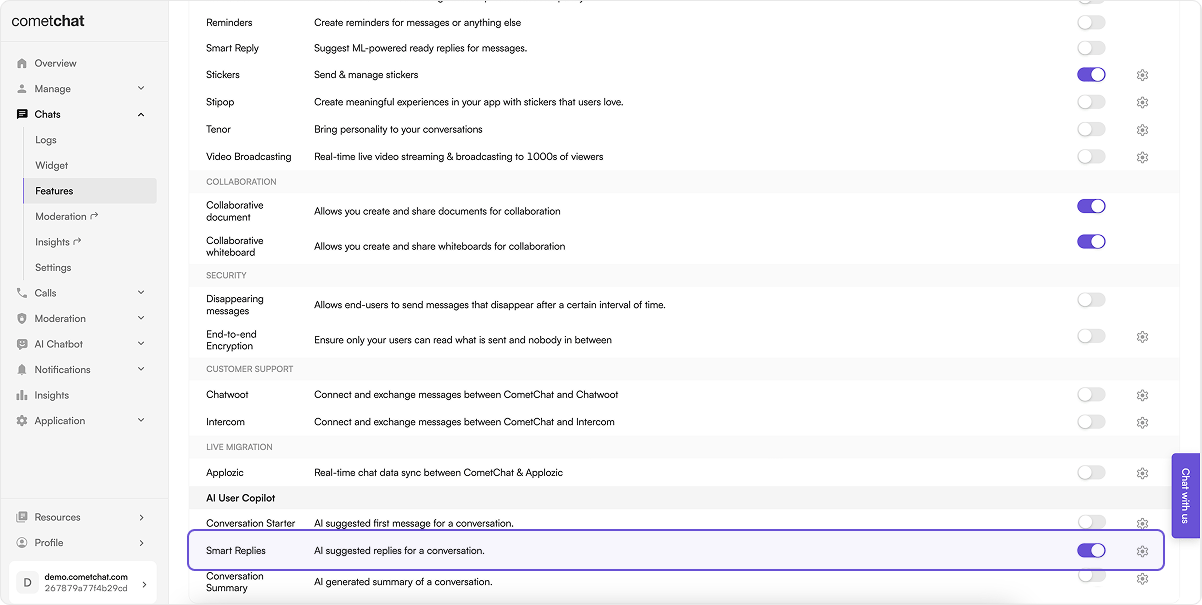
- Implement the chat functionality in your applications using CometChat’s v4 Chat SDKs.
How does it work?
CometChat AI goes through the messages of a conversation to understand the context of a conversation & provide relevant replies. It returns three replies:positive, negative & neutral.
The CometChat SDK has a method to fetch the smart replies in a conversation. It returns an object of three replies with keys: positive, negative & neutral.
The number of messages to be fetched to generate relevant Smart Replies is configurable. By default the CometChat AI takes the latest 1000 messages. This can be configured to specific timestamps as well.
While using any configuration mentioned above a maximum of only
1000 messages will be fetched.Implementation
SDKs
To implement Smart Replies in the platform of your choice, you may utilize the following code samples:- JS/React Native/Ionic SDK
- Java
- Kotlin
- Swift
- Dart
UI Kits
Assuming the necessary prerequisites are met, Smart Replies function seamlessly starting from v4 of the Chat UI Kits. In v4, Smart Replies are accessible manually, whereas from v5 onward they work automatically — no additional code is required once the feature is enabled in the dashboard. In the React UI Kit, Smart Replies are surfaced in the action sheet of the Message Composer component. For details on how each AI feature maps to a UI Kit component, see Smart Chat Features in the React UI Kit.Related
Conversation Starter
AI-generated opening lines for a new conversation.
Conversation Summary
A short recap of a long or unread conversation.
AI Settings
Configure your OpenAI model and key, then enable AI features.
React UI Kit AI Features
See which UI Kit component renders each AI feature.