> ## Documentation Index
> Fetch the complete documentation index at: https://cometchat-22654f5b-docs-audit-content-webhooks.mintlify.site/llms.txt
> Use this file to discover all available pages before exploring further.
# ShortCut Formatter
> ShortCut Formatter — CometChat integration guide.
## Overview
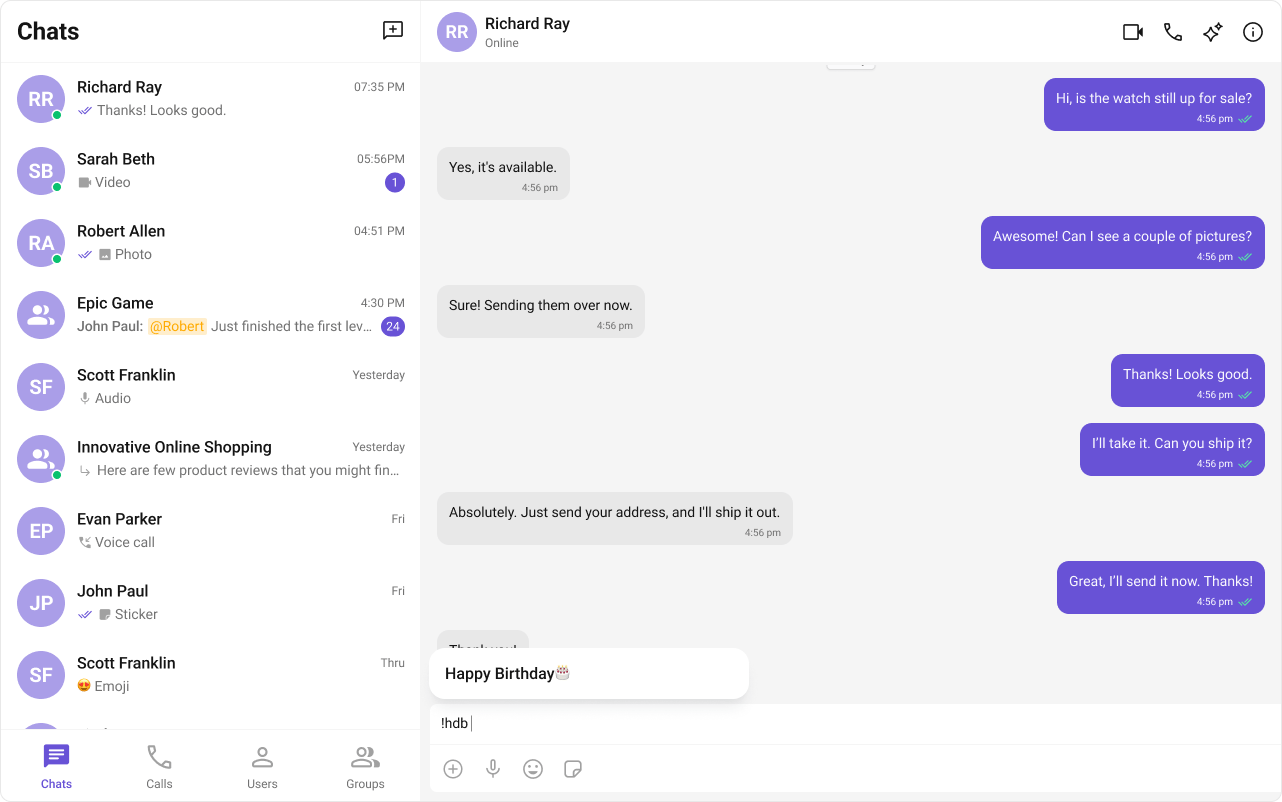
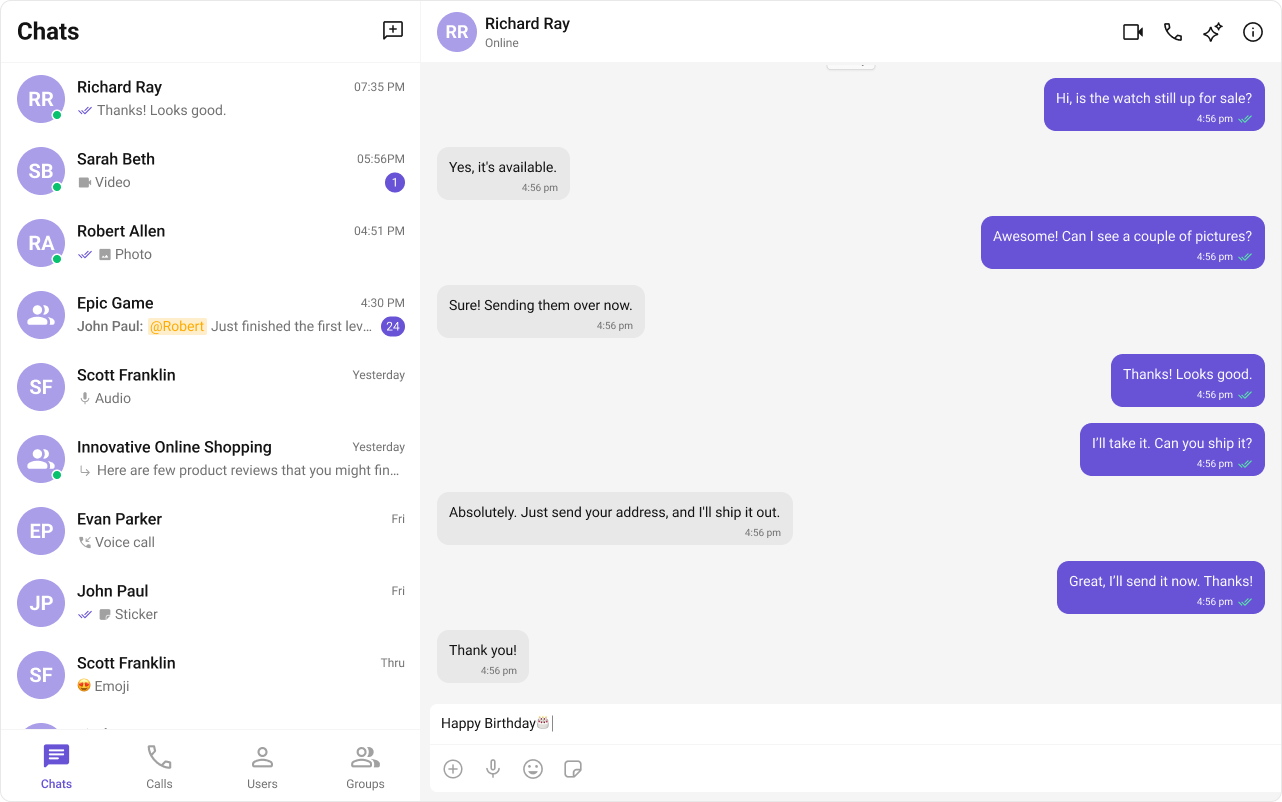
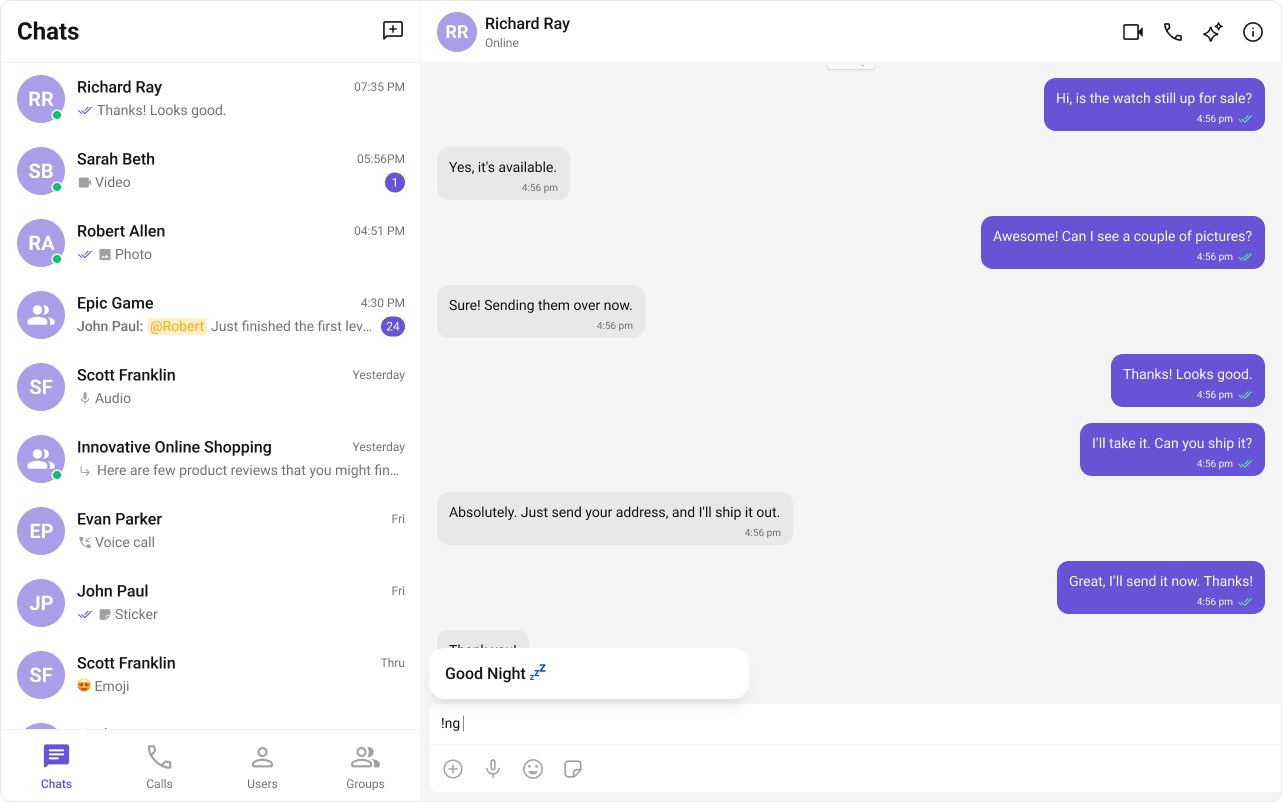
The `ShortCutFormatter` class extends the [CometChatTextFormatter](/ui-kit/react/v5/custom-text-formatter-guide) class to provide a mechanism for handling shortcuts within messages. This guide will walk you through the process of using `ShortCutFormatter` to implement shortcut extensions in your CometChat application.
## Usage
Here are the steps to create a `ShortCutFormatter` for CometChat using the CometChatTextFormatter:
1. Firstly, you need to import `CometChatTextFormatter` from the CometChat UI Kit react library.
```javascript theme={null}
import { CometChatTextFormatter } from "@cometchat/chat-uikit-react";
```
2. Now, extend the `CometChatTextFormatter` class to create your custom text formatter class. In this case, let's create a `HashTagTextFormatter`.
```java theme={null}
class ShortCutFormatter extends CometChatTextFormatter {
...
}
```
3. Set up the `trackCharacter` and define any necessary private fields.
```javascript theme={null}
this.setTrackingCharacter("!");
```
4. Implement the `onKeyDown` method to handle key events and trigger actions based on defined shortcuts.
```javascript theme={null}
onKeyDown(event: KeyboardEvent) {
// Your implementation
}
```
5. Implement any additional methods required for your custom formatter, such as opening and closing dialogs, handling button clicks, and formatting text.
```typescript theme={null}
openDialog(buttonText: string) {
// Your implementation
}
closeDialog() {
// Your implementation
}
handleButtonClick = () => {
// Your implementation
};
getFormattedText(text: string): string {
return text;
}
private getTextBeforeCaret(caretPosition: number): string {
// Your implementation
}
```
## Example
Below is an example demonstrating how to use a custom formatter class in components such as [CometChatConversations](/ui-kit/react/v5/conversations), [CometChatMessageList](/ui-kit/react/v5/message-list), [CometChatMessageComposer](/ui-kit/react/v5/message-composer).
```typescript theme={null}
import { CometChatTextFormatter } from "@cometchat/chat-uikit-react";
import DialogHelper from "./Dialog";
import { CometChat } from "@cometchat/chat-sdk-javascript";
class ShortcutFormatter extends CometChatTextFormatter {
private shortcuts: { [key: string]: string } = {};
private dialogIsOpen: boolean = false;
private dialogHelper = new DialogHelper();
private currentShortcut: string | null = null; // Track the currently open shortcut
constructor() {
super();
this.setTrackingCharacter("!");
CometChat.callExtension("message-shortcuts", "GET", "v1/fetch", undefined)
.then((data: any) => {
if (data && data.shortcuts) {
this.shortcuts = data.shortcuts;
}
})
.catch((error) => console.log("error fetching shortcuts", error));
}
onKeyUp(event: KeyboardEvent) {
const caretPosition =
this.currentCaretPosition instanceof Selection
? this.currentCaretPosition.anchorOffset
: 0;
const textBeforeCaret = this.getTextBeforeCaret(caretPosition);
const match = textBeforeCaret.match(/!([a-zA-Z]+)$/);
if (match) {
const shortcut = match[0];
const replacement = this.shortcuts[shortcut];
if (replacement) {
// Close the currently open dialog, if any
if (this.dialogIsOpen && this.currentShortcut !== shortcut) {
this.closeDialog();
}
this.openDialog(replacement, shortcut);
}
} else if (!textBeforeCaret) {
this.closeDialog();
}
}
getCaretPosition() {
if (!this.currentCaretPosition?.rangeCount) return { x: 0, y: 0 };
const range = this.currentCaretPosition?.getRangeAt(0);
const rect = range.getBoundingClientRect();
return {
x: rect.left,
y: rect.top,
};
}
openDialog(buttonText: string, shortcut: string) {
this.dialogHelper.createDialog(
() => this.handleButtonClick(buttonText),
buttonText
);
this.dialogIsOpen = true;
this.currentShortcut = shortcut;
}
closeDialog() {
this.dialogHelper.closeDialog(); // Use DialogHelper to close the dialog
this.dialogIsOpen = false;
this.currentShortcut = null;
}
handleButtonClick = (buttonText: string) => {
if (this.currentCaretPosition && this.currentRange) {
// Inserting the replacement text corresponding to the shortcut
const shortcut = Object.keys(this.shortcuts).find(
(key) => this.shortcuts[key] === buttonText
);
if (shortcut) {
const replacement = this.shortcuts[shortcut];
this.addAtCaretPosition(
replacement,
this.currentCaretPosition,
this.currentRange
);
}
}
if (this.dialogIsOpen) {
this.closeDialog();
}
};
getFormattedText(text: string): string {
return text;
}
private getTextBeforeCaret(caretPosition: number): string {
if (
this.currentRange &&
this.currentRange.startContainer &&
typeof this.currentRange.startContainer.textContent === "string"
) {
const textContent = this.currentRange.startContainer.textContent;
if (textContent.length >= caretPosition) {
return textContent.substring(0, caretPosition);
}
}
return "";
}
}
export default ShortcutFormatter;
```
```tsx theme={null}
import React from "react";
import ReactDOM from "react-dom";
import { CometChatUIEvents, PanelAlignment } from "@cometchat/chat-uikit-react";
interface DialogProps {
onClick: () => void;
buttonText: string;
}
const Dialog: React.FC = ({ onClick, buttonText }) => {
return (
 ## Usage
Here are the steps to create a `ShortCutFormatter` for CometChat using the CometChatTextFormatter:
1. Firstly, you need to import `CometChatTextFormatter` from the CometChat UI Kit react library.
```javascript theme={null}
import { CometChatTextFormatter } from "@cometchat/chat-uikit-react";
```
2. Now, extend the `CometChatTextFormatter` class to create your custom text formatter class. In this case, let's create a `HashTagTextFormatter`.
```java theme={null}
class ShortCutFormatter extends CometChatTextFormatter {
...
}
```
3. Set up the `trackCharacter` and define any necessary private fields.
```javascript theme={null}
this.setTrackingCharacter("!");
```
4. Implement the `onKeyDown` method to handle key events and trigger actions based on defined shortcuts.
```javascript theme={null}
onKeyDown(event: KeyboardEvent) {
// Your implementation
}
```
5. Implement any additional methods required for your custom formatter, such as opening and closing dialogs, handling button clicks, and formatting text.
```typescript theme={null}
openDialog(buttonText: string) {
// Your implementation
}
closeDialog() {
// Your implementation
}
handleButtonClick = () => {
// Your implementation
};
getFormattedText(text: string): string {
return text;
}
private getTextBeforeCaret(caretPosition: number): string {
// Your implementation
}
```
## Example
Below is an example demonstrating how to use a custom formatter class in components such as [CometChatConversations](/ui-kit/react/v5/conversations), [CometChatMessageList](/ui-kit/react/v5/message-list), [CometChatMessageComposer](/ui-kit/react/v5/message-composer).
## Usage
Here are the steps to create a `ShortCutFormatter` for CometChat using the CometChatTextFormatter:
1. Firstly, you need to import `CometChatTextFormatter` from the CometChat UI Kit react library.
```javascript theme={null}
import { CometChatTextFormatter } from "@cometchat/chat-uikit-react";
```
2. Now, extend the `CometChatTextFormatter` class to create your custom text formatter class. In this case, let's create a `HashTagTextFormatter`.
```java theme={null}
class ShortCutFormatter extends CometChatTextFormatter {
...
}
```
3. Set up the `trackCharacter` and define any necessary private fields.
```javascript theme={null}
this.setTrackingCharacter("!");
```
4. Implement the `onKeyDown` method to handle key events and trigger actions based on defined shortcuts.
```javascript theme={null}
onKeyDown(event: KeyboardEvent) {
// Your implementation
}
```
5. Implement any additional methods required for your custom formatter, such as opening and closing dialogs, handling button clicks, and formatting text.
```typescript theme={null}
openDialog(buttonText: string) {
// Your implementation
}
closeDialog() {
// Your implementation
}
handleButtonClick = () => {
// Your implementation
};
getFormattedText(text: string): string {
return text;
}
private getTextBeforeCaret(caretPosition: number): string {
// Your implementation
}
```
## Example
Below is an example demonstrating how to use a custom formatter class in components such as [CometChatConversations](/ui-kit/react/v5/conversations), [CometChatMessageList](/ui-kit/react/v5/message-list), [CometChatMessageComposer](/ui-kit/react/v5/message-composer).