> ## Documentation Index
> Fetch the complete documentation index at: https://cometchat-22654f5b-docs-audit-content-webhooks.mintlify.site/llms.txt
> Use this file to discover all available pages before exploring further.
# Message Information
> Message Information — CometChat documentation.
The MessageInformation is a [Component](/ui-kit/ios/v4/components-overview#components) designed to display message-related information, such as delivery and read receipts. It serves as an integral part of the CometChat UI Kit, extending the [ListBase](/ui-kit/ios/v4/list-base) class, which provides the underlying infrastructure for CometChat UI components. With its rich set of methods and properties, developers can easily customize and tailor the appearance and behavior of the message information view to suit the specific requirements of their application.
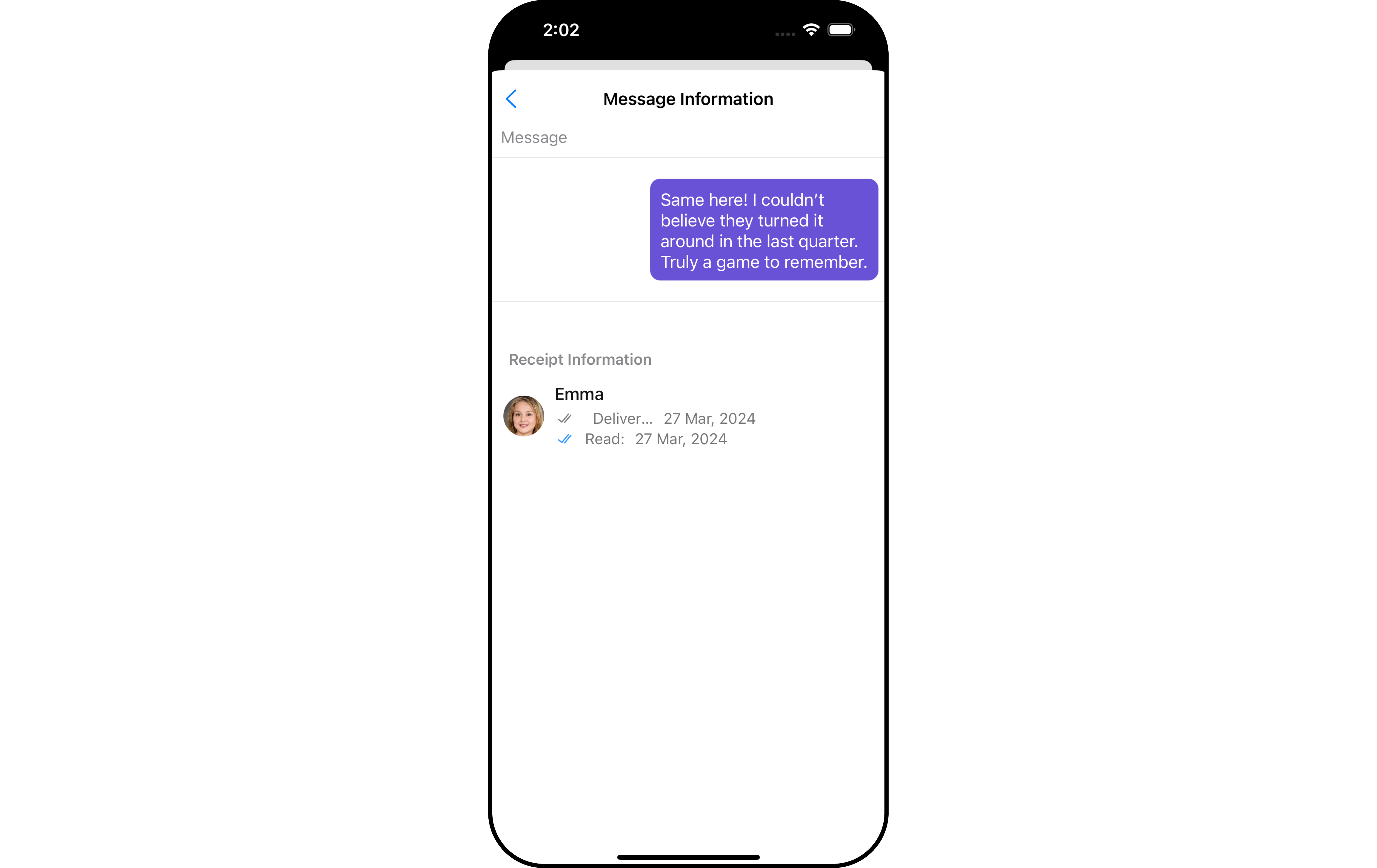 MessageInformation is comprised of the following [Base Components](/ui-kit/ios/v4/components-overview#base-components):
| Base Components | Description |
| ------------------------------------- | ------------------------------------------------------------------------------- |
| [List Base](/ui-kit/ios/v4/list-base) | This renders common components used across `Conversations`, `Groups` & `Users`. |
## Usage
### Integration
The following code snippet illustrates how you can directly incorporate the MessageInformation component into your `View_Controller` file.
```swift theme={null}
self.present(UINavigationController(rootViewController: CometChatMessageInformation()), animated: true)
```
If you are already using a navigation controller, you can use the `pushViewController` function instead of presenting the view controller.
### Actions
[Actions](/ui-kit/ios/v4/components-overview#actions) dictate how a component functions. They are divided into two types: Predefined and User-defined. You can override either type, allowing you to tailor the behavior of the component to fit your specific needs.
##### 1. OnBackPress
The `OnBackButtonClick` event is typically triggered when the back button is pressed and it carries a default action. However, with the following code snippet, you can effortlessly override this default operation.
```swift theme={null}
let messageInformationConfiguration = MessageInformationConfiguration()
.setOnBack {
// Your BackPress action
}
```
##### 2. onError
This function is used to set a callback that triggers in response to any errors.
```swift theme={null}
let messageInformationConfiguration = MessageInformationConfiguration()
.setStyle(messageInformationStyle: messageInformationStyle)
.setOnError { error in
// your error handling logic
}
```
***
### Filters
MessageInformation component does not have any available filters.
***
### Events
MessageInformation component does not have any available events.
***
## Customization
To fit your app's design requirements, you can customize the appearance of the MessageInformation component. We provide exposed methods that allow you to modify the experience and behavior according to your specific needs.
### Style
Using Style you can customize the look and feel of the component in your app, These parameters typically control elements such as the color, size, shape, and fonts used within the component.
##### 1. MessageInformation Style
To modify the styling, you can apply the MessageInformationStyle to the MessageInformation Component using the `setStyle` method.
```swift theme={null}
let messageInformationStyle = MessageInformationStyle()
let messageInformationConfiguration = MessageInformationConfiguration()
.setStyle(messageInformationStyle: messageInformationStyle)
```
The following properties are exposed by MessageInformationStyle:
| Property | Description | Code |
| --------------------------- | ----------------------------------------- | ----------------------------------------- |
| **SubtitleText Color** | Sets the text color for the subtitle | `.set(subtitleTextColor: UIColor)` |
| **SubtitleText Appearance** | Sets the text appearance for the subtitle | `.set(subtitleTextFont: UIFont)` |
| **Title Font** | Sets the font for the title | `.set(titleTextFont: UIFont)` |
| **EmptyText Font** | Sets the font for the empty state text | `setEmptyTextFont(String emptyTextFont)` |
| **Title Color** | Sets the text color for the title | `.set(titleTextColor: UIColor)` |
| **Background Color** | Sets the background color | `.set(background: UIColor)` |
| **Corner Radius** | Sets the corner radius | `set(cornerRadius: CometChatCornerStyle)` |
| **Border Width** | Sets the width of the border | `.set(borderWidth: CGFloat)` |
| **Border Color** | Sets the color of the border | `.set(borderColor: UIColor)` |
***
### Functionality
These are a set of small functional customizations that allow you to fine-tune the overall experience of the component. With these, you can change text, set custom icons, and toggle the visibility of UI elements.
```swift theme={null}
let messageInformationConfiguration = MessageInformationConfiguration()
.set(titleText: "CometChat")
let messageListConfiguration = MessageListConfiguration()
.set(messageInformationConfiguration: messageInformationConfiguration)
let cometChatMessages = CometChatMessages()
.set(messageListConfiguration: messageListConfiguration)
.set(user: user)
```
## How to integrate CometChatMesssageInformation ?
`CometChatMessageInformation` is a **view controller** that can be presented or pushed. `CometChatMessageInformation` includes various attributes and methods to customize its UI.
```swift theme={null}
self.present(UINavigationController(rootViewController: CometChatMessageInformation()), animated: true)
```
If you are already using a navigation controller, you can use the `pushViewController` function instead of presenting the view controller.
## Methods
| Methods | Parameters | Description |
| --------------------------- | ------------------------------------------------------------- | ------------------------------------------------------------- |
| **titleText** | String | used to set title |
| **backIcon** | UIImage | used to set the back icon |
| **readIcon** | UIImage | used to set the read icon |
| **deliveredIcon** | UIImage | used to set the delivered icon |
| **emptyStateText** | String | used to set the empty state text |
| **emptyStateView** | UIView | used to set the empty state view |
| **loadingIcon** | UIImage | used to set the loading icon |
| **loadingStateView** | UIView | used to set the loading state view |
| **errorStateText** | String | used to set the error state text |
| **errorStateView** | UIView | used to set the error state view |
| **listItemStyle** | [ListItemStyle](/ui-kit/ios/v4/list-item) | used to set the list item style |
| **template** | CometChatMessageTemplate | used to set the template of the message |
| **messageInformationStyle** | [MessageInformationStyle](/ui-kit/ios/v4/message-information) | used to set the message information style |
| **subtitle** | (message: BaseMessage, \_ receipt: MessageReceipt) -> UIView | used to set the subtitle view |
| **bubbleView** | (message: BaseMessage) -> UIView | used to set a custom bubble view |
| **listItemView** | (message\*: BaseMessage,\* receipt: MessageReceipt) -> UIView | used to set a custom listItemView |
| **onError** | (error: CometChatException) -> Void | used to set a callback triggered in case any error happens |
| **onBack** | () -> Void | used to set the back icon function when tapped on back icon |
| **receiptDatePattern** | (\_ timestamp: Int?) -> String | used to set the date pattern for delivered and read date time |
## MessageInformationStyle
allows you to set the styling for message information
| Methods | Parameters | Description |
| --------------------- | -------------------- | ------------------------------------ |
| **background** | UIColor | Used to set the background color |
| **cornerRadius** | CometChatCornerStyle | used to set the corner radius |
| **borderWidth** | CGFloat | used to set the border width |
| **borderColor** | UIColor | used to set the border color |
| **width** | CGFloat | used to set width |
| **height** | CGFloat | used to set height |
| **titleTextColor** | UIColor | used to set the title text color |
| **titleTextFont** | UIFont | used to set the title text font |
| **sendIconTint** | UIColor | used to set the send icon color |
| **readIconTint** | UIColor | used to set the read icon color |
| **deliveredIconTint** | UIColor | used to set the delivered icon color |
| **subtitleTextColor** | UIColor | used to set the subtitle text color |
| **subtitleTextFont** | UIFont | used to set the subtitle text font |
| **dividerTint** | UIColor | used to set the divider color |
```swift theme={null}
let messageInformationController = CometChatMessageInformation()
let navigationController = UINavigationController(rootViewController: messageInformationController)
if let template = templates?.filter({$0.template.type == MessageUtils.getDefaultMessageTypes(message: message) && $0.template.category == MessageUtils.getDefaultMessageCategories(message: message) }).first?.template {
messageInformationController.set(template: template)
}
messageInformationController.set(message: message)
self.present(navigationController, animated: true)
```
If you are already using a navigation controller, you can use the `pushViewController` function instead of presenting the view controller.
MessageInformation is comprised of the following [Base Components](/ui-kit/ios/v4/components-overview#base-components):
| Base Components | Description |
| ------------------------------------- | ------------------------------------------------------------------------------- |
| [List Base](/ui-kit/ios/v4/list-base) | This renders common components used across `Conversations`, `Groups` & `Users`. |
## Usage
### Integration
The following code snippet illustrates how you can directly incorporate the MessageInformation component into your `View_Controller` file.
```swift theme={null}
self.present(UINavigationController(rootViewController: CometChatMessageInformation()), animated: true)
```
If you are already using a navigation controller, you can use the `pushViewController` function instead of presenting the view controller.
### Actions
[Actions](/ui-kit/ios/v4/components-overview#actions) dictate how a component functions. They are divided into two types: Predefined and User-defined. You can override either type, allowing you to tailor the behavior of the component to fit your specific needs.
##### 1. OnBackPress
The `OnBackButtonClick` event is typically triggered when the back button is pressed and it carries a default action. However, with the following code snippet, you can effortlessly override this default operation.
```swift theme={null}
let messageInformationConfiguration = MessageInformationConfiguration()
.setOnBack {
// Your BackPress action
}
```
##### 2. onError
This function is used to set a callback that triggers in response to any errors.
```swift theme={null}
let messageInformationConfiguration = MessageInformationConfiguration()
.setStyle(messageInformationStyle: messageInformationStyle)
.setOnError { error in
// your error handling logic
}
```
***
### Filters
MessageInformation component does not have any available filters.
***
### Events
MessageInformation component does not have any available events.
***
## Customization
To fit your app's design requirements, you can customize the appearance of the MessageInformation component. We provide exposed methods that allow you to modify the experience and behavior according to your specific needs.
### Style
Using Style you can customize the look and feel of the component in your app, These parameters typically control elements such as the color, size, shape, and fonts used within the component.
##### 1. MessageInformation Style
To modify the styling, you can apply the MessageInformationStyle to the MessageInformation Component using the `setStyle` method.
```swift theme={null}
let messageInformationStyle = MessageInformationStyle()
let messageInformationConfiguration = MessageInformationConfiguration()
.setStyle(messageInformationStyle: messageInformationStyle)
```
The following properties are exposed by MessageInformationStyle:
| Property | Description | Code |
| --------------------------- | ----------------------------------------- | ----------------------------------------- |
| **SubtitleText Color** | Sets the text color for the subtitle | `.set(subtitleTextColor: UIColor)` |
| **SubtitleText Appearance** | Sets the text appearance for the subtitle | `.set(subtitleTextFont: UIFont)` |
| **Title Font** | Sets the font for the title | `.set(titleTextFont: UIFont)` |
| **EmptyText Font** | Sets the font for the empty state text | `setEmptyTextFont(String emptyTextFont)` |
| **Title Color** | Sets the text color for the title | `.set(titleTextColor: UIColor)` |
| **Background Color** | Sets the background color | `.set(background: UIColor)` |
| **Corner Radius** | Sets the corner radius | `set(cornerRadius: CometChatCornerStyle)` |
| **Border Width** | Sets the width of the border | `.set(borderWidth: CGFloat)` |
| **Border Color** | Sets the color of the border | `.set(borderColor: UIColor)` |
***
### Functionality
These are a set of small functional customizations that allow you to fine-tune the overall experience of the component. With these, you can change text, set custom icons, and toggle the visibility of UI elements.
```swift theme={null}
let messageInformationConfiguration = MessageInformationConfiguration()
.set(titleText: "CometChat")
let messageListConfiguration = MessageListConfiguration()
.set(messageInformationConfiguration: messageInformationConfiguration)
let cometChatMessages = CometChatMessages()
.set(messageListConfiguration: messageListConfiguration)
.set(user: user)
```
## How to integrate CometChatMesssageInformation ?
`CometChatMessageInformation` is a **view controller** that can be presented or pushed. `CometChatMessageInformation` includes various attributes and methods to customize its UI.
```swift theme={null}
self.present(UINavigationController(rootViewController: CometChatMessageInformation()), animated: true)
```
If you are already using a navigation controller, you can use the `pushViewController` function instead of presenting the view controller.
## Methods
| Methods | Parameters | Description |
| --------------------------- | ------------------------------------------------------------- | ------------------------------------------------------------- |
| **titleText** | String | used to set title |
| **backIcon** | UIImage | used to set the back icon |
| **readIcon** | UIImage | used to set the read icon |
| **deliveredIcon** | UIImage | used to set the delivered icon |
| **emptyStateText** | String | used to set the empty state text |
| **emptyStateView** | UIView | used to set the empty state view |
| **loadingIcon** | UIImage | used to set the loading icon |
| **loadingStateView** | UIView | used to set the loading state view |
| **errorStateText** | String | used to set the error state text |
| **errorStateView** | UIView | used to set the error state view |
| **listItemStyle** | [ListItemStyle](/ui-kit/ios/v4/list-item) | used to set the list item style |
| **template** | CometChatMessageTemplate | used to set the template of the message |
| **messageInformationStyle** | [MessageInformationStyle](/ui-kit/ios/v4/message-information) | used to set the message information style |
| **subtitle** | (message: BaseMessage, \_ receipt: MessageReceipt) -> UIView | used to set the subtitle view |
| **bubbleView** | (message: BaseMessage) -> UIView | used to set a custom bubble view |
| **listItemView** | (message\*: BaseMessage,\* receipt: MessageReceipt) -> UIView | used to set a custom listItemView |
| **onError** | (error: CometChatException) -> Void | used to set a callback triggered in case any error happens |
| **onBack** | () -> Void | used to set the back icon function when tapped on back icon |
| **receiptDatePattern** | (\_ timestamp: Int?) -> String | used to set the date pattern for delivered and read date time |
## MessageInformationStyle
allows you to set the styling for message information
| Methods | Parameters | Description |
| --------------------- | -------------------- | ------------------------------------ |
| **background** | UIColor | Used to set the background color |
| **cornerRadius** | CometChatCornerStyle | used to set the corner radius |
| **borderWidth** | CGFloat | used to set the border width |
| **borderColor** | UIColor | used to set the border color |
| **width** | CGFloat | used to set width |
| **height** | CGFloat | used to set height |
| **titleTextColor** | UIColor | used to set the title text color |
| **titleTextFont** | UIFont | used to set the title text font |
| **sendIconTint** | UIColor | used to set the send icon color |
| **readIconTint** | UIColor | used to set the read icon color |
| **deliveredIconTint** | UIColor | used to set the delivered icon color |
| **subtitleTextColor** | UIColor | used to set the subtitle text color |
| **subtitleTextFont** | UIFont | used to set the subtitle text font |
| **dividerTint** | UIColor | used to set the divider color |
```swift theme={null}
let messageInformationController = CometChatMessageInformation()
let navigationController = UINavigationController(rootViewController: messageInformationController)
if let template = templates?.filter({$0.template.type == MessageUtils.getDefaultMessageTypes(message: message) && $0.template.category == MessageUtils.getDefaultMessageCategories(message: message) }).first?.template {
messageInformationController.set(template: template)
}
messageInformationController.set(message: message)
self.present(navigationController, animated: true)
```
If you are already using a navigation controller, you can use the `pushViewController` function instead of presenting the view controller.