> ## Documentation Index
> Fetch the complete documentation index at: https://cometchat-22654f5b-docs-audit-content-webhooks.mintlify.site/llms.txt
> Use this file to discover all available pages before exploring further.
# AI Features
> Complete guide to AI-powered chat features in iOS apps - conversation starters, smart replies, and summaries
```json theme={null}
{
"category": "ai",
"features": [
{"name": "aiAgentChat", "description": "Chat with AI-powered assistants", "component": "CometChatMessages", "enabledByDefault": false},
{"name": "chatHistory", "description": "Browse and resume previous AI sessions", "component": "CometChatAIAssistanceChatHistory", "enabledByDefault": false},
{"name": "streamingResponses", "description": "Real-time AI message streaming", "component": "CometChatMessageList", "enabledByDefault": false},
{"name": "suggestedMessages", "description": "AI-powered conversation starters and smart replies", "component": "CometChatMessageComposer", "enabledByDefault": false}
],
"dashboardSetup": {
"location": "CometChat Dashboard → AI",
"features": ["Conversation Starter", "Smart Replies", "Conversation Summary"]
},
"relatedComponents": ["CometChatMessages", "CometChatAIAssistanceChatHistory", "CometChatMessageList", "CometChatMessageComposer"]
}
```
## Overview
CometChat AI features enhance your chat experience with intelligent suggestions and summaries. Once enabled in your dashboard, they integrate automatically into the UI Kit components.
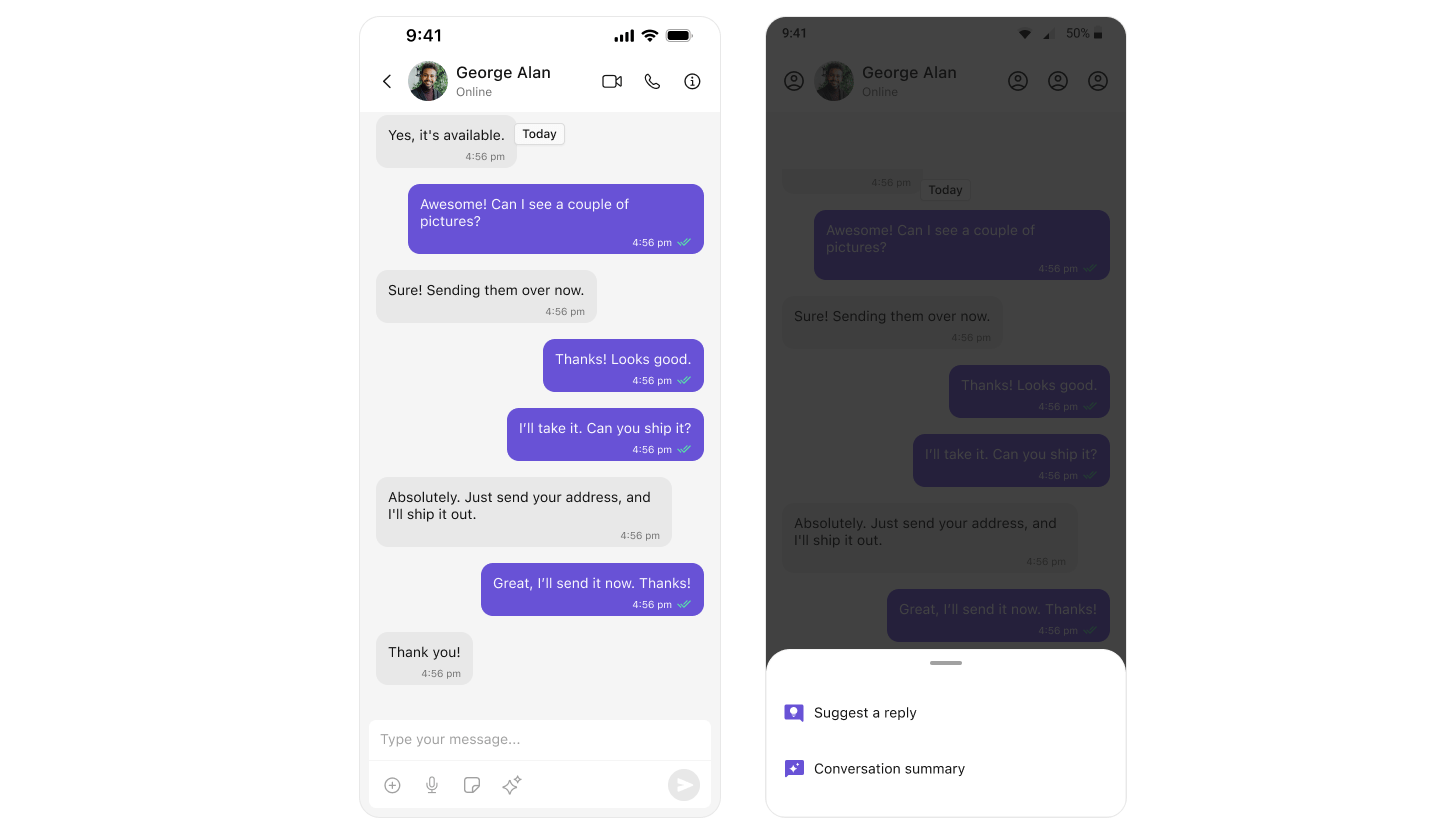 | Feature | What It Does | Where It Appears |
| --------------------- | --------------------------------------- | ---------------------------------- |
| Conversation Starters | Suggests opening messages for new chats | `CometChatMessageList` |
| Smart Replies | Suggests responses based on context | `CometChatMessageComposer` |
| Conversation Summary | Summarizes long conversations | `CometChatMessageComposer` |
| AI Assistant | Chat with AI bot | `CometChatAIAssistanceChatHistory` |
***
## Enable AI Features
Go to [app.cometchat.com](https://app.cometchat.com) and select your app.
Click **AI** in the sidebar, then enable the features you want:
* ✅ Conversation Starter
* ✅ Smart Replies
* ✅ Conversation Summary
Customize AI behavior, response style, and triggers in the dashboard settings.
**That's it!** AI features now work automatically in your app.
***
## Conversation Starters
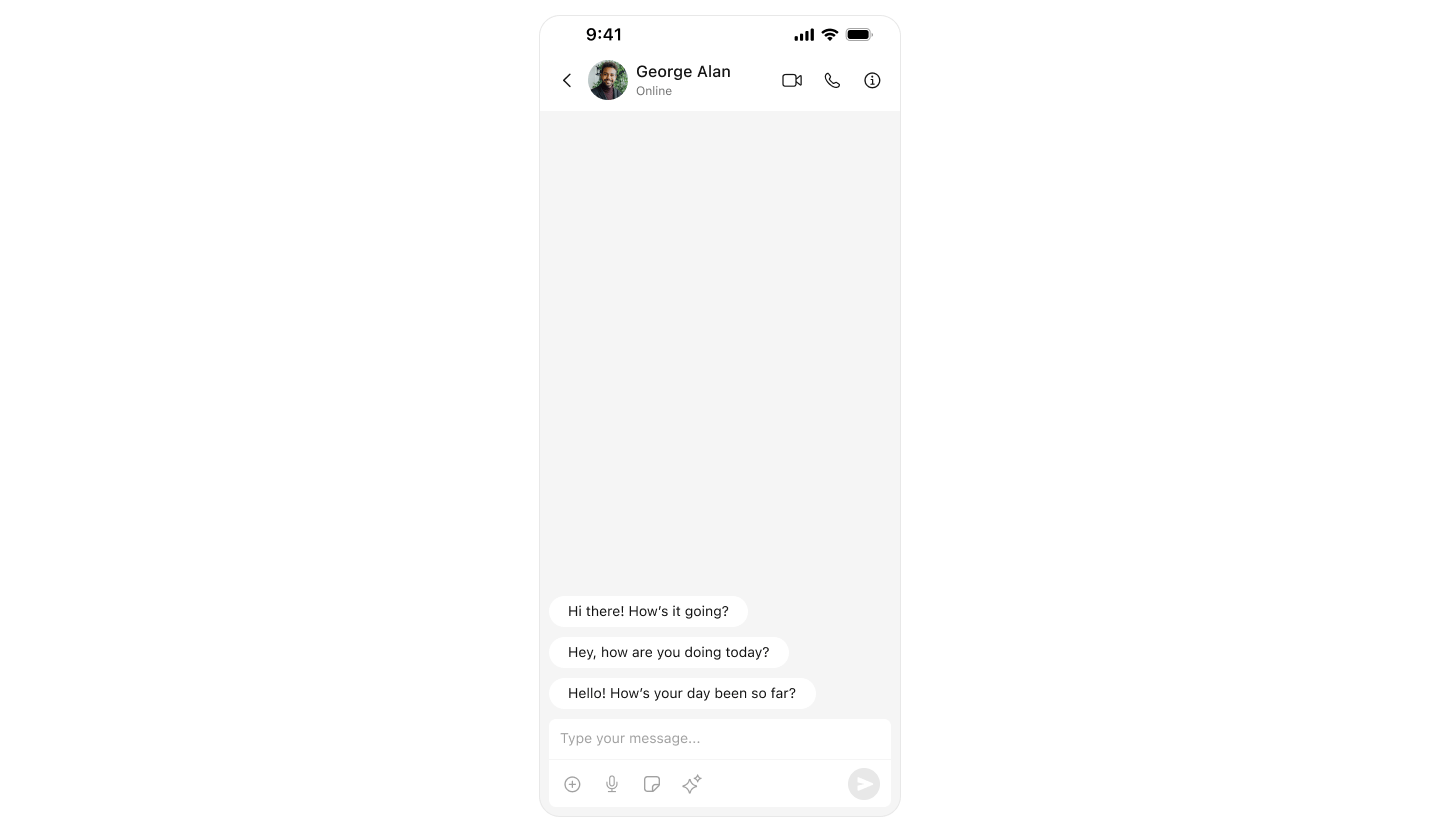
When a user opens a new chat with no message history, AI suggests conversation openers.
| Feature | What It Does | Where It Appears |
| --------------------- | --------------------------------------- | ---------------------------------- |
| Conversation Starters | Suggests opening messages for new chats | `CometChatMessageList` |
| Smart Replies | Suggests responses based on context | `CometChatMessageComposer` |
| Conversation Summary | Summarizes long conversations | `CometChatMessageComposer` |
| AI Assistant | Chat with AI bot | `CometChatAIAssistanceChatHistory` |
***
## Enable AI Features
Go to [app.cometchat.com](https://app.cometchat.com) and select your app.
Click **AI** in the sidebar, then enable the features you want:
* ✅ Conversation Starter
* ✅ Smart Replies
* ✅ Conversation Summary
Customize AI behavior, response style, and triggers in the dashboard settings.
**That's it!** AI features now work automatically in your app.
***
## Conversation Starters
When a user opens a new chat with no message history, AI suggests conversation openers.
 ### How It Works
1. User opens chat with someone they haven't messaged before
2. AI analyzes user profiles and context
3. Suggested messages appear in the message list
4. User taps a suggestion to send it
### Implementation
Conversation starters appear automatically in `CometChatMessages`:
```swift lines theme={null}
import UIKit
import CometChatUIKitSwift
import CometChatSDK
class ChatViewController: UIViewController {
func openChatWithUser(uid: String) {
CometChat.getUser(UID: uid) { [weak self] user in
DispatchQueue.main.async {
let messagesVC = CometChatMessages()
messagesVC.user = user
// Conversation starters appear automatically
// if enabled in dashboard and no previous messages exist
self?.navigationController?.pushViewController(messagesVC, animated: true)
}
} onError: { error in
print("Error: \(error?.errorDescription ?? "")")
}
}
}
```
***
## Smart Replies
AI suggests contextual responses based on the conversation.
### How It Works
1. User opens chat with someone they haven't messaged before
2. AI analyzes user profiles and context
3. Suggested messages appear in the message list
4. User taps a suggestion to send it
### Implementation
Conversation starters appear automatically in `CometChatMessages`:
```swift lines theme={null}
import UIKit
import CometChatUIKitSwift
import CometChatSDK
class ChatViewController: UIViewController {
func openChatWithUser(uid: String) {
CometChat.getUser(UID: uid) { [weak self] user in
DispatchQueue.main.async {
let messagesVC = CometChatMessages()
messagesVC.user = user
// Conversation starters appear automatically
// if enabled in dashboard and no previous messages exist
self?.navigationController?.pushViewController(messagesVC, animated: true)
}
} onError: { error in
print("Error: \(error?.errorDescription ?? "")")
}
}
}
```
***
## Smart Replies
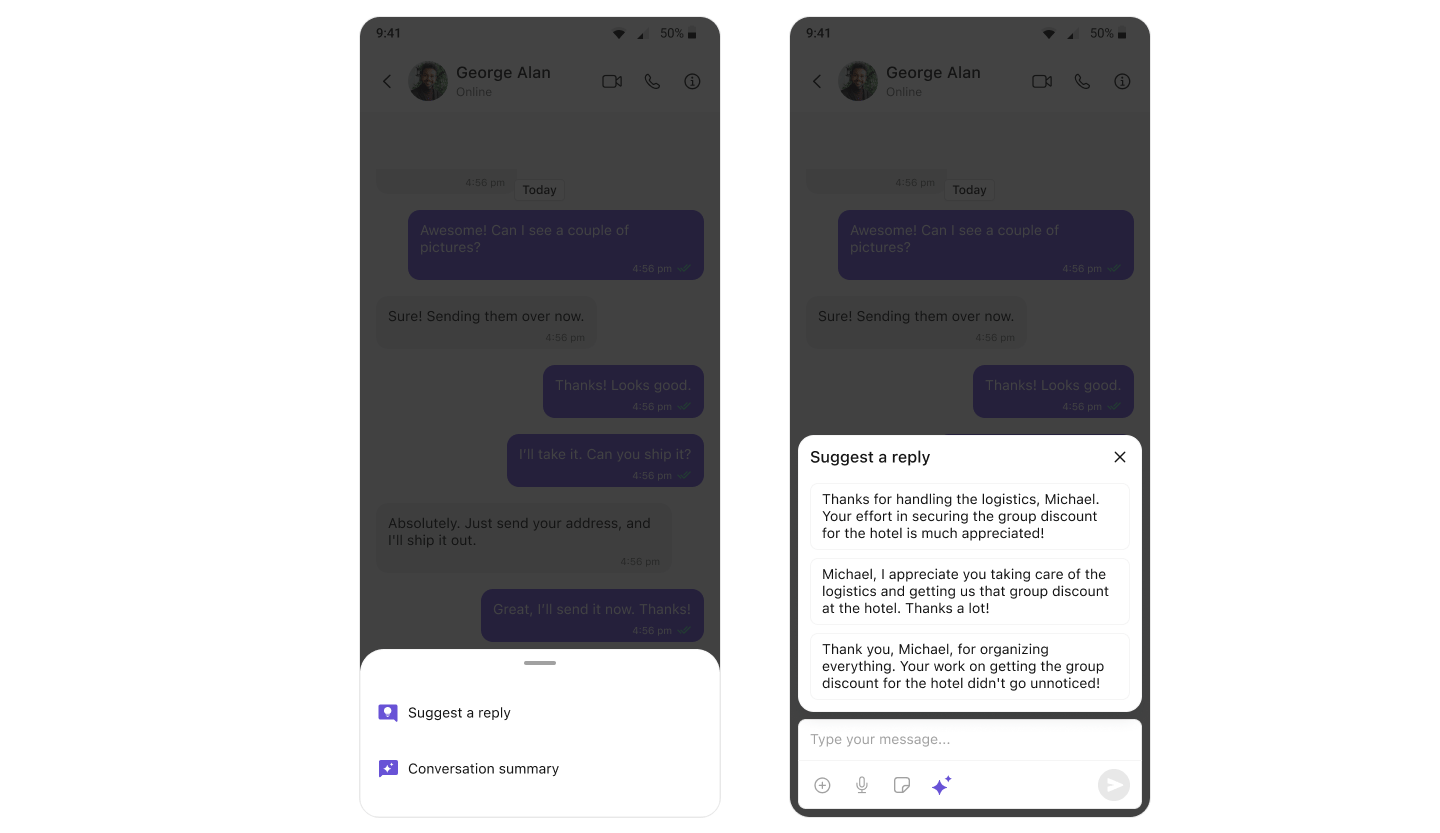
AI suggests contextual responses based on the conversation.
 ### How It Works
1. User receives a message
2. AI analyzes the message and conversation context
3. Smart reply suggestions appear in the composer action sheet
4. User taps a suggestion to insert it
### Implementation
Smart replies appear automatically in `CometChatMessageComposer`:
```swift lines theme={null}
import UIKit
import CometChatUIKitSwift
import CometChatSDK
class ChatViewController: UIViewController {
func openChat(with user: CometChat.User) {
let messagesVC = CometChatMessages()
messagesVC.user = user
// Smart replies appear automatically in the composer
// when enabled in dashboard
navigationController?.pushViewController(messagesVC, animated: true)
}
}
```
***
## Conversation Summary
AI generates summaries of long conversations so users can catch up quickly.
### How It Works
1. User receives a message
2. AI analyzes the message and conversation context
3. Smart reply suggestions appear in the composer action sheet
4. User taps a suggestion to insert it
### Implementation
Smart replies appear automatically in `CometChatMessageComposer`:
```swift lines theme={null}
import UIKit
import CometChatUIKitSwift
import CometChatSDK
class ChatViewController: UIViewController {
func openChat(with user: CometChat.User) {
let messagesVC = CometChatMessages()
messagesVC.user = user
// Smart replies appear automatically in the composer
// when enabled in dashboard
navigationController?.pushViewController(messagesVC, animated: true)
}
}
```
***
## Conversation Summary
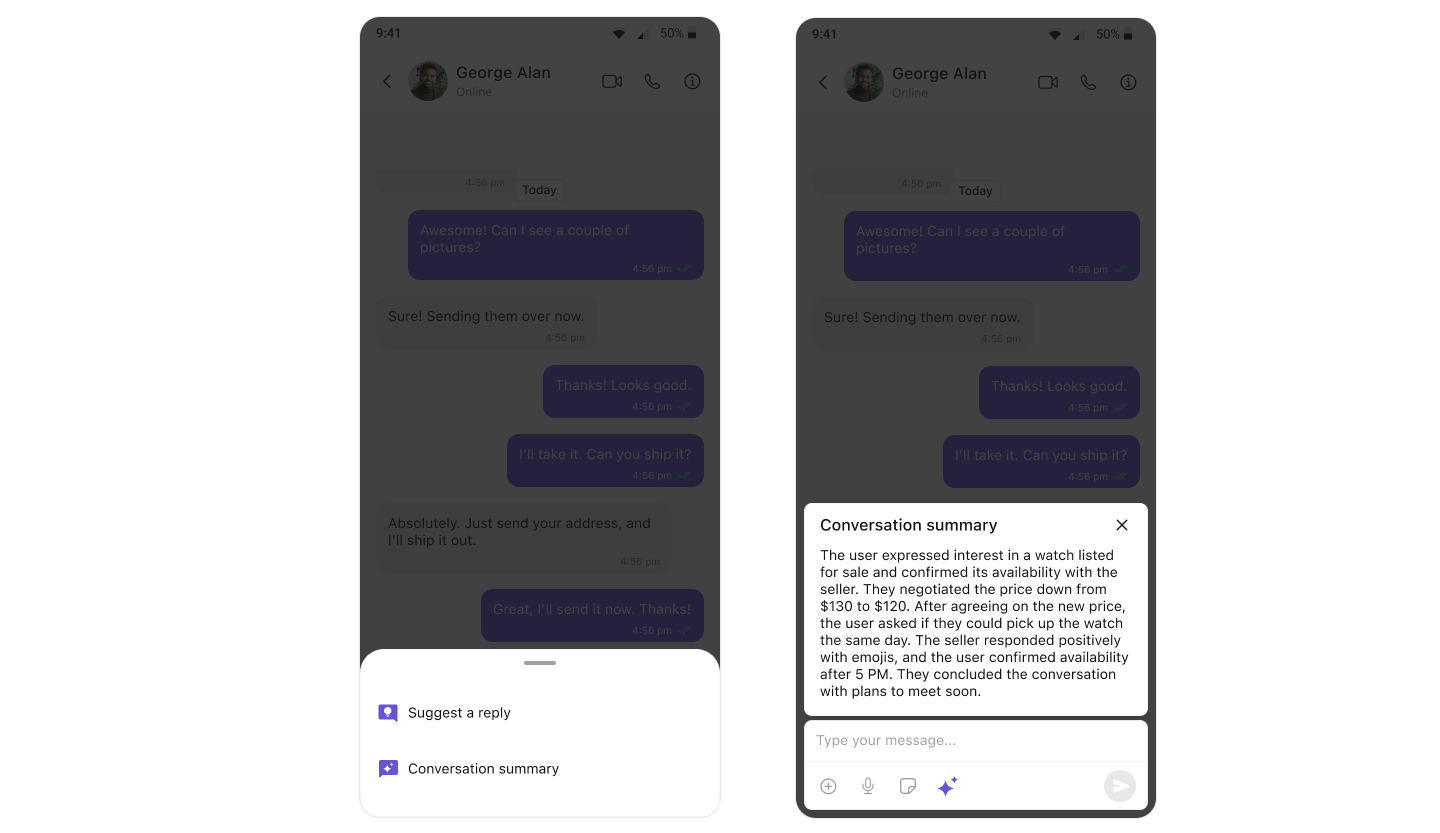
AI generates summaries of long conversations so users can catch up quickly.
 ### How It Works
1. User opens a conversation with many messages
2. User taps the summary option in composer action sheet
3. AI processes the conversation
4. Summary of key points is displayed
### Implementation
Conversation summary is available automatically:
```swift lines theme={null}
import UIKit
import CometChatUIKitSwift
import CometChatSDK
class ChatViewController: UIViewController {
func openChat(with user: CometChat.User) {
let messagesVC = CometChatMessages()
messagesVC.user = user
// Conversation summary option appears in composer action sheet
// when enabled in dashboard and sufficient messages exist
navigationController?.pushViewController(messagesVC, animated: true)
}
}
```
***
## AI Assistant Chat History
View and continue conversations with AI assistants.
### Basic Implementation
```swift lines theme={null}
import UIKit
import CometChatUIKitSwift
import CometChatSDK
class AIAssistantViewController: UIViewController {
var user: CometChat.User!
func showAIChatHistory() {
let chatHistory = CometChatAIAssistanceChatHistory()
chatHistory.user = user // Required
navigationController?.pushViewController(chatHistory, animated: true)
}
}
```
### Full Implementation with Callbacks
```swift lines theme={null}
import UIKit
import CometChatUIKitSwift
import CometChatSDK
class AIAssistantViewController: UIViewController {
var user: CometChat.User!
func showAIChatHistory() {
let chatHistory = CometChatAIAssistanceChatHistory()
chatHistory.user = user
// Handle new chat button
chatHistory.onNewChatButtonClicked = { [weak self] in
self?.startNewAIChat()
}
// Handle message tap
chatHistory.onMessageClicked = { message in
print("Tapped message: \(message.text ?? "")")
}
// Handle load success
chatHistory.set(onLoad: { messages in
print("Loaded \(messages.count) AI messages")
})
// Handle empty state
chatHistory.set(onEmpty: {
print("No AI chat history")
})
// Handle errors
chatHistory.set(onError: { [weak self] error in
self?.showError(error.localizedDescription)
})
navigationController?.pushViewController(chatHistory, animated: true)
}
private func startNewAIChat() {
// Navigate to new AI chat
print("Starting new AI conversation")
}
private func showError(_ message: String) {
let alert = UIAlertController(title: "Error", message: message, preferredStyle: .alert)
alert.addAction(UIAlertAction(title: "OK", style: .default))
present(alert, animated: true)
}
}
```
### Customize AI Chat History Styling
```swift lines theme={null}
import UIKit
import CometChatUIKitSwift
class AIAssistantViewController: UIViewController {
var user: CometChat.User!
func showStyledAIChatHistory() {
let chatHistory = CometChatAIAssistanceChatHistory()
chatHistory.user = user
// Custom styling
let style = AiAssistantChatHistoryStyle()
style.backgroundColor = .systemBackground
style.itemTextFont = UIFont.systemFont(ofSize: 16, weight: .medium)
style.itemTextColor = .label
style.newChatTitleFont = UIFont.systemFont(ofSize: 18, weight: .bold)
style.newChatTitleColor = .systemBlue
chatHistory.style = style
// Custom empty state
chatHistory.emptyStateText = "No AI conversations yet"
chatHistory.emptyStateSubtitleText = "Tap 'New Chat' to start"
// Custom date formatting
chatHistory.dateTimeFormatter.today = { timestamp in
let date = Date(timeIntervalSince1970: TimeInterval(timestamp))
let formatter = DateFormatter()
formatter.timeStyle = .short
return "Today at \(formatter.string(from: date))"
}
navigationController?.pushViewController(chatHistory, animated: true)
}
}
```
### How It Works
1. User opens a conversation with many messages
2. User taps the summary option in composer action sheet
3. AI processes the conversation
4. Summary of key points is displayed
### Implementation
Conversation summary is available automatically:
```swift lines theme={null}
import UIKit
import CometChatUIKitSwift
import CometChatSDK
class ChatViewController: UIViewController {
func openChat(with user: CometChat.User) {
let messagesVC = CometChatMessages()
messagesVC.user = user
// Conversation summary option appears in composer action sheet
// when enabled in dashboard and sufficient messages exist
navigationController?.pushViewController(messagesVC, animated: true)
}
}
```
***
## AI Assistant Chat History
View and continue conversations with AI assistants.
### Basic Implementation
```swift lines theme={null}
import UIKit
import CometChatUIKitSwift
import CometChatSDK
class AIAssistantViewController: UIViewController {
var user: CometChat.User!
func showAIChatHistory() {
let chatHistory = CometChatAIAssistanceChatHistory()
chatHistory.user = user // Required
navigationController?.pushViewController(chatHistory, animated: true)
}
}
```
### Full Implementation with Callbacks
```swift lines theme={null}
import UIKit
import CometChatUIKitSwift
import CometChatSDK
class AIAssistantViewController: UIViewController {
var user: CometChat.User!
func showAIChatHistory() {
let chatHistory = CometChatAIAssistanceChatHistory()
chatHistory.user = user
// Handle new chat button
chatHistory.onNewChatButtonClicked = { [weak self] in
self?.startNewAIChat()
}
// Handle message tap
chatHistory.onMessageClicked = { message in
print("Tapped message: \(message.text ?? "")")
}
// Handle load success
chatHistory.set(onLoad: { messages in
print("Loaded \(messages.count) AI messages")
})
// Handle empty state
chatHistory.set(onEmpty: {
print("No AI chat history")
})
// Handle errors
chatHistory.set(onError: { [weak self] error in
self?.showError(error.localizedDescription)
})
navigationController?.pushViewController(chatHistory, animated: true)
}
private func startNewAIChat() {
// Navigate to new AI chat
print("Starting new AI conversation")
}
private func showError(_ message: String) {
let alert = UIAlertController(title: "Error", message: message, preferredStyle: .alert)
alert.addAction(UIAlertAction(title: "OK", style: .default))
present(alert, animated: true)
}
}
```
### Customize AI Chat History Styling
```swift lines theme={null}
import UIKit
import CometChatUIKitSwift
class AIAssistantViewController: UIViewController {
var user: CometChat.User!
func showStyledAIChatHistory() {
let chatHistory = CometChatAIAssistanceChatHistory()
chatHistory.user = user
// Custom styling
let style = AiAssistantChatHistoryStyle()
style.backgroundColor = .systemBackground
style.itemTextFont = UIFont.systemFont(ofSize: 16, weight: .medium)
style.itemTextColor = .label
style.newChatTitleFont = UIFont.systemFont(ofSize: 18, weight: .bold)
style.newChatTitleColor = .systemBlue
chatHistory.style = style
// Custom empty state
chatHistory.emptyStateText = "No AI conversations yet"
chatHistory.emptyStateSubtitleText = "Tap 'New Chat' to start"
// Custom date formatting
chatHistory.dateTimeFormatter.today = { timestamp in
let date = Date(timeIntervalSince1970: TimeInterval(timestamp))
let formatter = DateFormatter()
formatter.timeStyle = .short
return "Today at \(formatter.string(from: date))"
}
navigationController?.pushViewController(chatHistory, animated: true)
}
}
```