> ## Documentation Index
> Fetch the complete documentation index at: https://cometchat-22654f5b-docs-audit-content-webhooks.mintlify.site/llms.txt
> Use this file to discover all available pages before exploring further.
# Messages
> Messages — CometChat documentation.
## Overview
The Messages is a [Composite Widget](/ui-kit/flutter/v4/components-overview#composite-components) that manages messages for users and groups.
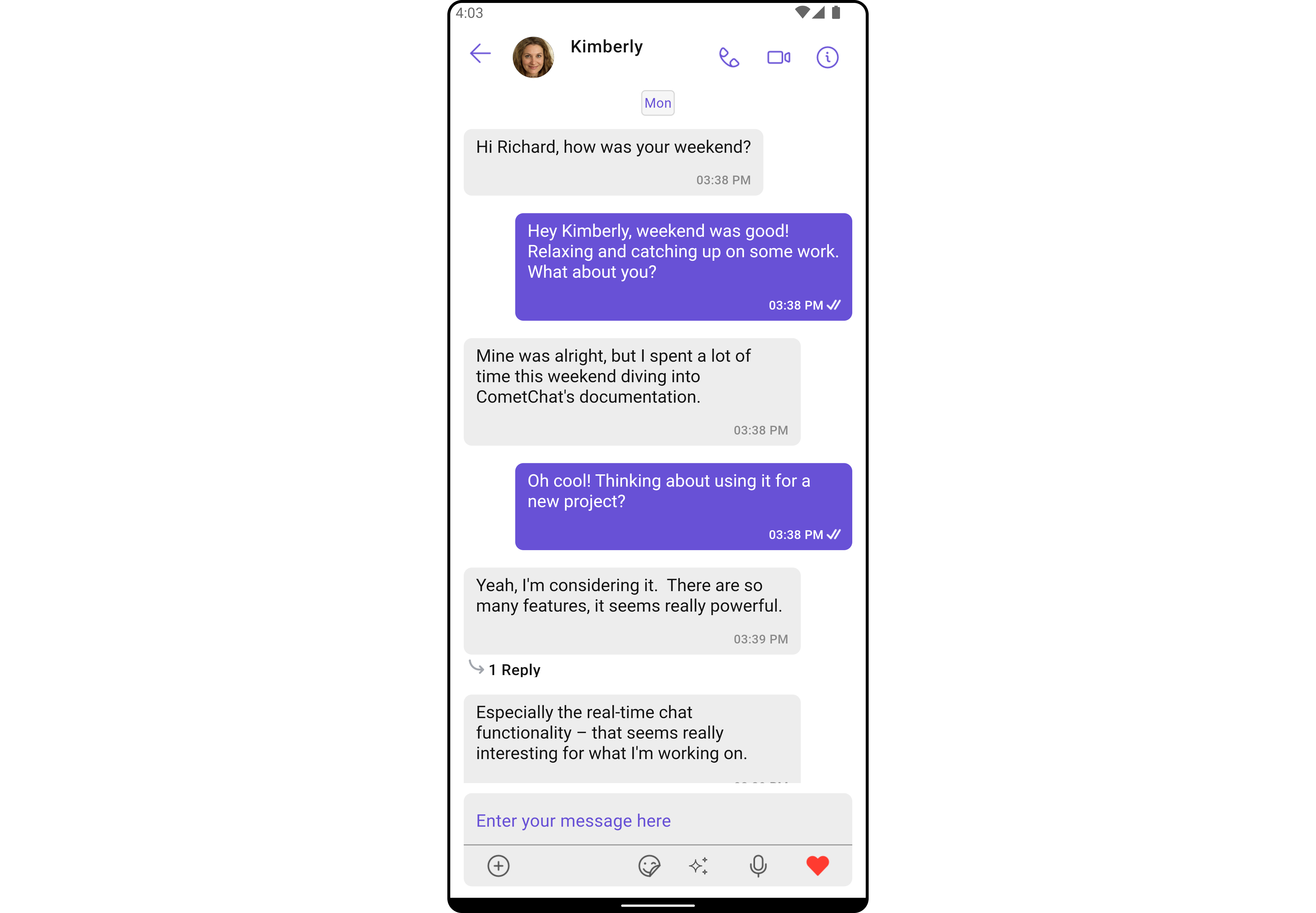
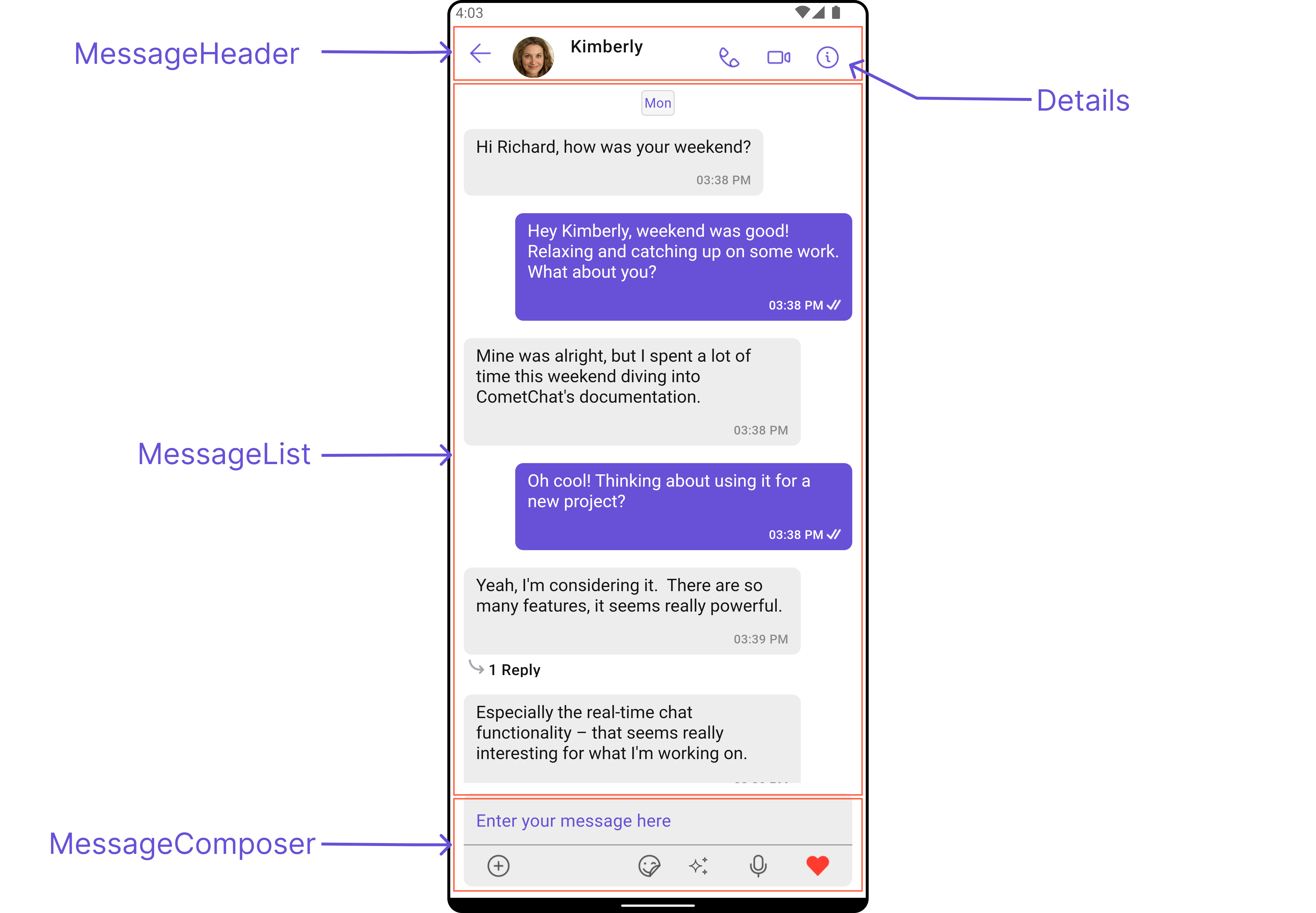
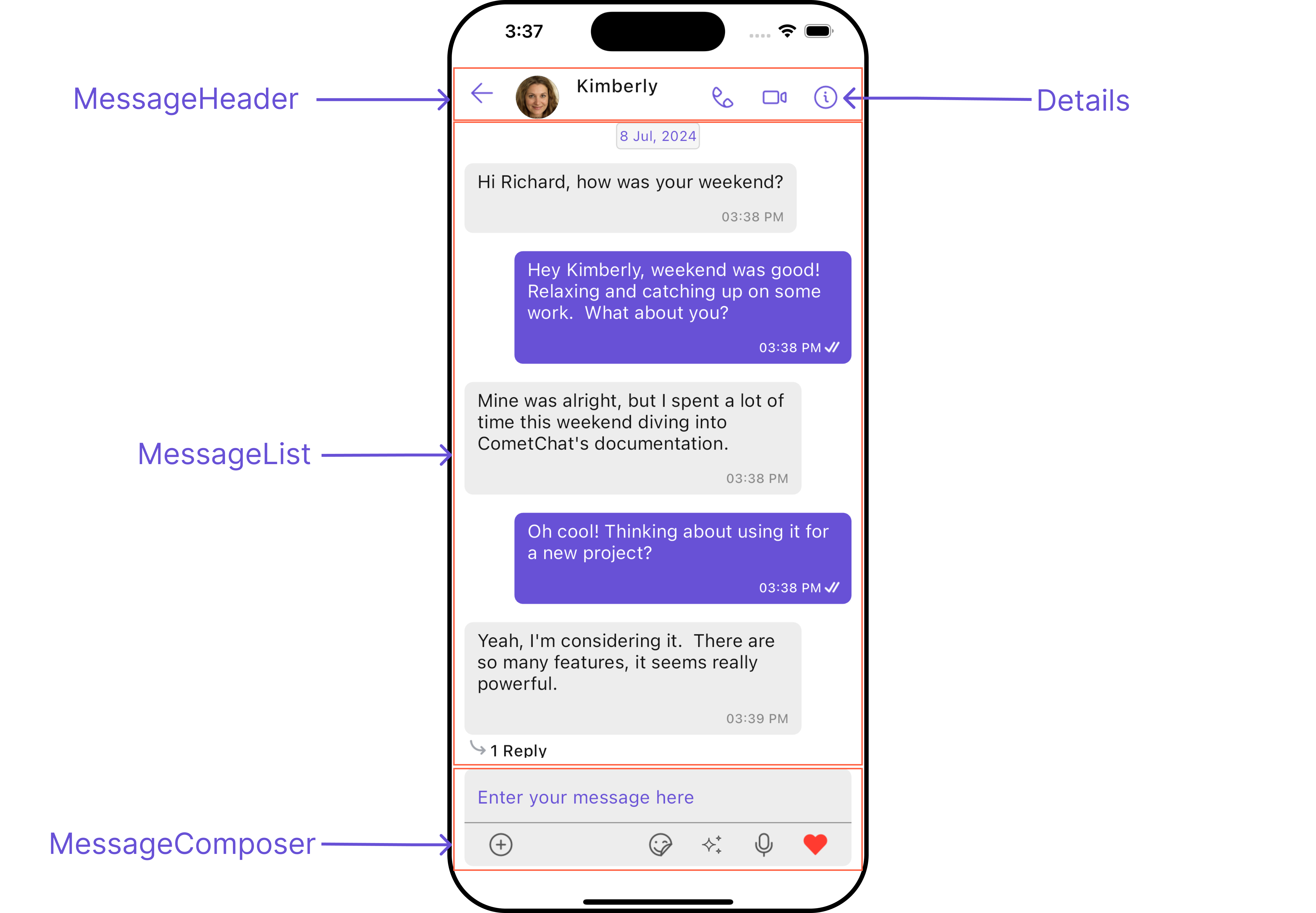
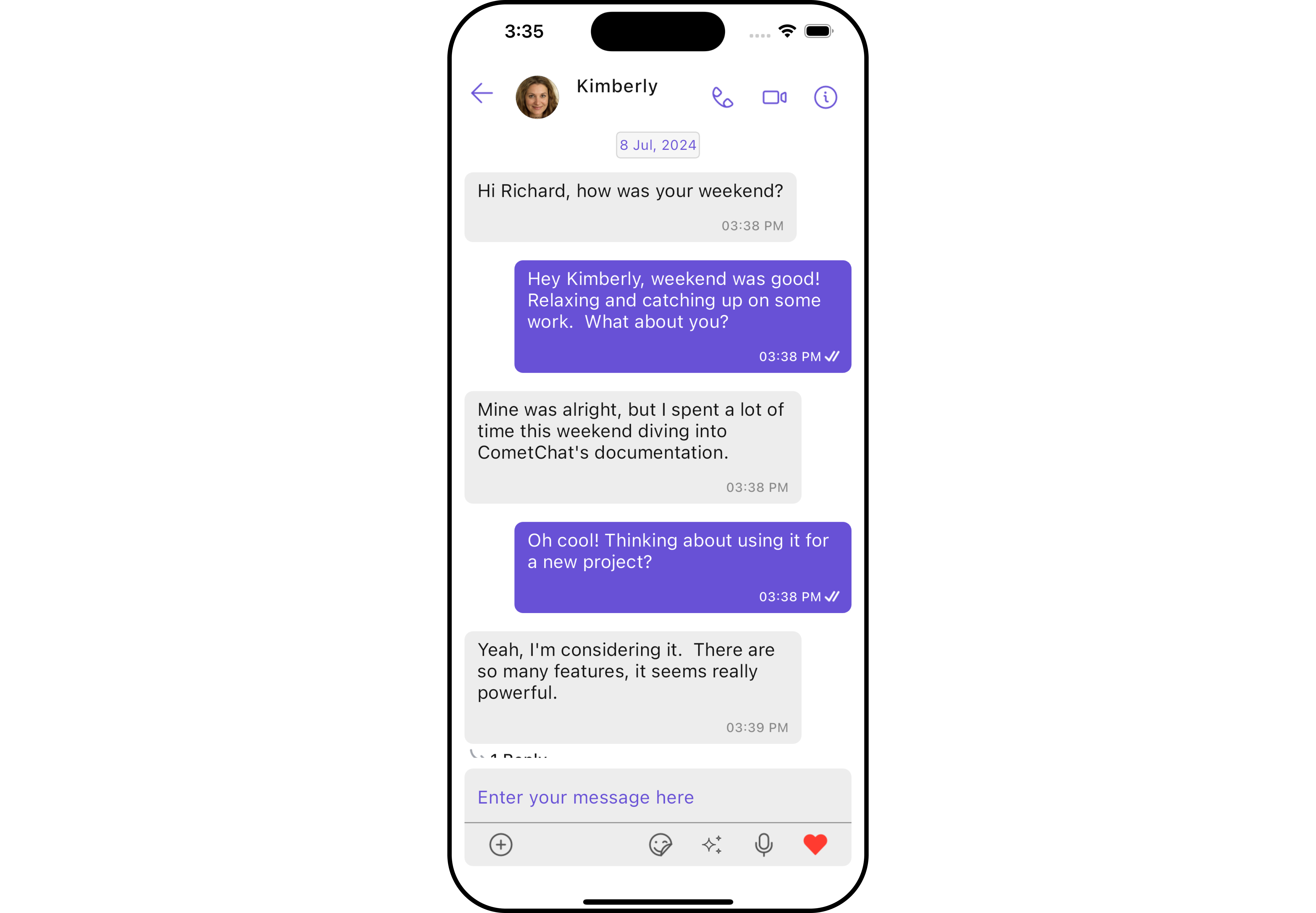 The Messages widget is composed of three individual widgets, [MessageHeader](/ui-kit/flutter/v4/message-header), [MessageList](/ui-kit/flutter/v4/message-list), and [MessageComposer](/ui-kit/flutter/v4/message-composer). In addition, the Messages widget also navigates to the [Details](/ui-kit/flutter/v4/group-details) and [ThreadedMessages](/ui-kit/flutter/v4/threaded-messages) widgets.
| Widgets | Description |
| -------------------------------------------------------- | -------------------------------------------------------------------------------------------------------------------------------------------------------------------------------------------------------- |
| [MessageHeader](/ui-kit/flutter/v4/message-header) | `CometChatMessageHeader` displays the `User` or `Group` information using CometChat SDK's `User` or `Group object.` It also shows the typing indicator when the user starts typing in `MessageComposer`. |
| [MessageList](/ui-kit/flutter/v4/message-list) | `CometChatMessageList` is one of the core UI widgets. It displays a list of messages and handles real-time operations. |
| [MessageComposer](/ui-kit/flutter/v4/message-composer) | `CometChatMessageComposer` is an independent and critical widget that allows users to compose and send various types of messages includes text, image, video and custom messages. |
| [Details](/ui-kit/flutter/v4/group-details) | `CometChatDetails` is a widget that displays all the available options available for `Users` & `Groups` |
| [ThreadedMessages](/ui-kit/flutter/v4/threaded-messages) | `CometChatThreadedMessages` is a widget that displays all replies made to a particular message in a conversation. |
## Usage
### Integration
You can launch `CometChatMessages` directly using `Navigator.push`, or you can define it as a widget within the `build` method of your `State` class.
##### 1. Using Navigator to Launch `CometChatMessages`
```dart theme={null}
Navigator.push(context, MaterialPageRoute(builder: (context) => CometChatMessages())); // A user or group object is required to launch this widget.
```
##### 2. Embedding `CometChatMessages` as a Widget in the build Method
```dart theme={null}
import 'package:cometchat_chat_uikit/cometchat_chat_uikit.dart';
import 'package:flutter/material.dart';
class Messages extends StatefulWidget {
const Messages({super.key});
@override
State createState() => _MessagesState();
}
class _MessagesState extends State {
@override
Widget build(BuildContext context) {
return Scaffold(
body: SafeArea(
child: CometChatMessages() // A user or group object is required to launch this widget.
)
);
}
}
```
***
### Actions
[Actions](/ui-kit/flutter/v4/components-overview#actions) dictate how a widget functions. They are divided into two types: Predefined and User-defined. You can override either type, allowing you to tailor the behavior of the widget to fit your specific needs.
The Messages widget does not have its actions. However, since it's a [Composite Widget](/ui-kit/flutter/v4/components-overview#composite-components), you can use the actions of its widgets by utilizing the [Configurations](#configuration) object of each component.
**Example**
In this example, we are employing the [ThreadRepliesClick](/ui-kit/flutter/v4/message-list#1-onthreadrepliesclick) action from the MessageList Widget through the MessageListConfiguration object.
```dart theme={null}
CometChatMessages(
user: user,
messageListConfiguration: MessageListConfiguration(
onThreadRepliesClick: (message, context, {bubbleView}) {
// TODO("Not yet implemented")
},
),
)
```
The Messages widget is composed of three individual widgets, [MessageHeader](/ui-kit/flutter/v4/message-header), [MessageList](/ui-kit/flutter/v4/message-list), and [MessageComposer](/ui-kit/flutter/v4/message-composer). In addition, the Messages widget also navigates to the [Details](/ui-kit/flutter/v4/group-details) and [ThreadedMessages](/ui-kit/flutter/v4/threaded-messages) widgets.
| Widgets | Description |
| -------------------------------------------------------- | -------------------------------------------------------------------------------------------------------------------------------------------------------------------------------------------------------- |
| [MessageHeader](/ui-kit/flutter/v4/message-header) | `CometChatMessageHeader` displays the `User` or `Group` information using CometChat SDK's `User` or `Group object.` It also shows the typing indicator when the user starts typing in `MessageComposer`. |
| [MessageList](/ui-kit/flutter/v4/message-list) | `CometChatMessageList` is one of the core UI widgets. It displays a list of messages and handles real-time operations. |
| [MessageComposer](/ui-kit/flutter/v4/message-composer) | `CometChatMessageComposer` is an independent and critical widget that allows users to compose and send various types of messages includes text, image, video and custom messages. |
| [Details](/ui-kit/flutter/v4/group-details) | `CometChatDetails` is a widget that displays all the available options available for `Users` & `Groups` |
| [ThreadedMessages](/ui-kit/flutter/v4/threaded-messages) | `CometChatThreadedMessages` is a widget that displays all replies made to a particular message in a conversation. |
## Usage
### Integration
You can launch `CometChatMessages` directly using `Navigator.push`, or you can define it as a widget within the `build` method of your `State` class.
##### 1. Using Navigator to Launch `CometChatMessages`
```dart theme={null}
Navigator.push(context, MaterialPageRoute(builder: (context) => CometChatMessages())); // A user or group object is required to launch this widget.
```
##### 2. Embedding `CometChatMessages` as a Widget in the build Method
```dart theme={null}
import 'package:cometchat_chat_uikit/cometchat_chat_uikit.dart';
import 'package:flutter/material.dart';
class Messages extends StatefulWidget {
const Messages({super.key});
@override
State createState() => _MessagesState();
}
class _MessagesState extends State {
@override
Widget build(BuildContext context) {
return Scaffold(
body: SafeArea(
child: CometChatMessages() // A user or group object is required to launch this widget.
)
);
}
}
```
***
### Actions
[Actions](/ui-kit/flutter/v4/components-overview#actions) dictate how a widget functions. They are divided into two types: Predefined and User-defined. You can override either type, allowing you to tailor the behavior of the widget to fit your specific needs.
The Messages widget does not have its actions. However, since it's a [Composite Widget](/ui-kit/flutter/v4/components-overview#composite-components), you can use the actions of its widgets by utilizing the [Configurations](#configuration) object of each component.
**Example**
In this example, we are employing the [ThreadRepliesClick](/ui-kit/flutter/v4/message-list#1-onthreadrepliesclick) action from the MessageList Widget through the MessageListConfiguration object.
```dart theme={null}
CometChatMessages(
user: user,
messageListConfiguration: MessageListConfiguration(
onThreadRepliesClick: (message, context, {bubbleView}) {
// TODO("Not yet implemented")
},
),
)
```
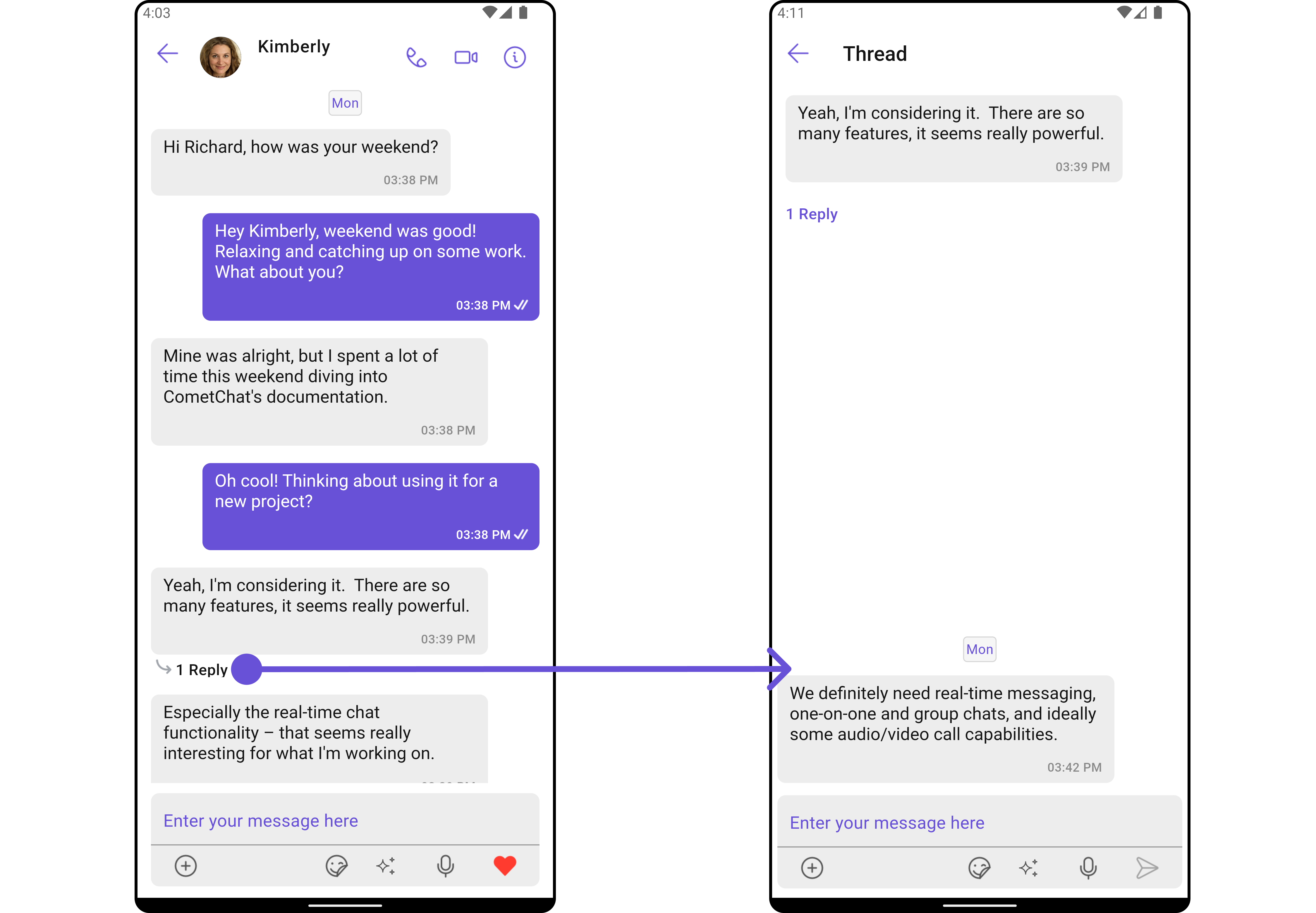
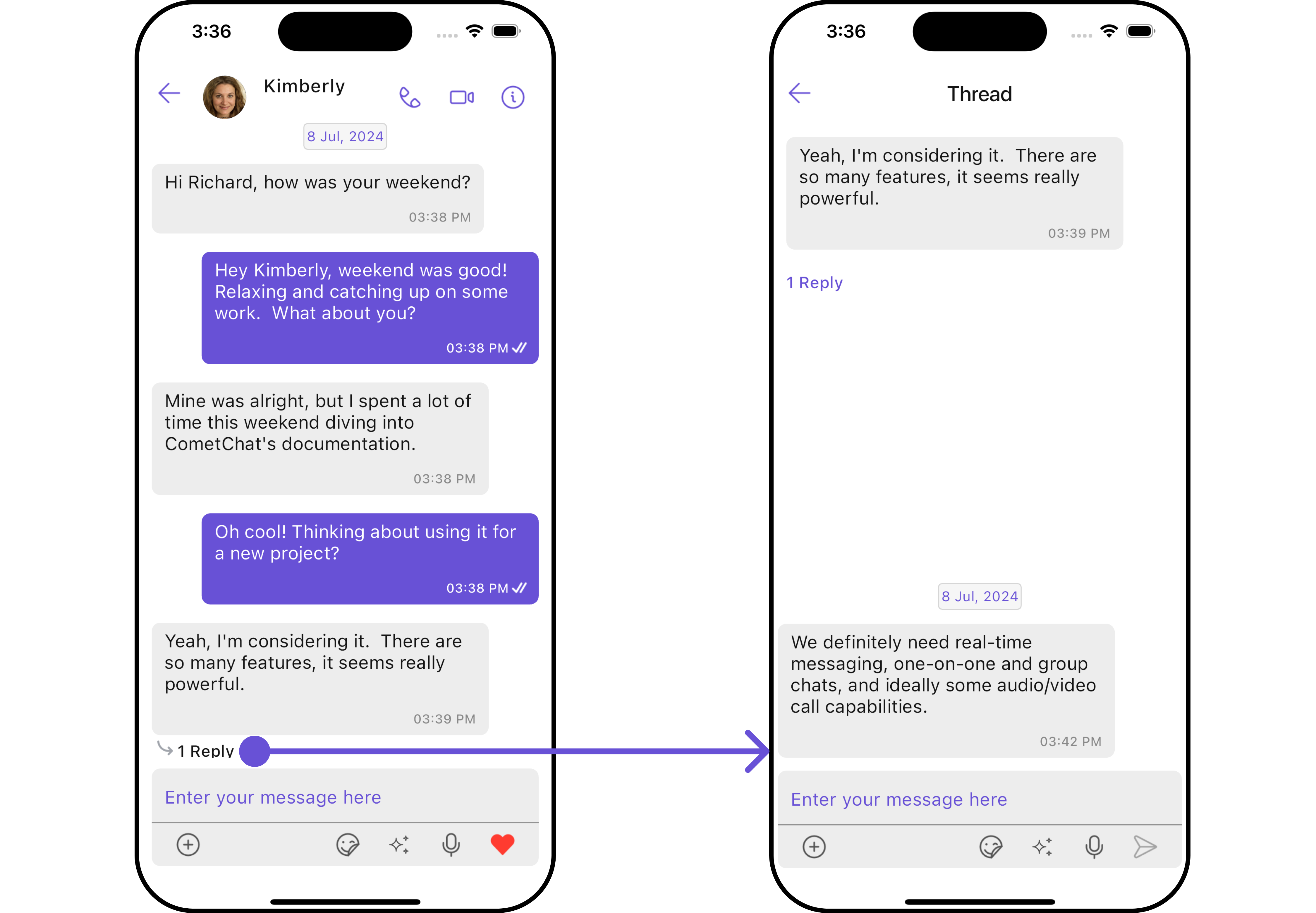 > The Messages Widget overrides the [ThreadRepliesClick](/ui-kit/flutter/v4/message-list#1-onthreadrepliesclick) action to navigate to the [ThreadedMessages](/ui-kit/flutter/v4/threaded-messages) component. If you override `ThreadRepliesClick`, it will also override the default behavior of the Messages Widget.
***
### Filters
**Filters** allow you to customize the data displayed in a list within a Widget. You can filter the list based on your specific criteria, allowing for a more customized. Filters can be applied using RequestBuilders of Chat SDK.
The Messages widget does not have its filters. But as it is a [Composite Widget](/ui-kit/flutter/v4/components-overview#composite-components), you can use the filters of its widgets by using the [Configurations](#configuration) object of each component. For more details on the filters of its widgets, please refer to [MessageList Filters](/ui-kit/flutter/v4/message-list#filters).
**Example**
In this example, we're applying the MessageList Widget filter to the Messages Widget using `MessageListConfiguration`.
```dart theme={null}
CometChatMessages(
user: user,
messageListConfiguration: MessageListConfiguration(
messagesRequestBuilder: MessagesRequestBuilder()
..uid = user.uid
..searchKeyword = "searchKeyword"
),
)
```
***
### Events
[Events](/ui-kit/flutter/v4/components-overview#events) are emitted by a `Widget`. By using event you can extend existing functionality. Being global events, they can be applied in Multiple Locations and are capable of being Added or Removed.
The list of events emitted by the Messages widget is as follows.
| Event | Description |
| -------------------- | --------------------------------------------------------------------------------------------------------------------------------- |
| **ccMessageSent** | Triggers whenever a loggedIn user sends any message, it will have two states such as: inProgress & sent |
| **ccMessageEdited** | Triggers whenever a loggedIn user edits any message from the list of messages .it will have two states such as: inProgress & sent |
| **ccMessageDeleted** | Triggers whenever a loggedIn user deletes any message from the list of messages |
| **ccMessageRead** | Triggers whenever a loggedIn user reads any message. |
| **ccLiveReaction** | Triggers whenever a loggedIn clicks on live reaction |
**Example**
```dart theme={null}
import 'package:cometchat_chat_uikit/cometchat_chat_uikit.dart';
import 'package:flutter/material.dart';
class YourScreen extends StatefulWidget {
const YourScreen({super.key});
@override
State createState() => _YourScreenState();
}
class _YourScreenState extends State with CometChatMessageEventListener {
@override
void initState() {
super.initState();
CometChatMessageEvents.addMessagesListener("listenerId", this); // Add the listener
}
@override
void dispose(){
super.dispose();
CometChatMessageEvents.removeMessagesListener("listenerId"); // Remove the listener
}
@override
void ccMessageSent(BaseMessage message, MessageStatus messageStatus) {
// TODO: implement ccMessageSent
super.ccMessageSent(message, messageStatus);
}
@override
void ccMessageEdited(BaseMessage message, MessageEditStatus status) {
// TODO: implement ccMessageEdited
super.ccMessageEdited(message, status);
}
@override
void ccMessageDeleted(BaseMessage message, EventStatus messageStatus) {
// TODO: implement ccMessageDeleted
super.ccMessageDeleted(message, messageStatus);
}
@override
void ccLiveReaction(String reaction) {
// TODO: implement ccLiveReaction
super.ccLiveReaction(reaction);
}
@override
Widget build(BuildContext context) {
return const Placeholder();
}
}
```
***
## Customization
To fit your app's design requirements, you can customize the appearance of the conversation component. We provide exposed methods that allow you to modify the experience and behavior according to your specific needs.
### Style
Using Style you can customize the look and feel of the widget in your app, These parameters typically control elements such as the color, size, shape, and fonts used within the component.
##### 1. Messages Style
You can customize the appearance of the Messages Widget by applying the MessagesStyle to it using the following code snippet.
```dart theme={null}
CometChatMessages(
user: user,
messagesStyle: MessagesStyle(
background: Color(0xFFE4EBF5),
),
)
```
> The Messages Widget overrides the [ThreadRepliesClick](/ui-kit/flutter/v4/message-list#1-onthreadrepliesclick) action to navigate to the [ThreadedMessages](/ui-kit/flutter/v4/threaded-messages) component. If you override `ThreadRepliesClick`, it will also override the default behavior of the Messages Widget.
***
### Filters
**Filters** allow you to customize the data displayed in a list within a Widget. You can filter the list based on your specific criteria, allowing for a more customized. Filters can be applied using RequestBuilders of Chat SDK.
The Messages widget does not have its filters. But as it is a [Composite Widget](/ui-kit/flutter/v4/components-overview#composite-components), you can use the filters of its widgets by using the [Configurations](#configuration) object of each component. For more details on the filters of its widgets, please refer to [MessageList Filters](/ui-kit/flutter/v4/message-list#filters).
**Example**
In this example, we're applying the MessageList Widget filter to the Messages Widget using `MessageListConfiguration`.
```dart theme={null}
CometChatMessages(
user: user,
messageListConfiguration: MessageListConfiguration(
messagesRequestBuilder: MessagesRequestBuilder()
..uid = user.uid
..searchKeyword = "searchKeyword"
),
)
```
***
### Events
[Events](/ui-kit/flutter/v4/components-overview#events) are emitted by a `Widget`. By using event you can extend existing functionality. Being global events, they can be applied in Multiple Locations and are capable of being Added or Removed.
The list of events emitted by the Messages widget is as follows.
| Event | Description |
| -------------------- | --------------------------------------------------------------------------------------------------------------------------------- |
| **ccMessageSent** | Triggers whenever a loggedIn user sends any message, it will have two states such as: inProgress & sent |
| **ccMessageEdited** | Triggers whenever a loggedIn user edits any message from the list of messages .it will have two states such as: inProgress & sent |
| **ccMessageDeleted** | Triggers whenever a loggedIn user deletes any message from the list of messages |
| **ccMessageRead** | Triggers whenever a loggedIn user reads any message. |
| **ccLiveReaction** | Triggers whenever a loggedIn clicks on live reaction |
**Example**
```dart theme={null}
import 'package:cometchat_chat_uikit/cometchat_chat_uikit.dart';
import 'package:flutter/material.dart';
class YourScreen extends StatefulWidget {
const YourScreen({super.key});
@override
State createState() => _YourScreenState();
}
class _YourScreenState extends State with CometChatMessageEventListener {
@override
void initState() {
super.initState();
CometChatMessageEvents.addMessagesListener("listenerId", this); // Add the listener
}
@override
void dispose(){
super.dispose();
CometChatMessageEvents.removeMessagesListener("listenerId"); // Remove the listener
}
@override
void ccMessageSent(BaseMessage message, MessageStatus messageStatus) {
// TODO: implement ccMessageSent
super.ccMessageSent(message, messageStatus);
}
@override
void ccMessageEdited(BaseMessage message, MessageEditStatus status) {
// TODO: implement ccMessageEdited
super.ccMessageEdited(message, status);
}
@override
void ccMessageDeleted(BaseMessage message, EventStatus messageStatus) {
// TODO: implement ccMessageDeleted
super.ccMessageDeleted(message, messageStatus);
}
@override
void ccLiveReaction(String reaction) {
// TODO: implement ccLiveReaction
super.ccLiveReaction(reaction);
}
@override
Widget build(BuildContext context) {
return const Placeholder();
}
}
```
***
## Customization
To fit your app's design requirements, you can customize the appearance of the conversation component. We provide exposed methods that allow you to modify the experience and behavior according to your specific needs.
### Style
Using Style you can customize the look and feel of the widget in your app, These parameters typically control elements such as the color, size, shape, and fonts used within the component.
##### 1. Messages Style
You can customize the appearance of the Messages Widget by applying the MessagesStyle to it using the following code snippet.
```dart theme={null}
CometChatMessages(
user: user,
messagesStyle: MessagesStyle(
background: Color(0xFFE4EBF5),
),
)
```
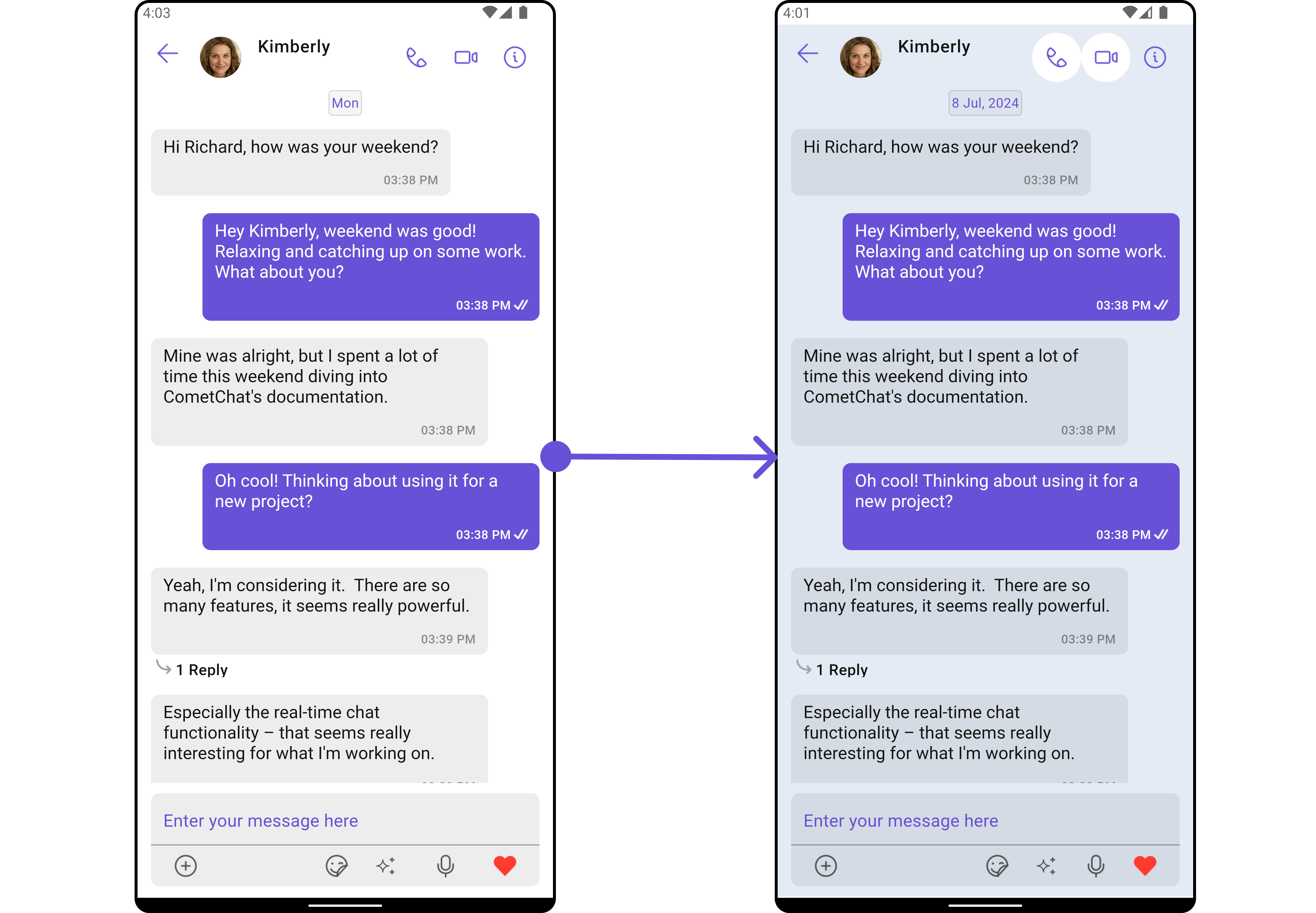
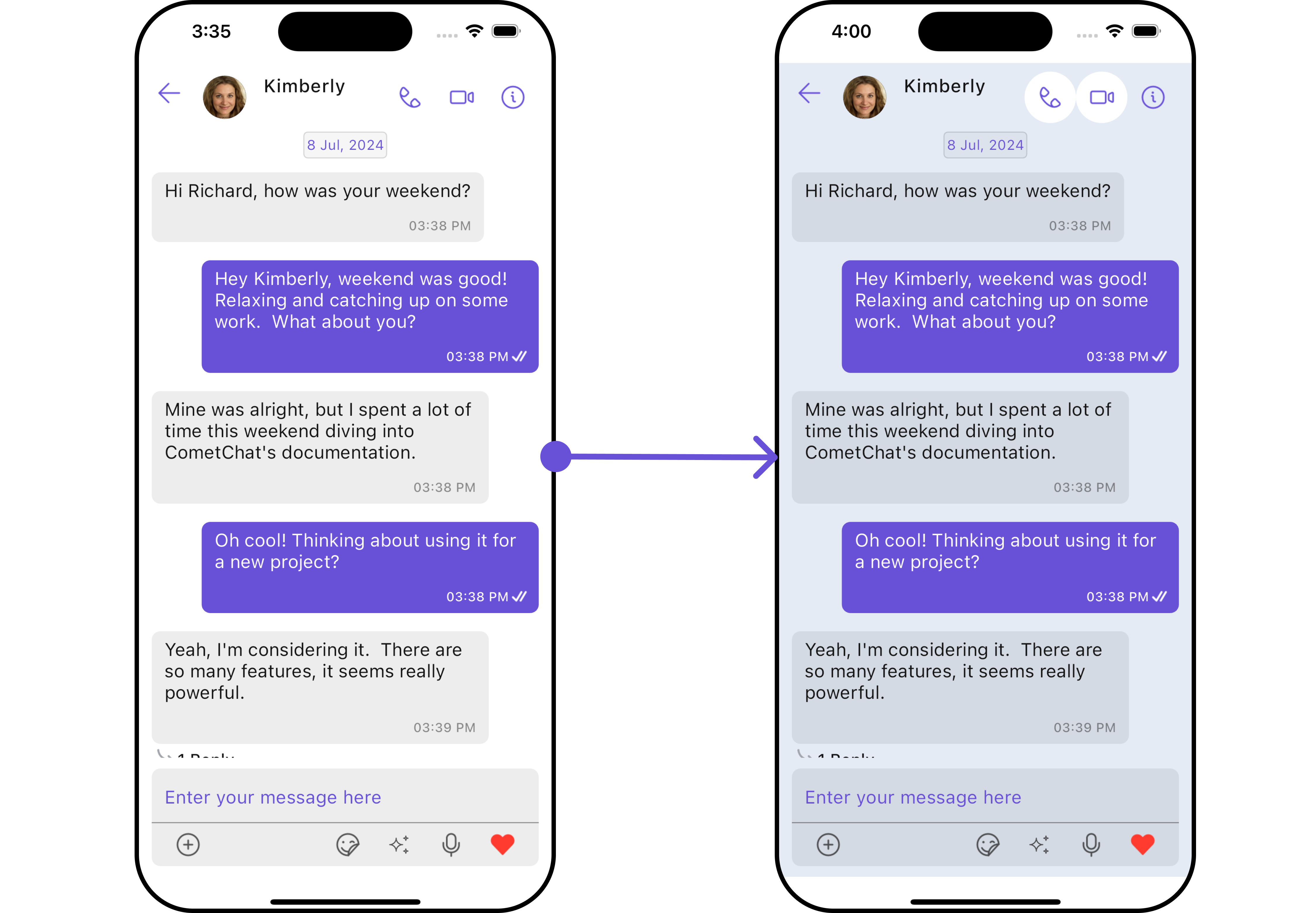 List of properties exposed by `MessagesStyle`
| Property | Description | Code |
| ----------------- | ------------------------------ | ----------------------------- |
| **Background** | Background color of the widget | `background: Color?` |
| **Border** | Border of the widget | `border: Border?` |
| **Border Radius** | Border radius of the widget | `borderRadius: BorderRadius?` |
| **Gradient** | Gradient of the widget | `gradient: Gradient?` |
***
##### 2. Widget's Styles
Being a [Composite component](/ui-kit/flutter/v4/components-overview#composite-components), the Messages Widget allows you to customize the styles of its widgets using their respective Configuration objects.
For a list of all available properties, refer to each component's styling documentation: [MesssageHeader Styles](/ui-kit/flutter/v4/message-header#style), [MessageList Styles](/ui-kit/flutter/v4/message-list#style), [MessageComposer Styles](/ui-kit/flutter/v4/message-composer#style), [Details Styles](/ui-kit/flutter/v4/group-details), [ThreadMessages Styles](/ui-kit/flutter/v4/threaded-messages).
**Example**
In this example, we are creating `MessageListStyle` and `MessageComposerStyle` and then applying them to the Messages Widget using `MessageListConfiguration` and `MessageComposerConfiguration`.
```dart theme={null}
CometChatMessages(
user: user,
messageListConfiguration: MessageListConfiguration(
messageListStyle: MessageListStyle(
background: Color(0xFFE4EBF5),
border: Border.all(width: 3, color: Colors.red)
),
),
messageComposerConfiguration: MessageComposerConfiguration(
messageComposerStyle: MessageComposerStyle(
background: Color(0xFFB39DDB),
border: Border.all(width: 3, color: Colors.yellow)
)
),
)
```
***
### Functionality
These are a set of small functional customizations that allow you to fine-tune the overall experience of the component. With these, you can change text, set custom icons, and toggle the visibility of UI elements.
List of properties exposed by `MessagesStyle`
| Property | Description | Code |
| ----------------- | ------------------------------ | ----------------------------- |
| **Background** | Background color of the widget | `background: Color?` |
| **Border** | Border of the widget | `border: Border?` |
| **Border Radius** | Border radius of the widget | `borderRadius: BorderRadius?` |
| **Gradient** | Gradient of the widget | `gradient: Gradient?` |
***
##### 2. Widget's Styles
Being a [Composite component](/ui-kit/flutter/v4/components-overview#composite-components), the Messages Widget allows you to customize the styles of its widgets using their respective Configuration objects.
For a list of all available properties, refer to each component's styling documentation: [MesssageHeader Styles](/ui-kit/flutter/v4/message-header#style), [MessageList Styles](/ui-kit/flutter/v4/message-list#style), [MessageComposer Styles](/ui-kit/flutter/v4/message-composer#style), [Details Styles](/ui-kit/flutter/v4/group-details), [ThreadMessages Styles](/ui-kit/flutter/v4/threaded-messages).
**Example**
In this example, we are creating `MessageListStyle` and `MessageComposerStyle` and then applying them to the Messages Widget using `MessageListConfiguration` and `MessageComposerConfiguration`.
```dart theme={null}
CometChatMessages(
user: user,
messageListConfiguration: MessageListConfiguration(
messageListStyle: MessageListStyle(
background: Color(0xFFE4EBF5),
border: Border.all(width: 3, color: Colors.red)
),
),
messageComposerConfiguration: MessageComposerConfiguration(
messageComposerStyle: MessageComposerStyle(
background: Color(0xFFB39DDB),
border: Border.all(width: 3, color: Colors.yellow)
)
),
)
```
***
### Functionality
These are a set of small functional customizations that allow you to fine-tune the overall experience of the component. With these, you can change text, set custom icons, and toggle the visibility of UI elements.
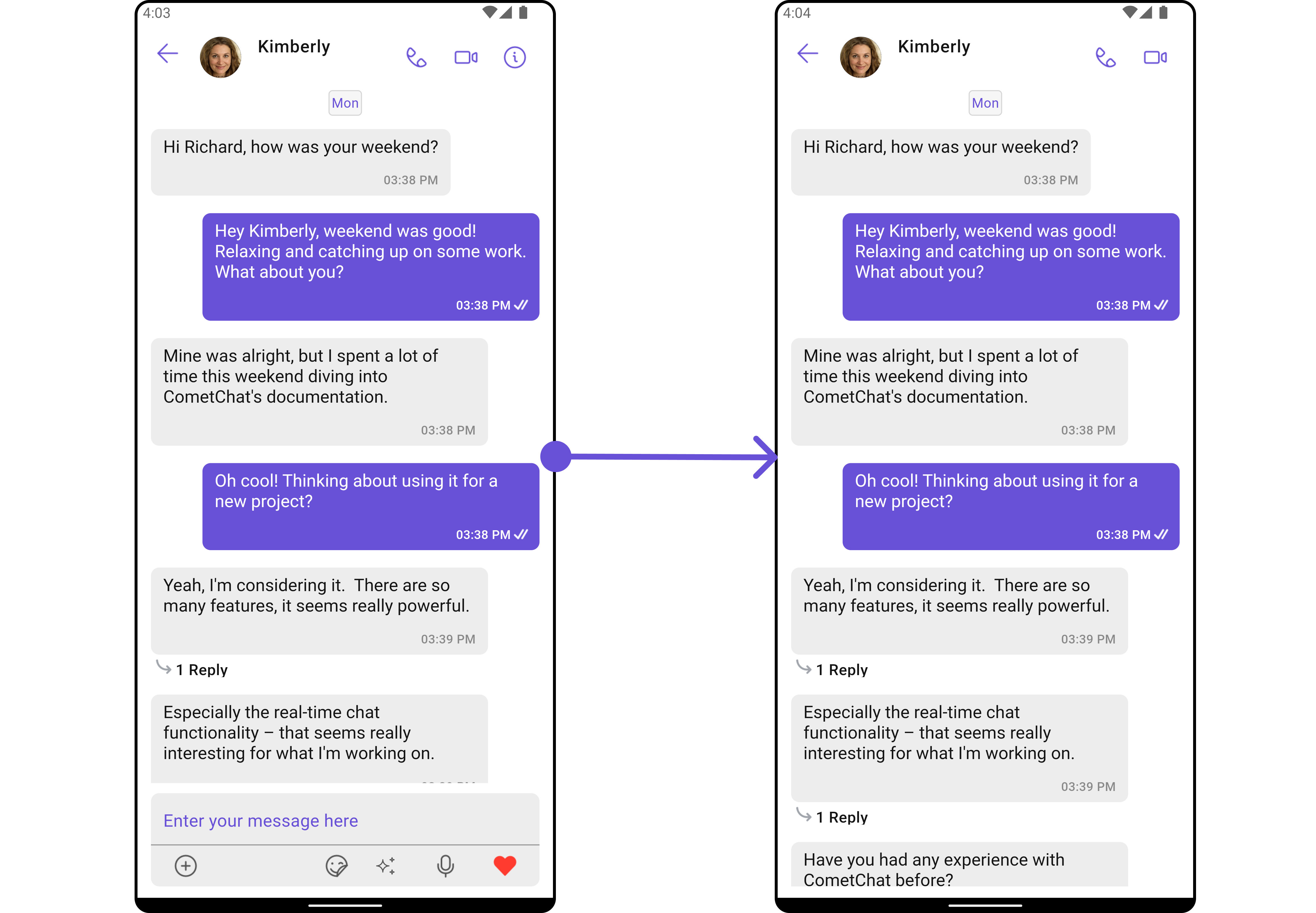
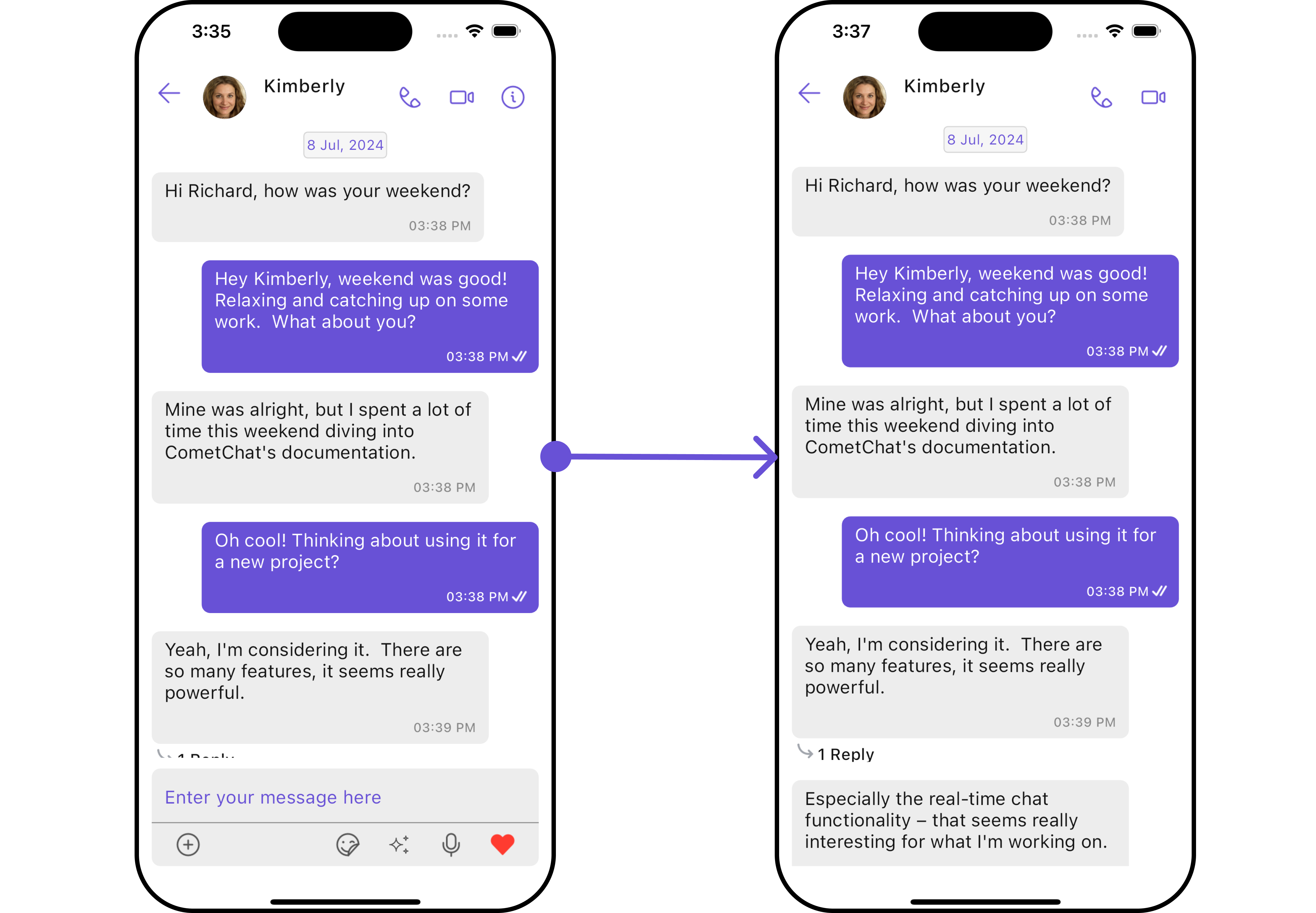
 ```dart theme={null}
CometChatMessages(
user: user,
hideMessageComposer: true,
hideDetails: true
)
```
```dart theme={null}
CometChatMessages(
user: user,
hideMessageComposer: true,
hideDetails: true
)
```
 List of properties exposed by `CometChatMessages`
| Property | Description | Code |
| --------------------------------------------- | ------------------------------------------------------ | ----------------------------------------------- |
| **User** | User object for which the messages are to be shown | `user: User?` |
| **Group** | Group object for which the messages are to be shown | `group: Group?` |
| **Hide Message Composer** | Toggles visibility for message composer | `hideMessageComposer: bool?` |
| **Disable Typing** | If true, disables the typing indicator | `disableTyping: bool?` |
| **Custom Sound For Incoming Messages** | Custom sound path for incoming messages | `customSoundForIncomingMessages: String?` |
| **Custom Sound For Incoming Message Package** | Package name for sound incoming from different package | `customSoundForIncomingMessagePackage: String?` |
| **Custom Sound For Outgoing Messages** | Custom sound path for outgoing messages | `customSoundForOutgoingMessages: String?` |
| **Custom Sound For Outgoing Message Package** | Package name for sound outgoing from different package | `customSoundForOutgoingMessagePackage: String?` |
| **Hide Message Header** | Toggles visibility for message header | `hideMessageHeader: bool?` |
| **Disable Sound For Messages** | Disables sound for incoming and outgoing message | `disableSoundForMessages: bool?` |
| **Theme** | Custom theme for the messages screen | `theme: CometChatTheme?` |
| **Hide Details** | Toggles visibility for details icons | `hideDetails: bool?` |
***
### Advanced
For advanced-level customization, you can set custom widgets to the component. This lets you tailor each aspect of the widget to fit your exact needs and application aesthetics. You can create and define your widgets and then incorporate those into the component.
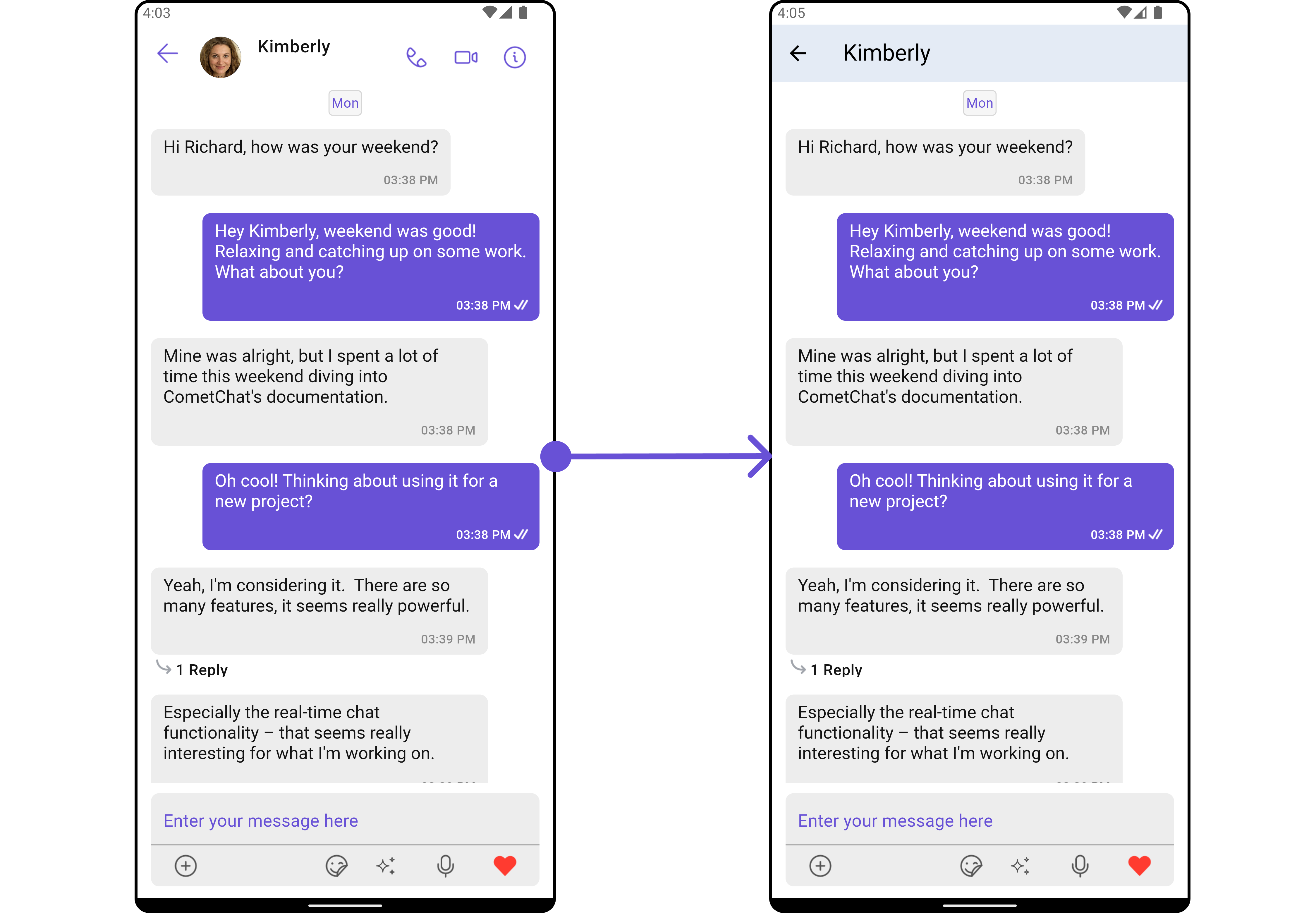
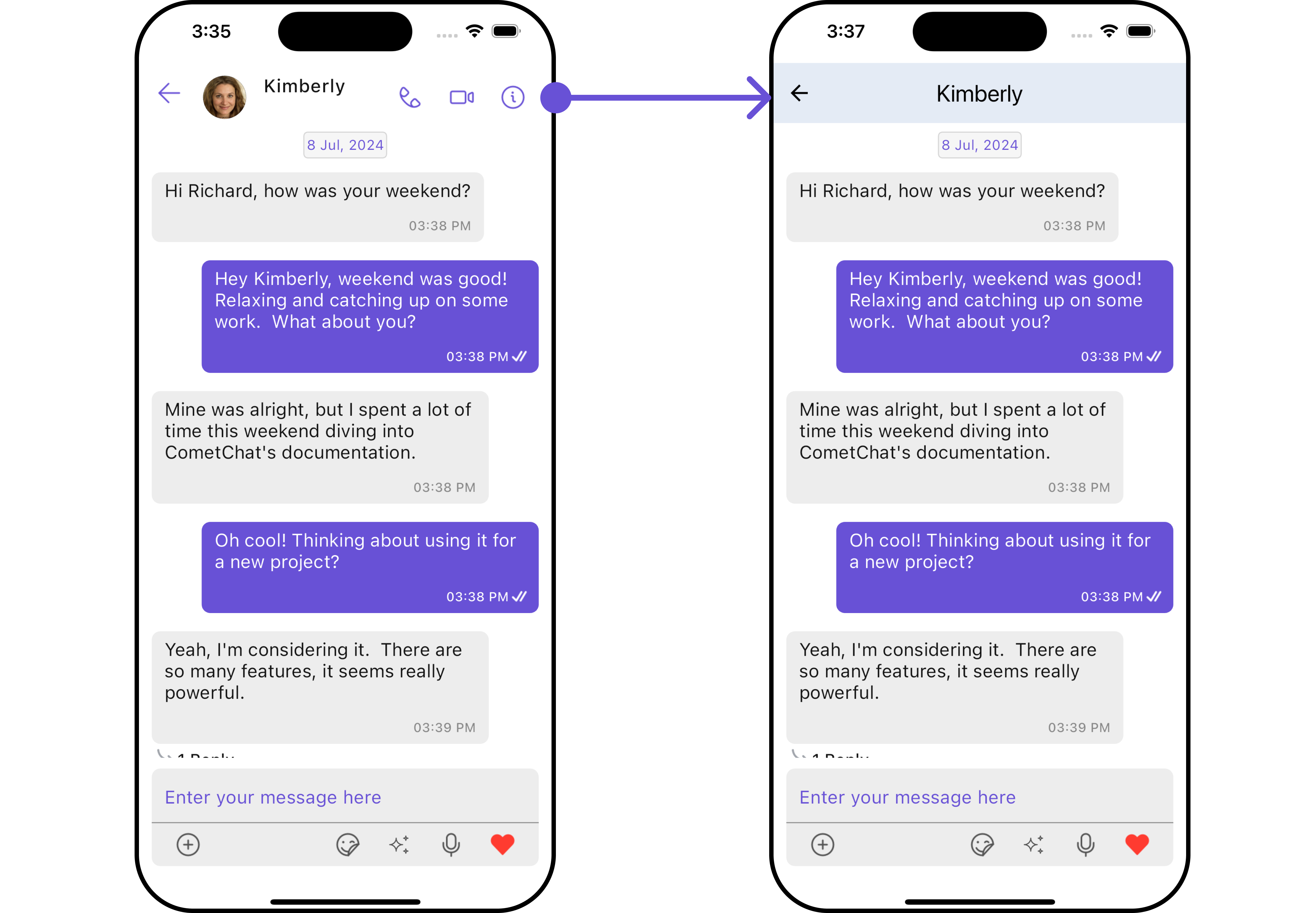
#### MessageHeaderView
You can set your custom message header widget using the `messageHeaderView` method. But keep in mind, by using this you will override the default message header functionality.
Here is the complete example for reference:
**Example**
```dart theme={null}
CometChatMessages(
user: user,
messageHeaderView: (user, group, context) {
return AppBar(
backgroundColor: Color(0xFFE4EBF5),
title: Text(user?.name ?? 'Default Title'),
leading: IconButton(
icon: Icon(Icons.arrow_back),
onPressed: () {
// TODO("Not yet implemented")
},
),
); // Custom AppBar
},
)
```
List of properties exposed by `CometChatMessages`
| Property | Description | Code |
| --------------------------------------------- | ------------------------------------------------------ | ----------------------------------------------- |
| **User** | User object for which the messages are to be shown | `user: User?` |
| **Group** | Group object for which the messages are to be shown | `group: Group?` |
| **Hide Message Composer** | Toggles visibility for message composer | `hideMessageComposer: bool?` |
| **Disable Typing** | If true, disables the typing indicator | `disableTyping: bool?` |
| **Custom Sound For Incoming Messages** | Custom sound path for incoming messages | `customSoundForIncomingMessages: String?` |
| **Custom Sound For Incoming Message Package** | Package name for sound incoming from different package | `customSoundForIncomingMessagePackage: String?` |
| **Custom Sound For Outgoing Messages** | Custom sound path for outgoing messages | `customSoundForOutgoingMessages: String?` |
| **Custom Sound For Outgoing Message Package** | Package name for sound outgoing from different package | `customSoundForOutgoingMessagePackage: String?` |
| **Hide Message Header** | Toggles visibility for message header | `hideMessageHeader: bool?` |
| **Disable Sound For Messages** | Disables sound for incoming and outgoing message | `disableSoundForMessages: bool?` |
| **Theme** | Custom theme for the messages screen | `theme: CometChatTheme?` |
| **Hide Details** | Toggles visibility for details icons | `hideDetails: bool?` |
***
### Advanced
For advanced-level customization, you can set custom widgets to the component. This lets you tailor each aspect of the widget to fit your exact needs and application aesthetics. You can create and define your widgets and then incorporate those into the component.
#### MessageHeaderView
You can set your custom message header widget using the `messageHeaderView` method. But keep in mind, by using this you will override the default message header functionality.
Here is the complete example for reference:
**Example**
```dart theme={null}
CometChatMessages(
user: user,
messageHeaderView: (user, group, context) {
return AppBar(
backgroundColor: Color(0xFFE4EBF5),
title: Text(user?.name ?? 'Default Title'),
leading: IconButton(
icon: Icon(Icons.arrow_back),
onPressed: () {
// TODO("Not yet implemented")
},
),
); // Custom AppBar
},
)
```
 ***
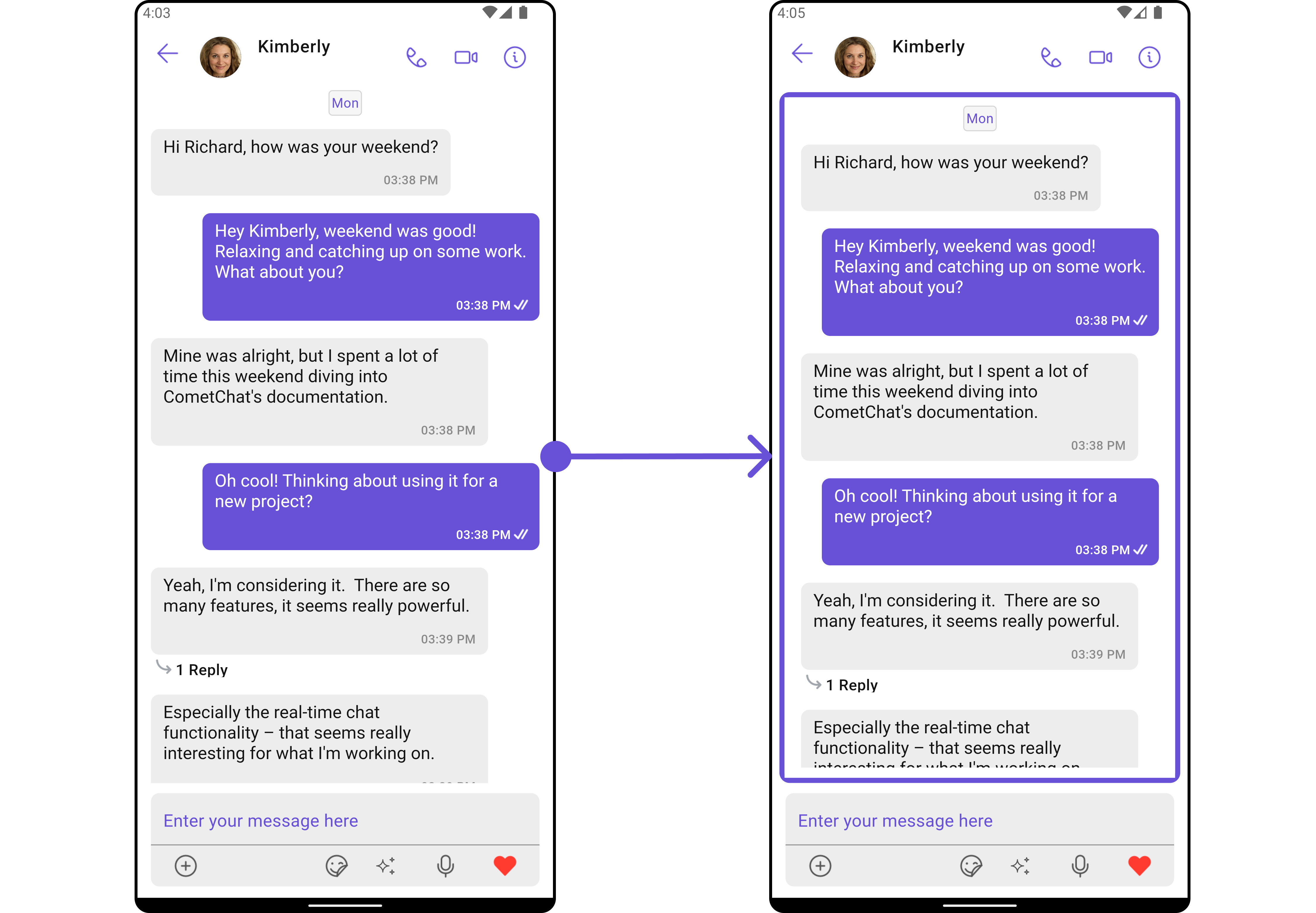
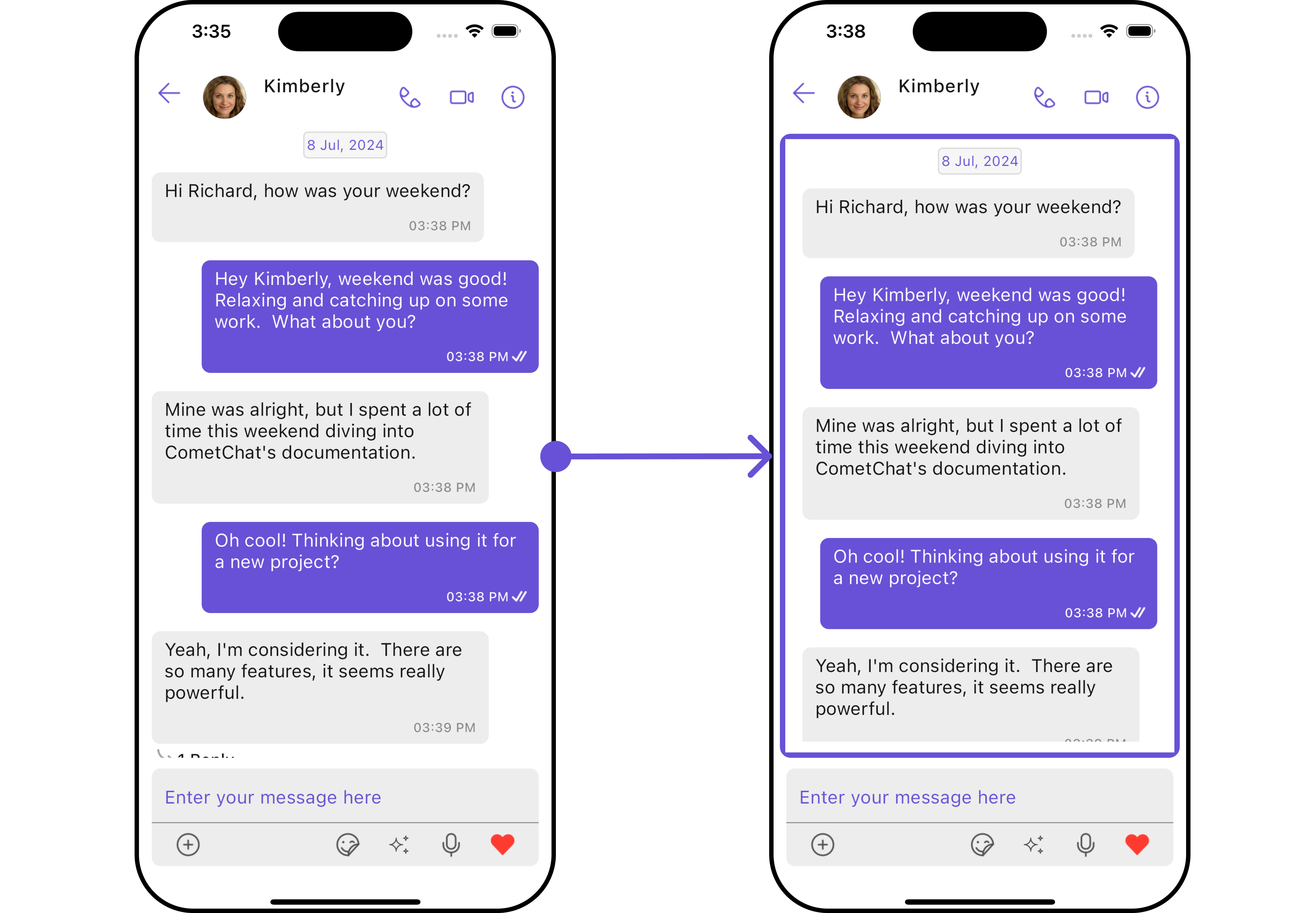
#### MessageListView
You can set your custom message list widget using the `messageListView` method. But keep in mind, by using this you will override the default message ListView functionality.
Here is the complete example for reference:
**Example**
```dart theme={null}
CometChatMessages(
user: user,
messageListView: (user, group, context) {
return Container(
margin: const EdgeInsets.all(10),
decoration: BoxDecoration(
color: Color(0xFFE4EBF5),
borderRadius: BorderRadius.circular(10),
border: Border.all(width: 5, color: Color(0xFF6851D6)),
),
child: Center(
child: CometChatMessageList(user: user,),
),
);
},
)
```
***
#### MessageListView
You can set your custom message list widget using the `messageListView` method. But keep in mind, by using this you will override the default message ListView functionality.
Here is the complete example for reference:
**Example**
```dart theme={null}
CometChatMessages(
user: user,
messageListView: (user, group, context) {
return Container(
margin: const EdgeInsets.all(10),
decoration: BoxDecoration(
color: Color(0xFFE4EBF5),
borderRadius: BorderRadius.circular(10),
border: Border.all(width: 5, color: Color(0xFF6851D6)),
),
child: Center(
child: CometChatMessageList(user: user,),
),
);
},
)
```
 ***
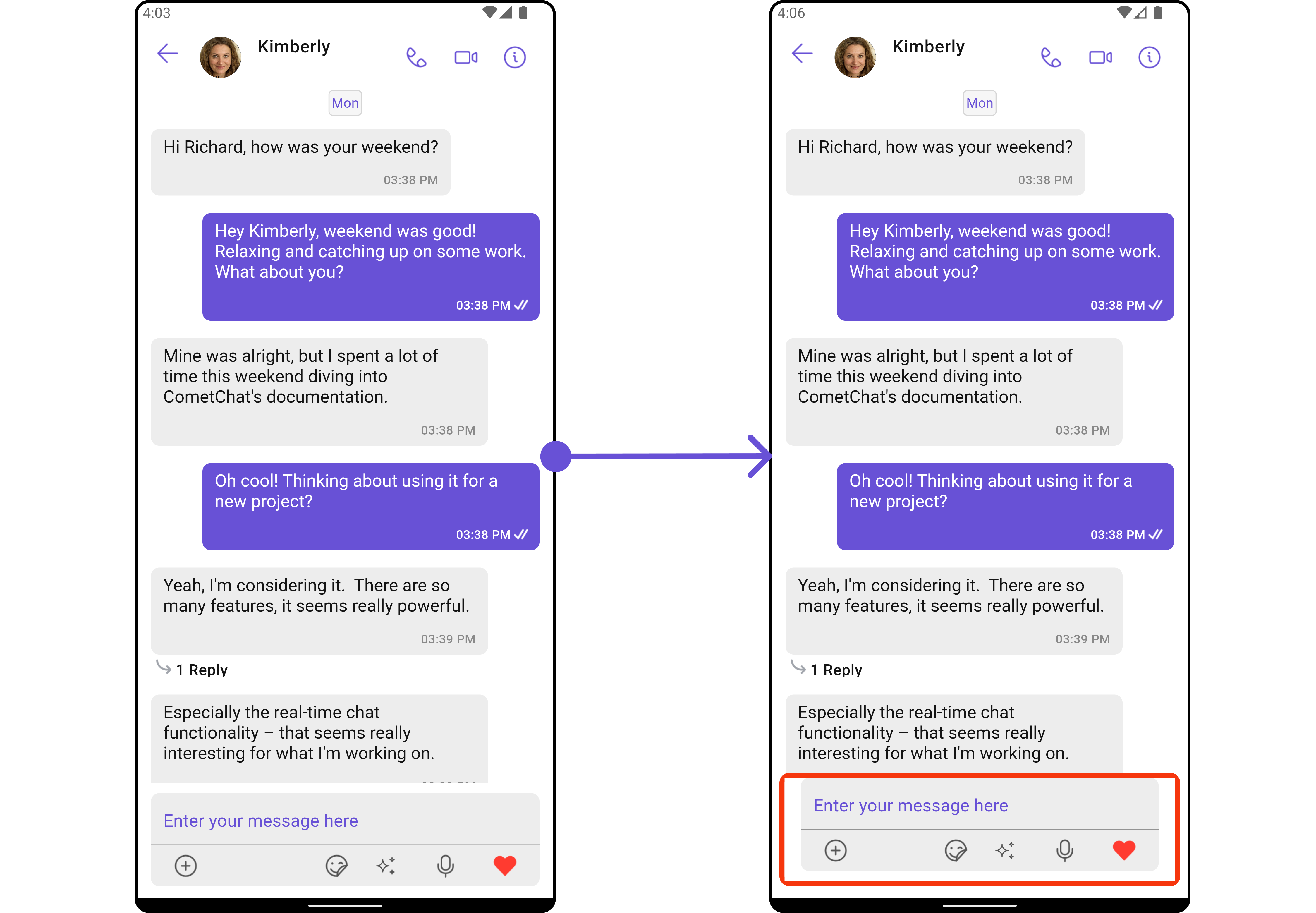
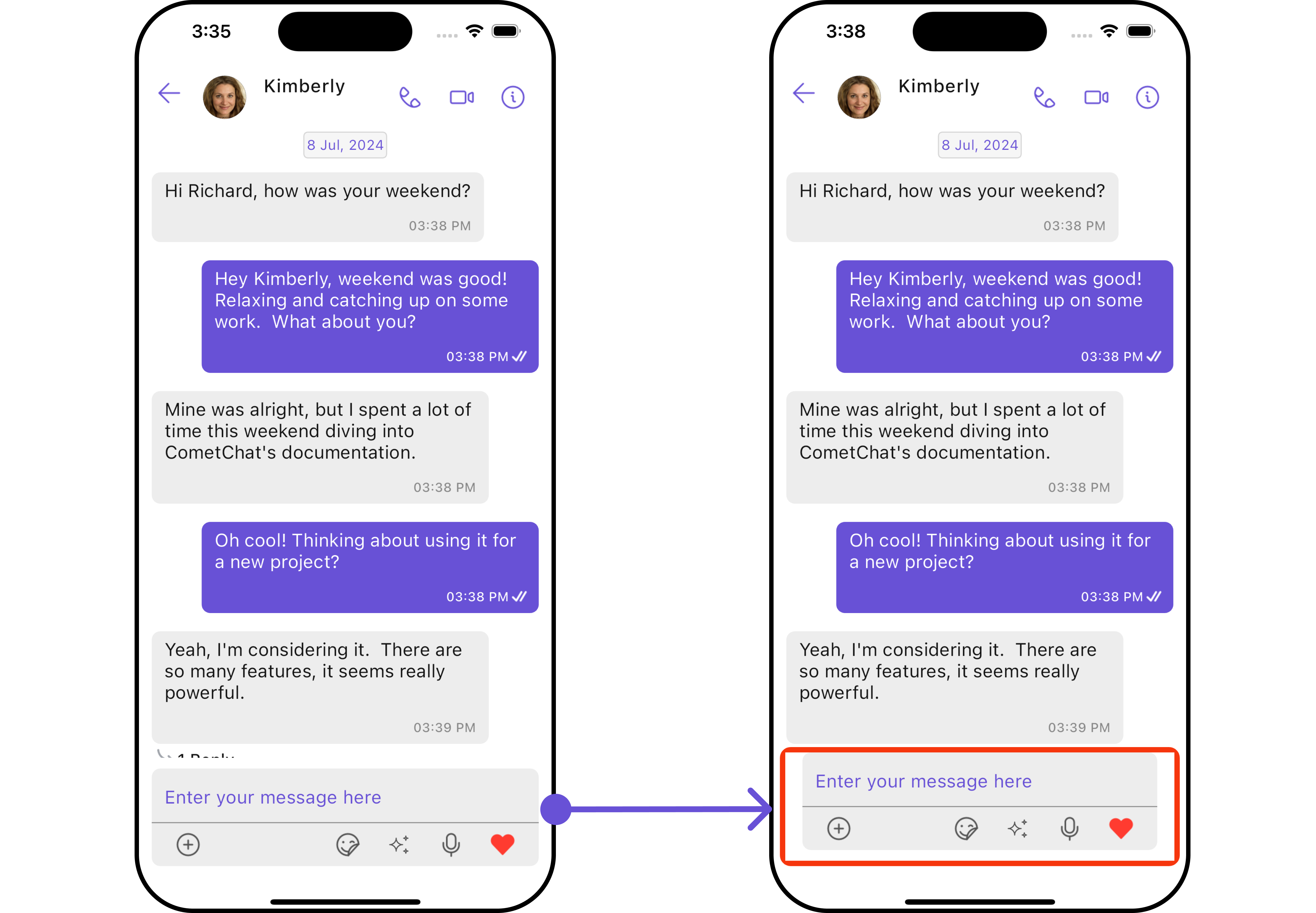
#### MessageComposerView
You can set your custom Message Composer widget using the `messageComposerView` method. But keep in mind, by using this you will override the default message composer functionality.
Here is the complete example for reference:
**Example**
```dart theme={null}
CometChatMessages(
user: user,
messageComposerView: (user, group, context) {
return Container(
margin: const EdgeInsets.all(10),
decoration: BoxDecoration(
color: Color(0xFFE4EBF5),
borderRadius: BorderRadius.circular(10),
border: Border.all(width: 5, color: Colors.red),
),
child: CometChatMessageComposer(user: user),
);
},
)
```
***
#### MessageComposerView
You can set your custom Message Composer widget using the `messageComposerView` method. But keep in mind, by using this you will override the default message composer functionality.
Here is the complete example for reference:
**Example**
```dart theme={null}
CometChatMessages(
user: user,
messageComposerView: (user, group, context) {
return Container(
margin: const EdgeInsets.all(10),
decoration: BoxDecoration(
color: Color(0xFFE4EBF5),
borderRadius: BorderRadius.circular(10),
border: Border.all(width: 5, color: Colors.red),
),
child: CometChatMessageComposer(user: user),
);
},
)
```
 ***
## Configuration
Configurations offer the ability to customize the properties of each individual widget within a Composite Widget.
The Messages Widget is a Composite Widget and it has a specific set of configuration for each of its widgets.
### MessageHeader
If you want to customize the properties of the [MessageHeader](/ui-kit/flutter/v4/message-header) Widget inside Messages Widget, you need use the `MessageHeaderConfiguration` object.
```dart theme={null}
CometChatMessages(
user: user,
messageHeaderConfiguration: MessageHeaderConfiguration(),
)
```
The `MessageHeaderConfiguration` provides access to all the [Action](/ui-kit/flutter/v4/message-header#style), [Filters](/ui-kit/flutter/v4/message-header#filters), [Styles](/ui-kit/flutter/v4/message-header#style), [Functionality](/ui-kit/flutter/v4/message-header#functionality), and [Advanced](/ui-kit/flutter/v4/message-header#advanced) properties of the [MessageHeader](/ui-kit/flutter/v4/message-header) component.
> Please note that the properties marked with the 🛑 symbol are not accessible within the Configuration Object.
**Example**
In this example, we will be adding a custom back button and styling a few properties of the Avatar widget of the [MessageHeader](/ui-kit/flutter/v4/message-header) widget using `MessageHeaderConfiguration`.
```dart theme={null}
CometChatMessages(
user: user,
messageHeaderConfiguration: MessageHeaderConfiguration(
avatarStyle: AvatarStyle(
border: Border.all(width: 5),
borderRadius: 20,
background: Colors.red
),
),
)
```
***
## Configuration
Configurations offer the ability to customize the properties of each individual widget within a Composite Widget.
The Messages Widget is a Composite Widget and it has a specific set of configuration for each of its widgets.
### MessageHeader
If you want to customize the properties of the [MessageHeader](/ui-kit/flutter/v4/message-header) Widget inside Messages Widget, you need use the `MessageHeaderConfiguration` object.
```dart theme={null}
CometChatMessages(
user: user,
messageHeaderConfiguration: MessageHeaderConfiguration(),
)
```
The `MessageHeaderConfiguration` provides access to all the [Action](/ui-kit/flutter/v4/message-header#style), [Filters](/ui-kit/flutter/v4/message-header#filters), [Styles](/ui-kit/flutter/v4/message-header#style), [Functionality](/ui-kit/flutter/v4/message-header#functionality), and [Advanced](/ui-kit/flutter/v4/message-header#advanced) properties of the [MessageHeader](/ui-kit/flutter/v4/message-header) component.
> Please note that the properties marked with the 🛑 symbol are not accessible within the Configuration Object.
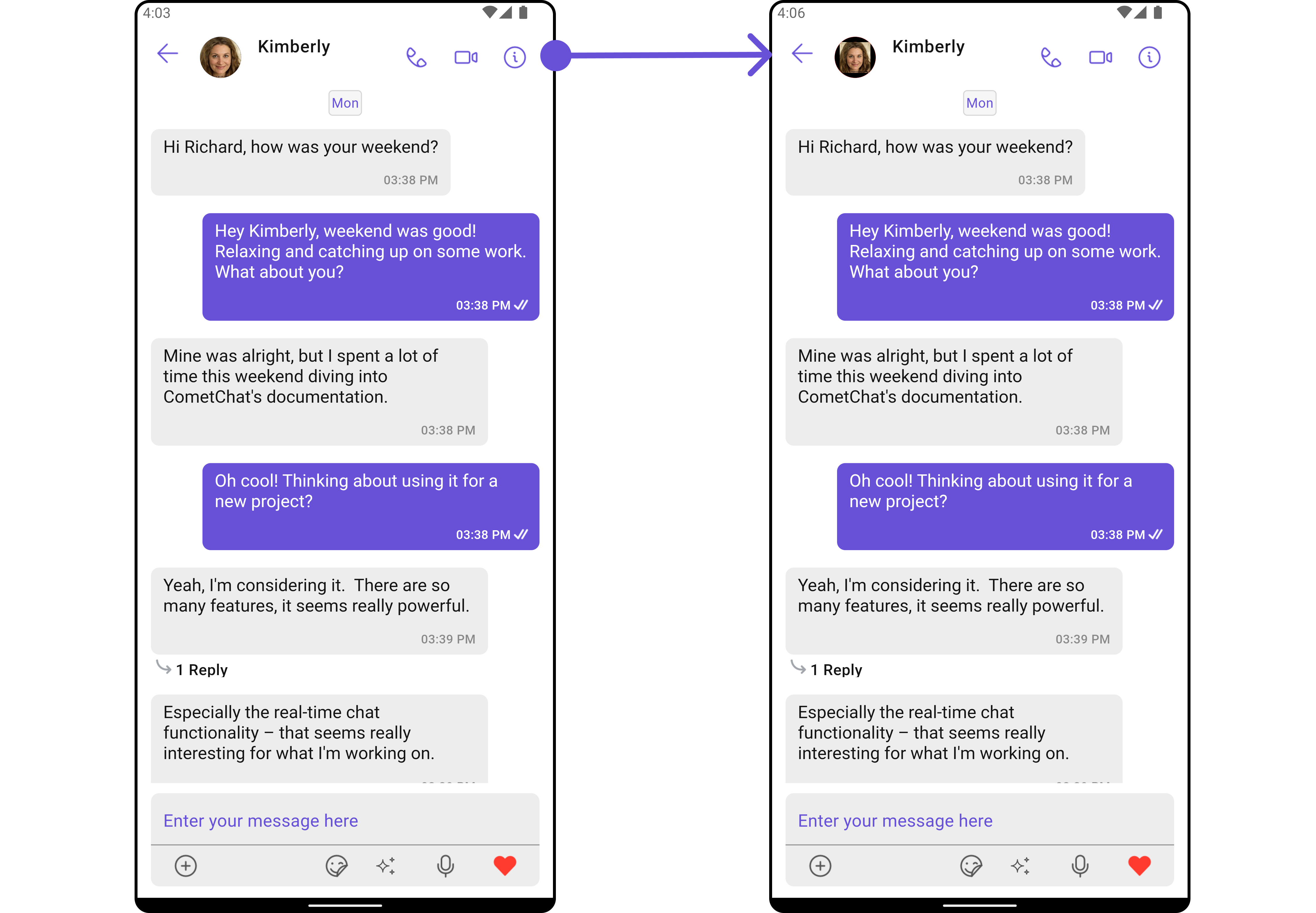
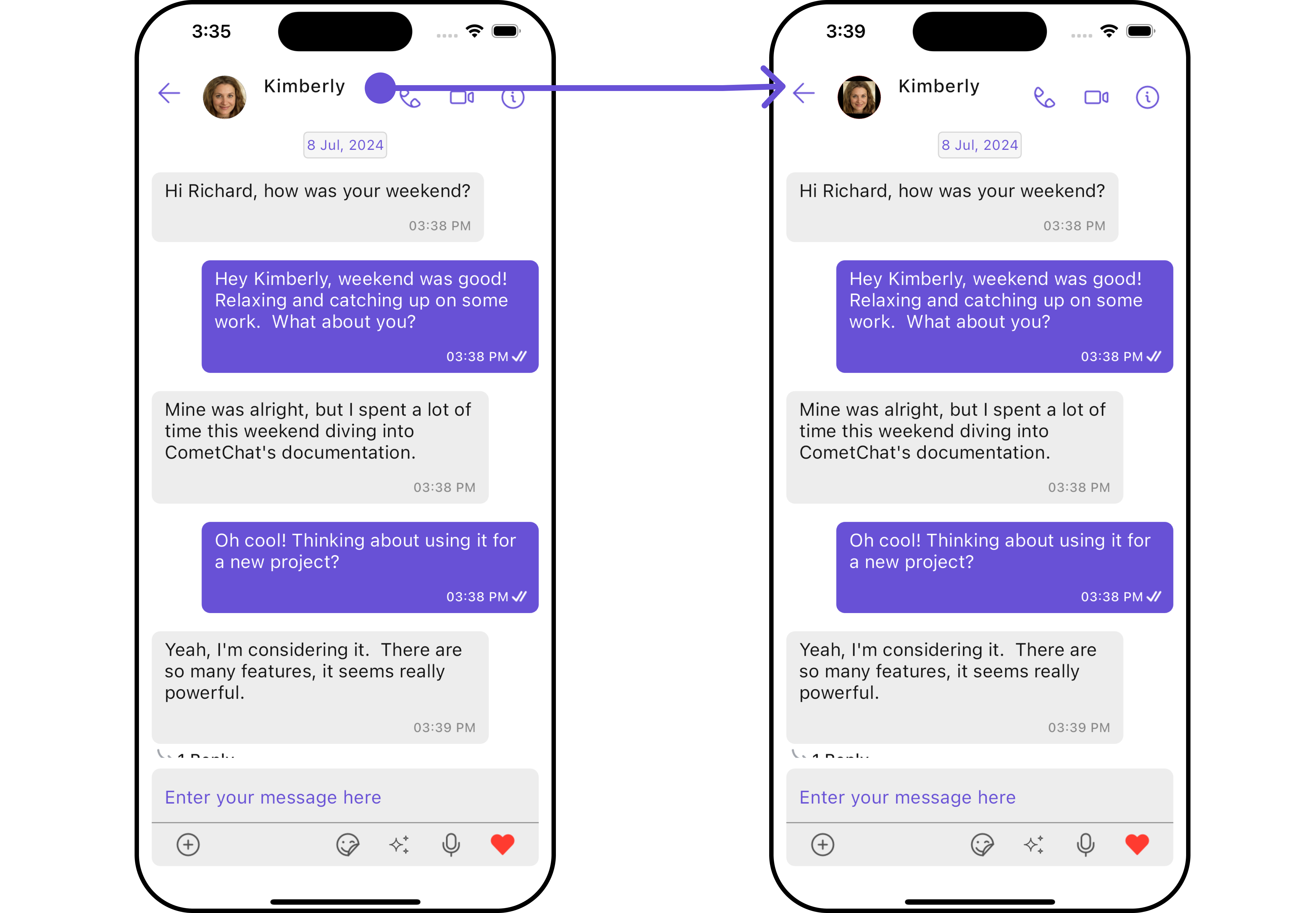
**Example**
In this example, we will be adding a custom back button and styling a few properties of the Avatar widget of the [MessageHeader](/ui-kit/flutter/v4/message-header) widget using `MessageHeaderConfiguration`.
```dart theme={null}
CometChatMessages(
user: user,
messageHeaderConfiguration: MessageHeaderConfiguration(
avatarStyle: AvatarStyle(
border: Border.all(width: 5),
borderRadius: 20,
background: Colors.red
),
),
)
```
 ***
### MessageList
If you want to customize the properties of the [MessageList](/ui-kit/flutter/v4/message-list) Widget inside Messages Widget, you need use the `MessageListConfiguration` object.
```dart theme={null}
CometChatMessages(
user: user,
messageListConfiguration: MessageListConfiguration(),
)
```
The `MessageListConfiguration` provides access to all the [Action](/ui-kit/flutter/v4/message-list#style), [Filters](/ui-kit/flutter/v4/message-list#filters), [Styles](/ui-kit/flutter/v4/message-list#style), [Functionality](/ui-kit/flutter/v4/message-list#functionality), and [Advanced](/ui-kit/flutter/v4/message-list#advanced) properties of the [MessageList](/ui-kit/flutter/v4/message-list) component.
> Please note that the properties marked with the 🛑 symbol are not accessible within the Configuration Object.
**Example**
In this example, we will be changing the list alignment and modifying the message bubble styles in the [MessageList](/ui-kit/flutter/v4/message-list) widget using `MessageListConfiguration`.
```dart theme={null}
CometChatMessages(
user: user,
messageListConfiguration: MessageListConfiguration(
alignment: ChatAlignment.leftAligned,
messageListStyle: MessageListStyle(
background: Color(0xFFE4EBF5),
border: Border.all(width: 1, color: Colors.red),
borderRadius: 10,
),
),
)
```
***
### MessageList
If you want to customize the properties of the [MessageList](/ui-kit/flutter/v4/message-list) Widget inside Messages Widget, you need use the `MessageListConfiguration` object.
```dart theme={null}
CometChatMessages(
user: user,
messageListConfiguration: MessageListConfiguration(),
)
```
The `MessageListConfiguration` provides access to all the [Action](/ui-kit/flutter/v4/message-list#style), [Filters](/ui-kit/flutter/v4/message-list#filters), [Styles](/ui-kit/flutter/v4/message-list#style), [Functionality](/ui-kit/flutter/v4/message-list#functionality), and [Advanced](/ui-kit/flutter/v4/message-list#advanced) properties of the [MessageList](/ui-kit/flutter/v4/message-list) component.
> Please note that the properties marked with the 🛑 symbol are not accessible within the Configuration Object.
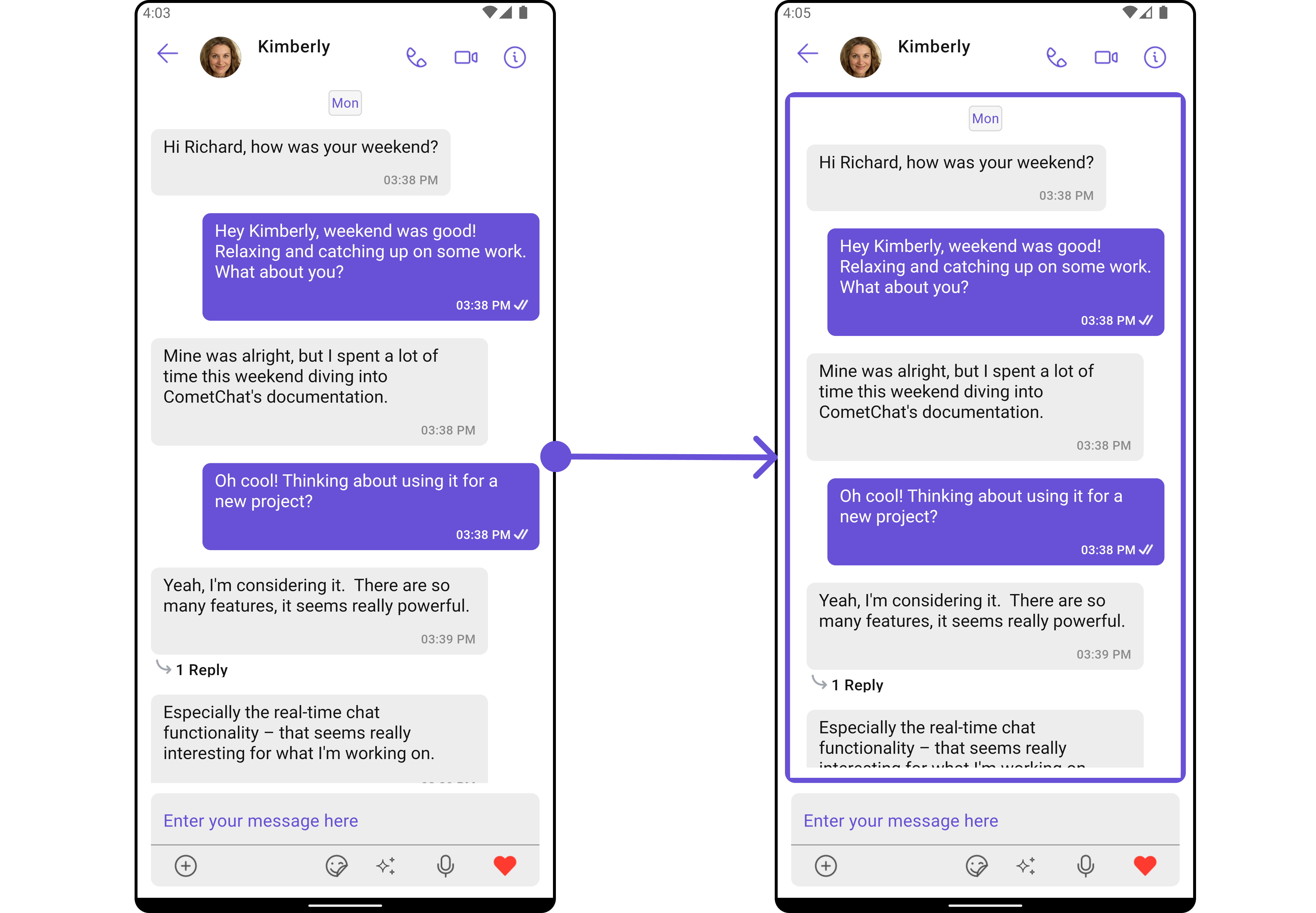
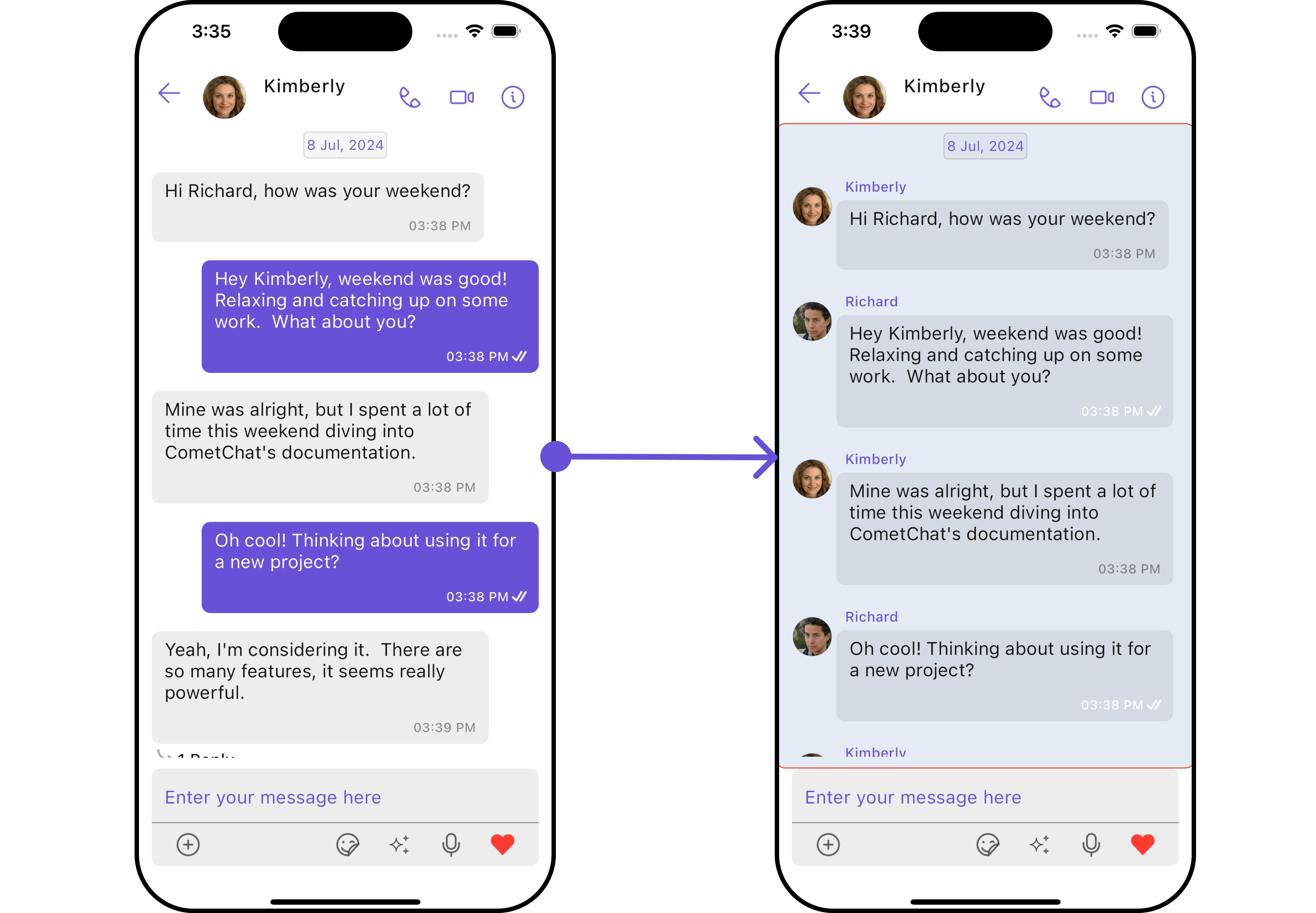
**Example**
In this example, we will be changing the list alignment and modifying the message bubble styles in the [MessageList](/ui-kit/flutter/v4/message-list) widget using `MessageListConfiguration`.
```dart theme={null}
CometChatMessages(
user: user,
messageListConfiguration: MessageListConfiguration(
alignment: ChatAlignment.leftAligned,
messageListStyle: MessageListStyle(
background: Color(0xFFE4EBF5),
border: Border.all(width: 1, color: Colors.red),
borderRadius: 10,
),
),
)
```
 ***
### MessageComposer
If you want to customize the properties of the [MessageComposer](/ui-kit/flutter/v4/message-composer) Widget inside Messages Widget, you need use the `MessageComposerConfiguration` object.
```dart theme={null}
CometChatMessages(
user: user,
messageComposerConfiguration: MessageComposerConfiguration(),
)
```
The `MessageComposerConfiguration` provides access to all the [Action](/ui-kit/flutter/v4/message-composer#style), [Filters](/ui-kit/flutter/v4/message-composer#filters), [Styles](/ui-kit/flutter/v4/message-composer#style), [Functionality](/ui-kit/flutter/v4/message-composer#functionality), and [Advanced](/ui-kit/flutter/v4/message-composer#advanced) properties of the [MessageComposer](/ui-kit/flutter/v4/message-composer) component.
> Please note that the properties marked with the 🛑 symbol are not accessible within the Configuration Object.
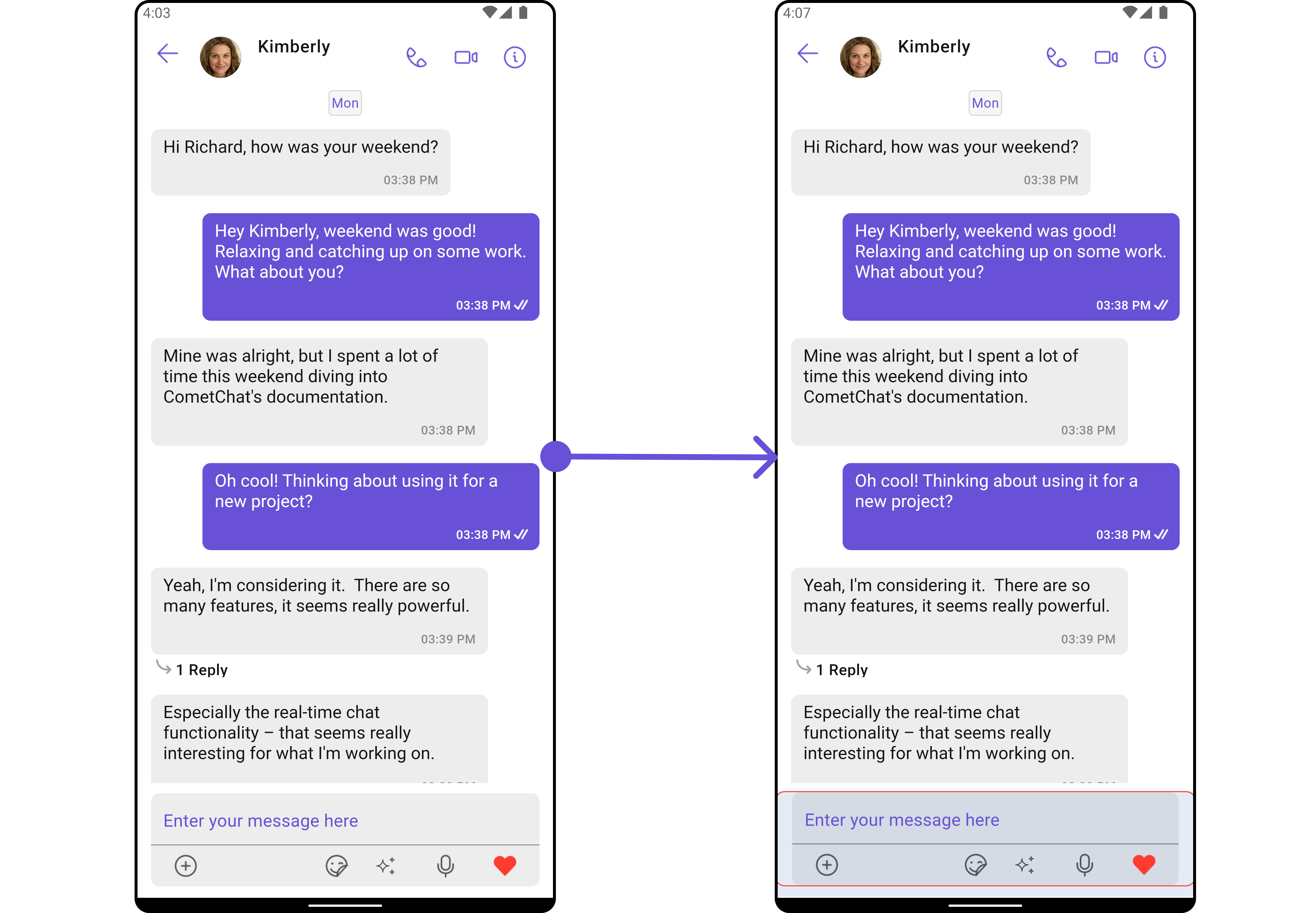
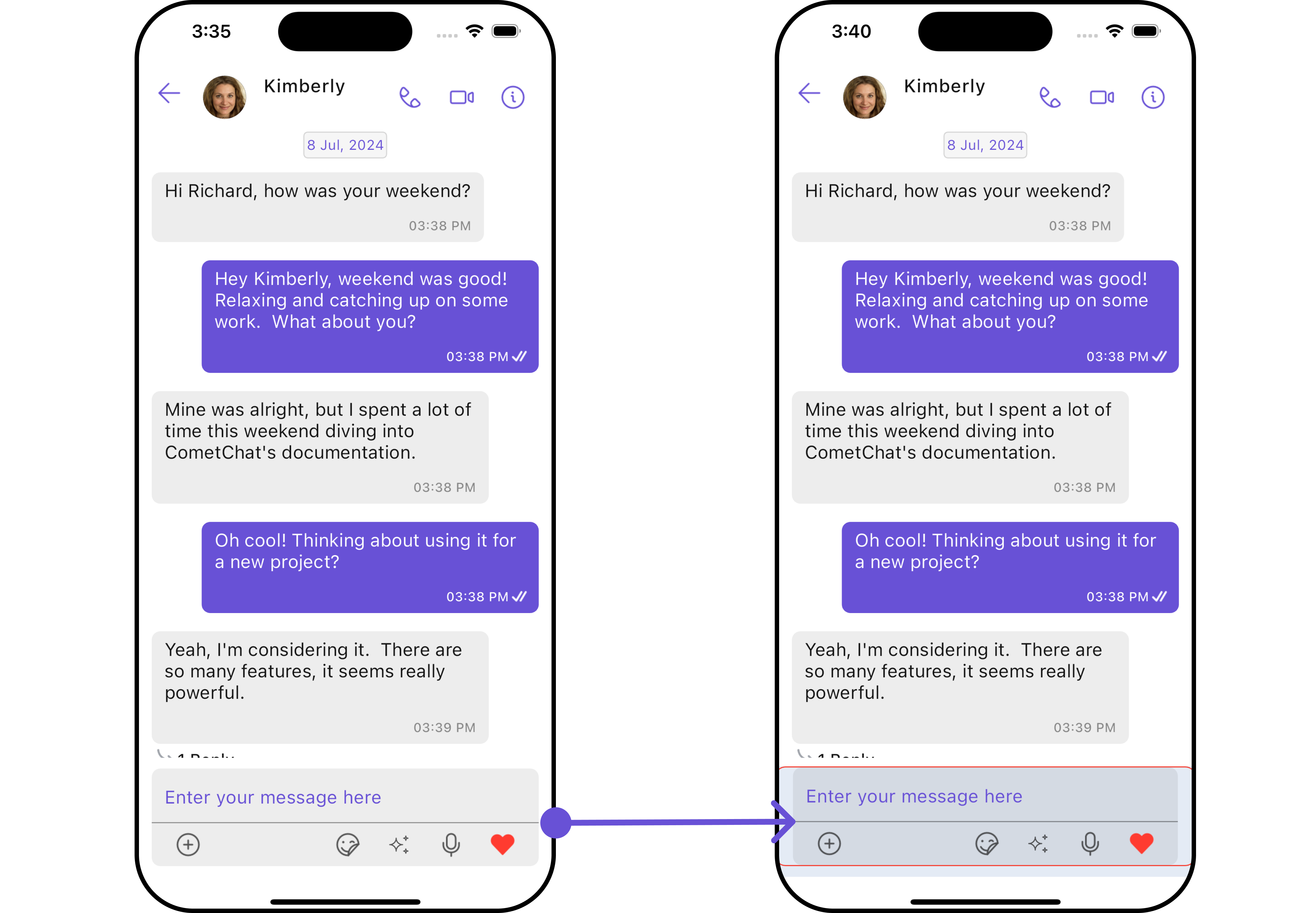
**Example**
In this example, we'll be adding a custom header widget and customizing some properties of the [MessageComposer](/ui-kit/flutter/v4/message-composer) widget using `MessageComposerConfiguration`.
```dart theme={null}
CometChatMessages(
user: user,
messageComposerConfiguration: MessageComposerConfiguration(
headerView: (context, user, group, id) {
return Container(
width: MediaQuery.of(context).size.width/1.2,
margin: const EdgeInsets.all(10),
decoration: BoxDecoration(
color: Color(0xFF6851D6),
borderRadius: BorderRadius.circular(10),
border: Border.all(width: 5, color: Color(0xFF6851D6)),
),
child: Center(child: Text("Your Custom Header View", style: TextStyle(color: Colors.white),)),
);
},
messageComposerStyle: MessageComposerStyle(
background: Color(0xFFE4EBF5),
border: Border.all(width: 1, color: Colors.red),
borderRadius: 10,
),
),
)
```
***
### MessageComposer
If you want to customize the properties of the [MessageComposer](/ui-kit/flutter/v4/message-composer) Widget inside Messages Widget, you need use the `MessageComposerConfiguration` object.
```dart theme={null}
CometChatMessages(
user: user,
messageComposerConfiguration: MessageComposerConfiguration(),
)
```
The `MessageComposerConfiguration` provides access to all the [Action](/ui-kit/flutter/v4/message-composer#style), [Filters](/ui-kit/flutter/v4/message-composer#filters), [Styles](/ui-kit/flutter/v4/message-composer#style), [Functionality](/ui-kit/flutter/v4/message-composer#functionality), and [Advanced](/ui-kit/flutter/v4/message-composer#advanced) properties of the [MessageComposer](/ui-kit/flutter/v4/message-composer) component.
> Please note that the properties marked with the 🛑 symbol are not accessible within the Configuration Object.
**Example**
In this example, we'll be adding a custom header widget and customizing some properties of the [MessageComposer](/ui-kit/flutter/v4/message-composer) widget using `MessageComposerConfiguration`.
```dart theme={null}
CometChatMessages(
user: user,
messageComposerConfiguration: MessageComposerConfiguration(
headerView: (context, user, group, id) {
return Container(
width: MediaQuery.of(context).size.width/1.2,
margin: const EdgeInsets.all(10),
decoration: BoxDecoration(
color: Color(0xFF6851D6),
borderRadius: BorderRadius.circular(10),
border: Border.all(width: 5, color: Color(0xFF6851D6)),
),
child: Center(child: Text("Your Custom Header View", style: TextStyle(color: Colors.white),)),
);
},
messageComposerStyle: MessageComposerStyle(
background: Color(0xFFE4EBF5),
border: Border.all(width: 1, color: Colors.red),
borderRadius: 10,
),
),
)
```
 ***
### ThreadedMessages
If you want to customize the properties of the [ThreadedMessages](/ui-kit/flutter/v4/threaded-messages) Widget inside Messages Widget, you need use the `ThreadedMessagesConfiguration` object.
```dart theme={null}
CometChatMessages(
user: user,
threadedMessagesConfiguration: ThreadedMessagesConfiguration()
)
```
The `ThreadedMessagesConfiguration` provides access to all the [Action](/ui-kit/flutter/v4/threaded-messages#style), [Filters](/ui-kit/flutter/v4/threaded-messages#filters), [Styles](/ui-kit/flutter/v4/threaded-messages#style), [Functionality](/ui-kit/flutter/v4/threaded-messages#functionality), and [Advanced](/ui-kit/flutter/v4/threaded-messages#advanced) properties of the [ThreadedMessages](/ui-kit/flutter/v4/threaded-messages) component.
> Please note that the properties marked with the 🛑 symbol are not accessible within the Configuration Object.
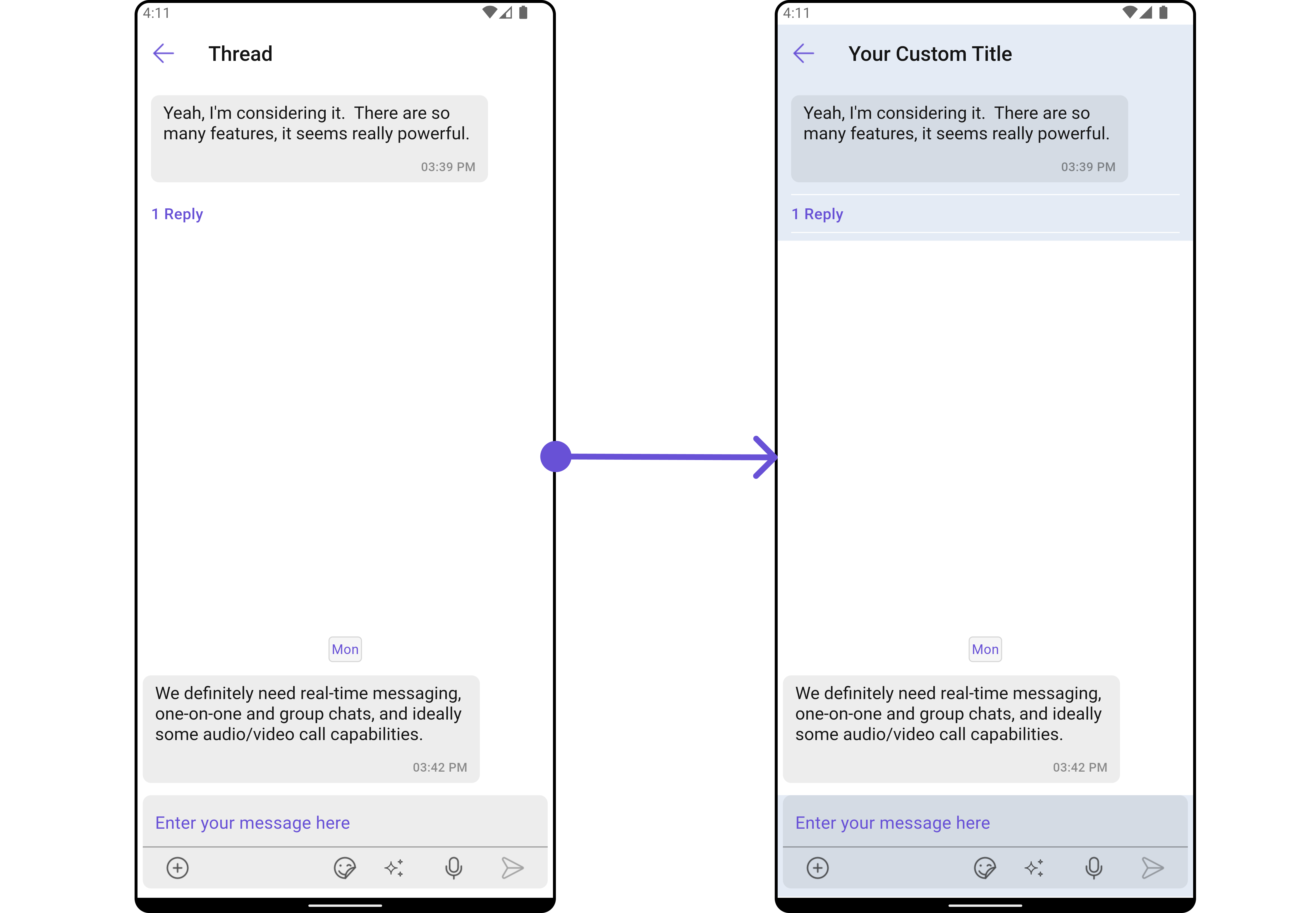
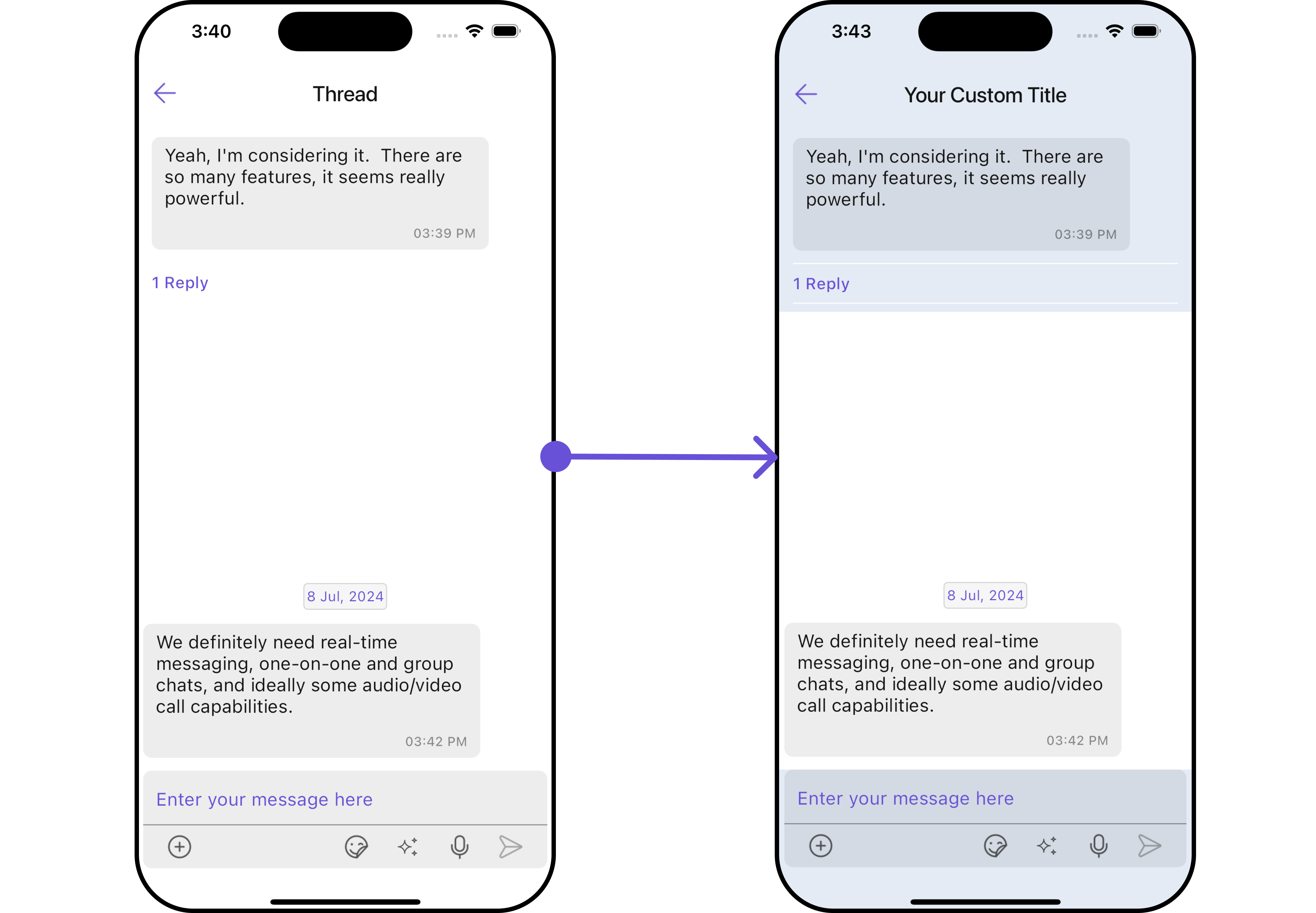
**Example**
In this example, we are adding a custom title to the Threaded Message widget and also adding custom properties to the [MessageList](#messagelist) using `MessageListConfiguration`. We then apply these changes to the [ThreadedMessages](/ui-kit/flutter/v4/threaded-messages) widget using `ThreadedMessagesConfiguration`.
```dart theme={null}
CometChatMessages(
user: user,
threadedMessagesConfiguration: ThreadedMessagesConfiguration(
title: "Your Custom Title",
threadedMessagesStyle: ThreadedMessageStyle(
background: Color(0xFFE4EBF5),
border: Border.all(width: 1, color: Colors.red),
borderRadius: 10,
)
)
)
```
***
### ThreadedMessages
If you want to customize the properties of the [ThreadedMessages](/ui-kit/flutter/v4/threaded-messages) Widget inside Messages Widget, you need use the `ThreadedMessagesConfiguration` object.
```dart theme={null}
CometChatMessages(
user: user,
threadedMessagesConfiguration: ThreadedMessagesConfiguration()
)
```
The `ThreadedMessagesConfiguration` provides access to all the [Action](/ui-kit/flutter/v4/threaded-messages#style), [Filters](/ui-kit/flutter/v4/threaded-messages#filters), [Styles](/ui-kit/flutter/v4/threaded-messages#style), [Functionality](/ui-kit/flutter/v4/threaded-messages#functionality), and [Advanced](/ui-kit/flutter/v4/threaded-messages#advanced) properties of the [ThreadedMessages](/ui-kit/flutter/v4/threaded-messages) component.
> Please note that the properties marked with the 🛑 symbol are not accessible within the Configuration Object.
**Example**
In this example, we are adding a custom title to the Threaded Message widget and also adding custom properties to the [MessageList](#messagelist) using `MessageListConfiguration`. We then apply these changes to the [ThreadedMessages](/ui-kit/flutter/v4/threaded-messages) widget using `ThreadedMessagesConfiguration`.
```dart theme={null}
CometChatMessages(
user: user,
threadedMessagesConfiguration: ThreadedMessagesConfiguration(
title: "Your Custom Title",
threadedMessagesStyle: ThreadedMessageStyle(
background: Color(0xFFE4EBF5),
border: Border.all(width: 1, color: Colors.red),
borderRadius: 10,
)
)
)
```
 ***
### Details
If you want to customize the properties of the Details Widget inside Messages Widget, you need use the `DetailsConfiguration` object.
```dart theme={null}
CometChatMessages(
user: user,
detailsConfiguration: DetailsConfiguration()
)
```
The `DetailsConfiguration` provides access to all the [Action](/ui-kit/flutter/v4/message-composer#style), [Filters](/ui-kit/flutter/v4/message-composer#filters), [Styles](/ui-kit/flutter/v4/message-composer#style), [Functionality](/ui-kit/flutter/v4/message-composer#functionality), and [Advanced](/ui-kit/flutter/v4/message-composer#advanced) properties of the [MessageComposer](/ui-kit/flutter/v4/message-composer) component.
> Please note that the properties marked with the 🛑 symbol are not accessible within the Configuration Object.
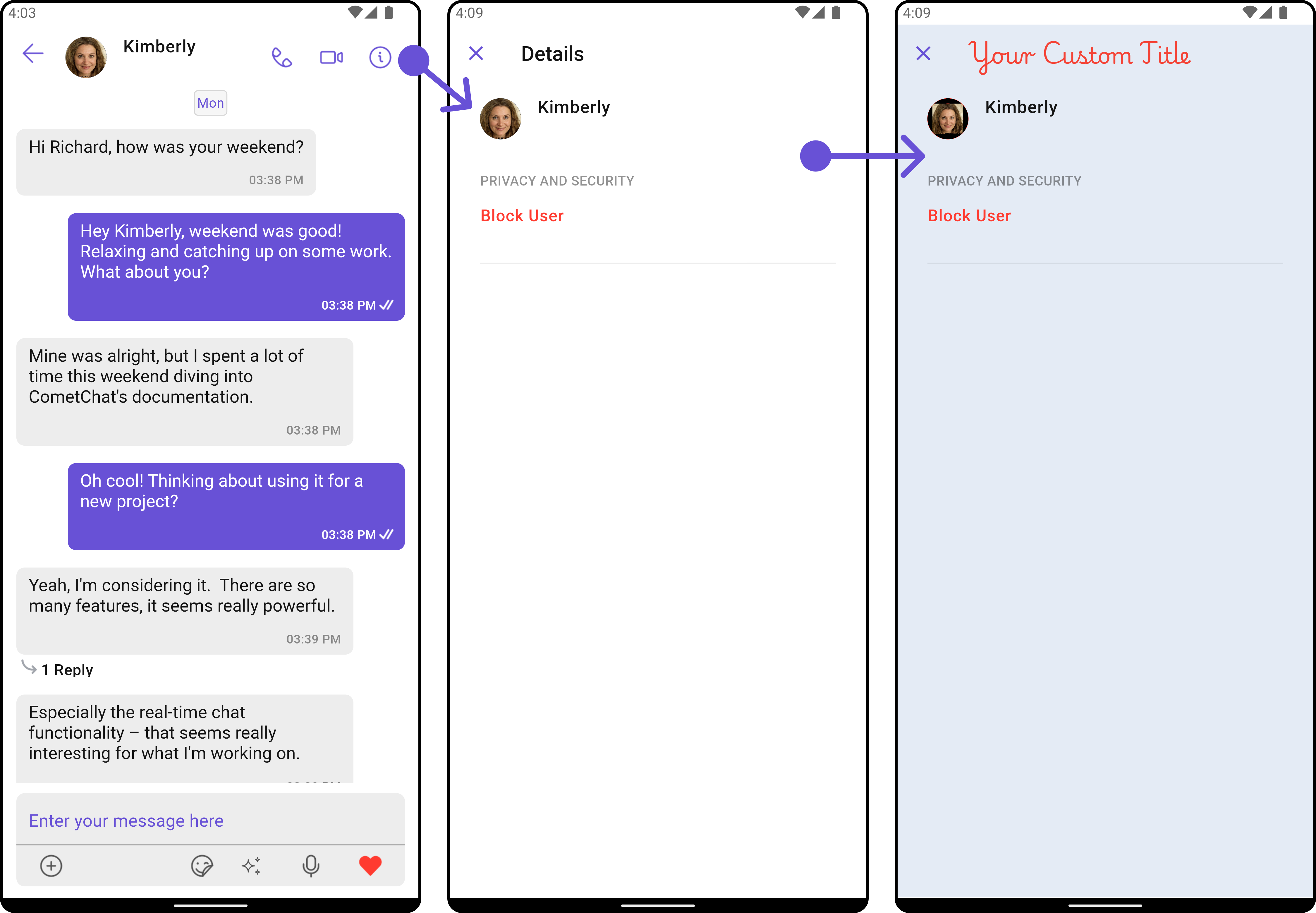
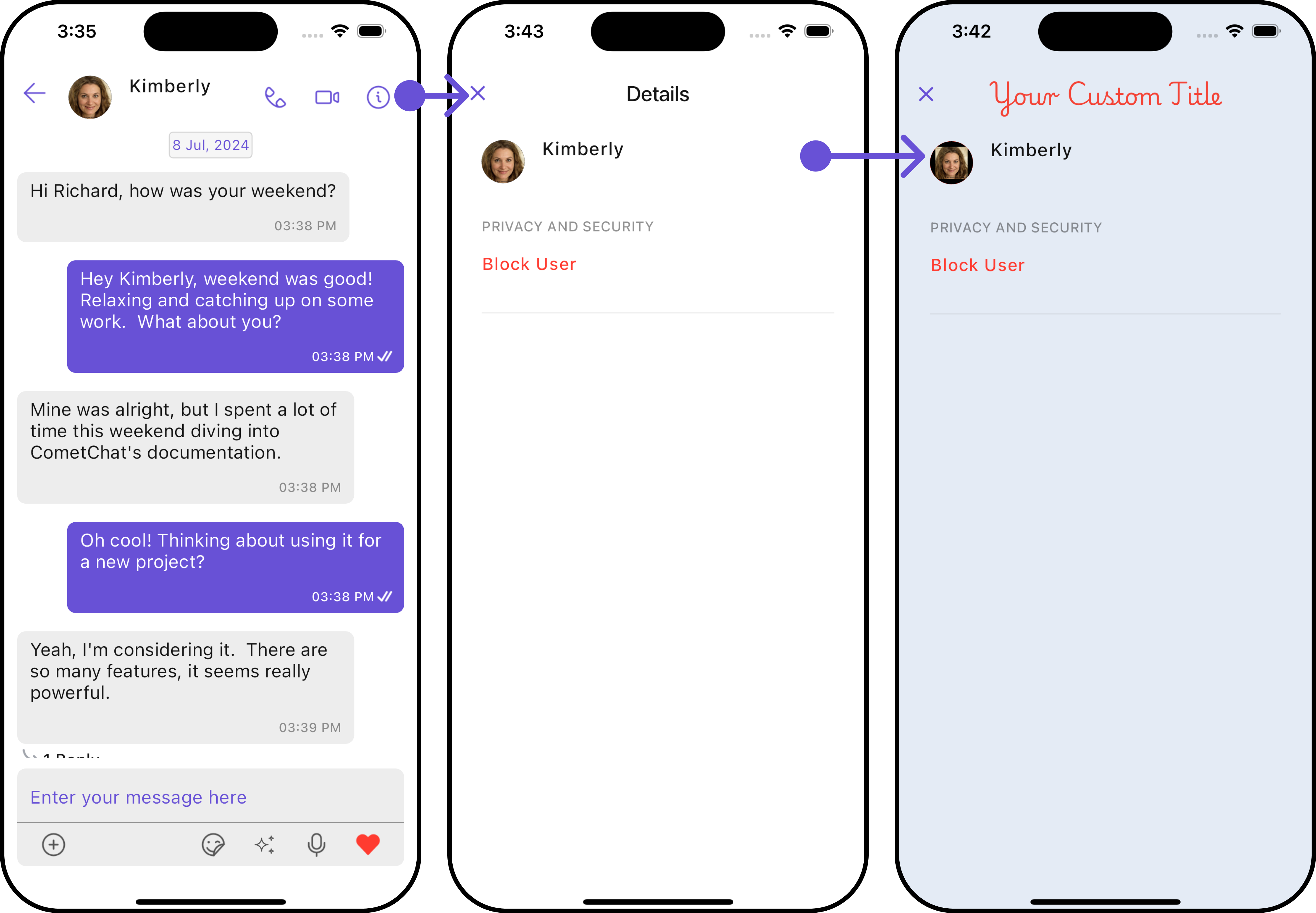
**Example**
In this example, we'll be customizing some properties of the [MessageComposer](/ui-kit/flutter/v4/message-composer) widget using `DetailsConfiguration`.
```dart theme={null}
CometChatMessages(
user: user,
detailsConfiguration: DetailsConfiguration(
title: "Your Custom Title",
avatarStyle: AvatarStyle(
border: Border.all(width: 5),
borderRadius: 20,
background: Colors.red
),
detailsStyle: DetailsStyle(
background: Color(0xFFE4EBF5),
border: Border.all(width: 1, color: Colors.red),
titleStyle: TextStyle(color: Colors.red, fontFamily: "PlaywritePL"),
)
)
)
```
***
### Details
If you want to customize the properties of the Details Widget inside Messages Widget, you need use the `DetailsConfiguration` object.
```dart theme={null}
CometChatMessages(
user: user,
detailsConfiguration: DetailsConfiguration()
)
```
The `DetailsConfiguration` provides access to all the [Action](/ui-kit/flutter/v4/message-composer#style), [Filters](/ui-kit/flutter/v4/message-composer#filters), [Styles](/ui-kit/flutter/v4/message-composer#style), [Functionality](/ui-kit/flutter/v4/message-composer#functionality), and [Advanced](/ui-kit/flutter/v4/message-composer#advanced) properties of the [MessageComposer](/ui-kit/flutter/v4/message-composer) component.
> Please note that the properties marked with the 🛑 symbol are not accessible within the Configuration Object.
**Example**
In this example, we'll be customizing some properties of the [MessageComposer](/ui-kit/flutter/v4/message-composer) widget using `DetailsConfiguration`.
```dart theme={null}
CometChatMessages(
user: user,
detailsConfiguration: DetailsConfiguration(
title: "Your Custom Title",
avatarStyle: AvatarStyle(
border: Border.all(width: 5),
borderRadius: 20,
background: Colors.red
),
detailsStyle: DetailsStyle(
background: Color(0xFFE4EBF5),
border: Border.all(width: 1, color: Colors.red),
titleStyle: TextStyle(color: Colors.red, fontFamily: "PlaywritePL"),
)
)
)
```
 ***
***