> ## Documentation Index
> Fetch the complete documentation index at: https://cometchat-22654f5b-docs-audit-content-webhooks.mintlify.site/llms.txt
> Use this file to discover all available pages before exploring further.
# Call Logs
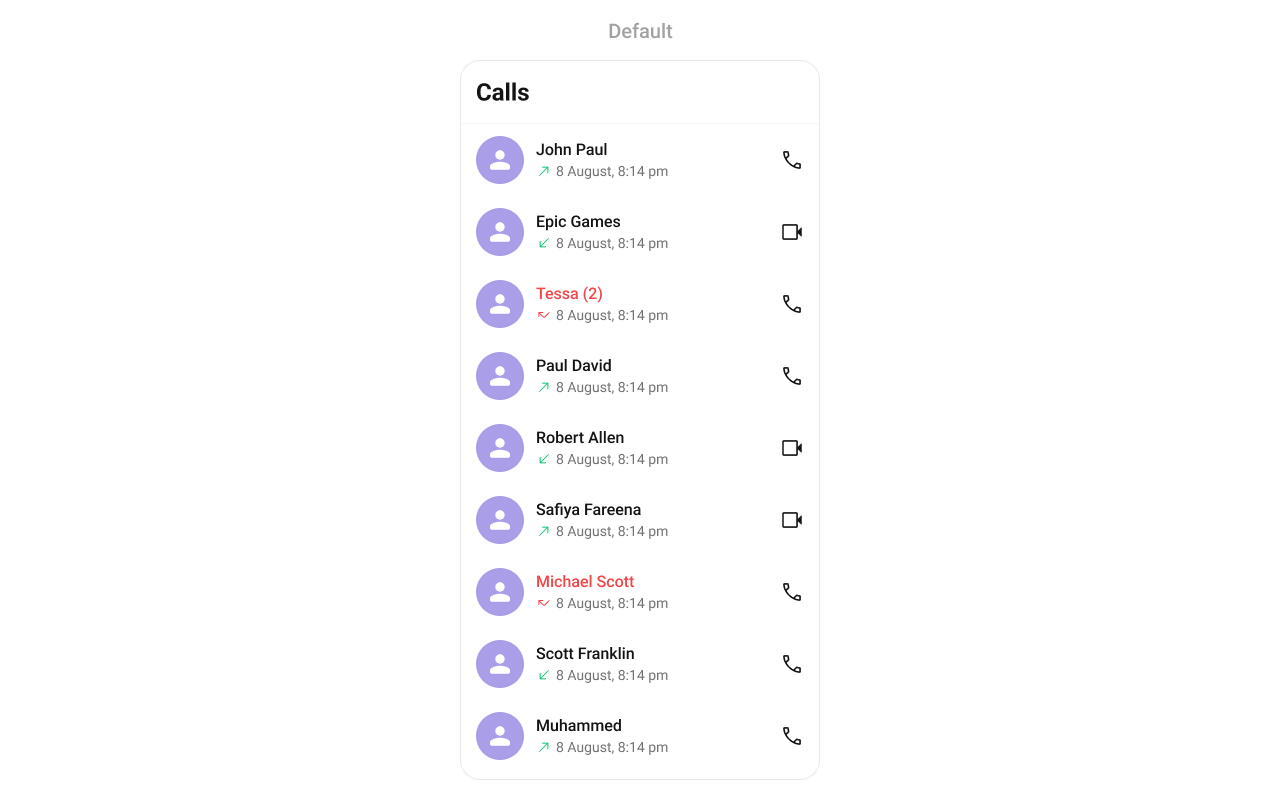
> Scrollable list of call logs for the logged-in user with caller names, avatars, call status, and timestamps.
`CometChatCallLogs` renders a scrollable list of call logs for the logged-in user with caller names, avatars, call status indicators, and timestamps.
 ***
## Where It Fits
`CometChatCallLogs` is a list component. It renders the user's call history and emits the selected `CallLog` via `onItemClick`. Use it as a standalone call history screen or as a tab in a tabbed layout alongside conversations and contacts.
```xml activity_call_logs.xml lines theme={null}
```
```kotlin lines theme={null}
val callLogs = findViewById(R.id.call_logs)
callLogs.setOnItemClick { callLog ->
// Navigate to call detail or initiate call
}
```
```kotlin lines theme={null}
CometChatCallLogs(
modifier = Modifier.fillMaxSize(),
onItemClick = { callLog ->
// Navigate to call detail or initiate call
}
)
```
***
## Quick Start
Add to your layout XML:
```xml lines theme={null}
```
Or programmatically:
```kotlin lines theme={null}
override fun onCreate(savedInstanceState: Bundle?) {
super.onCreate(savedInstanceState)
setContentView(CometChatCallLogs(this))
}
```
```kotlin lines theme={null}
@Composable
fun CallLogsScreen() {
CometChatCallLogs(
modifier = Modifier.fillMaxSize()
)
}
```
Prerequisites: CometChat SDK initialized with `CometChatUIKit.init()`, a user logged in, the UI Kit dependency added, and the CometChat Calls SDK configured.
Or in a Fragment:
```kotlin lines theme={null}
override fun onCreateView(inflater: LayoutInflater, container: ViewGroup?, savedInstanceState: Bundle?): View {
return CometChatCallLogs(requireContext())
}
```
```kotlin lines theme={null}
override fun onCreateView(inflater: LayoutInflater, container: ViewGroup?, savedInstanceState: Bundle?): View {
return ComposeView(requireContext()).apply {
setContent { CometChatCallLogs() }
}
}
```
***
## Filtering Call Logs
Pass a `CallLogRequest.CallLogRequestBuilder` to control what loads:
```kotlin lines theme={null}
callLogs.setCallLogRequestBuilder(
CallLogRequest.CallLogRequestBuilder()
.setLimit(20)
.setCallCategory(CometChatConstants.CALL_CATEGORY_CALL)
)
```
```kotlin lines theme={null}
CometChatCallLogs(
callLogRequestBuilder = CallLogRequest.CallLogRequestBuilder()
.setLimit(20)
.setCallCategory(CometChatConstants.CALL_CATEGORY_CALL)
)
```
### Filter Recipes
| Recipe | Builder method |
| ---------------- | --------------------------------------------------------- |
| Limit per page | `.setLimit(10)` |
| Audio calls only | `.setCallType(CometChatConstants.CALL_TYPE_AUDIO)` |
| Video calls only | `.setCallType(CometChatConstants.CALL_TYPE_VIDEO)` |
| Call category | `.setCallCategory(CometChatConstants.CALL_CATEGORY_CALL)` |
Pass the builder object, not the result of `.build()`. The component calls `.build()` internally. Default page size is 30 with infinite scroll.
***
## Actions and Events
### Callback Methods
#### `onItemClick`
Fires when a call log row is tapped. Primary navigation hook.
```kotlin lines theme={null}
callLogs.setOnItemClick { callLog ->
// Navigate to call detail
}
```
```kotlin lines theme={null}
CometChatCallLogs(
onItemClick = { callLog ->
// Navigate to call detail
}
)
```
> Replaces the default item-click behavior. Your custom lambda executes instead of the built-in navigation.
#### `onItemLongClick`
Fires when a call log row is long-pressed.
```kotlin lines theme={null}
callLogs.setOnItemLongClick { callLog ->
// Show context menu
}
```
```kotlin lines theme={null}
CometChatCallLogs(
onItemLongClick = { callLog ->
// Show context menu
}
)
```
#### `onBackPress`
Fires when the user presses the back button in the toolbar.
```kotlin lines theme={null}
callLogs.setOnBackPress {
finish()
}
```
```kotlin lines theme={null}
CometChatCallLogs(
onBackPress = { /* navigate back */ }
)
```
#### `onError`
Fires on internal errors (network failure, auth issue, SDK exception).
```kotlin lines theme={null}
callLogs.setOnError { exception ->
Log.e("CallLogs", "Error: ${exception.message}")
}
```
```kotlin lines theme={null}
CometChatCallLogs(
onError = { exception ->
Log.e("CallLogs", "Error: ${exception.message}")
}
)
```
#### `onLoad`
Fires when the list is successfully fetched and loaded.
```kotlin lines theme={null}
callLogs.setOnLoad { callLogList ->
Log.d("CallLogs", "Loaded ${callLogList.size}")
}
```
```kotlin lines theme={null}
CometChatCallLogs(
onLoad = { callLogList ->
Log.d("CallLogs", "Loaded ${callLogList.size}")
}
)
```
#### `onEmpty`
Fires when the list is empty after loading.
```kotlin lines theme={null}
callLogs.setOnEmpty {
Log.d("CallLogs", "No call logs")
}
```
```kotlin lines theme={null}
CometChatCallLogs(
onEmpty = { /* no call logs */ }
)
```
***
## Functionality
| Method (Kotlin XML) | Compose Parameter | Description |
| ------------------------------------- | ------------------------ | ---------------------- |
| `setBackIconVisibility(View.VISIBLE)` | `hideBackIcon = false` | Toggle back button |
| `setToolbarVisibility(View.GONE)` | `hideToolbar = true` | Toggle toolbar |
| `setSeparatorVisibility(View.GONE)` | `hideSeparator = true` | Toggle list separators |
| `setTitle("Call History")` | `title = "Call History"` | Custom toolbar title |
***
## Custom View Slots
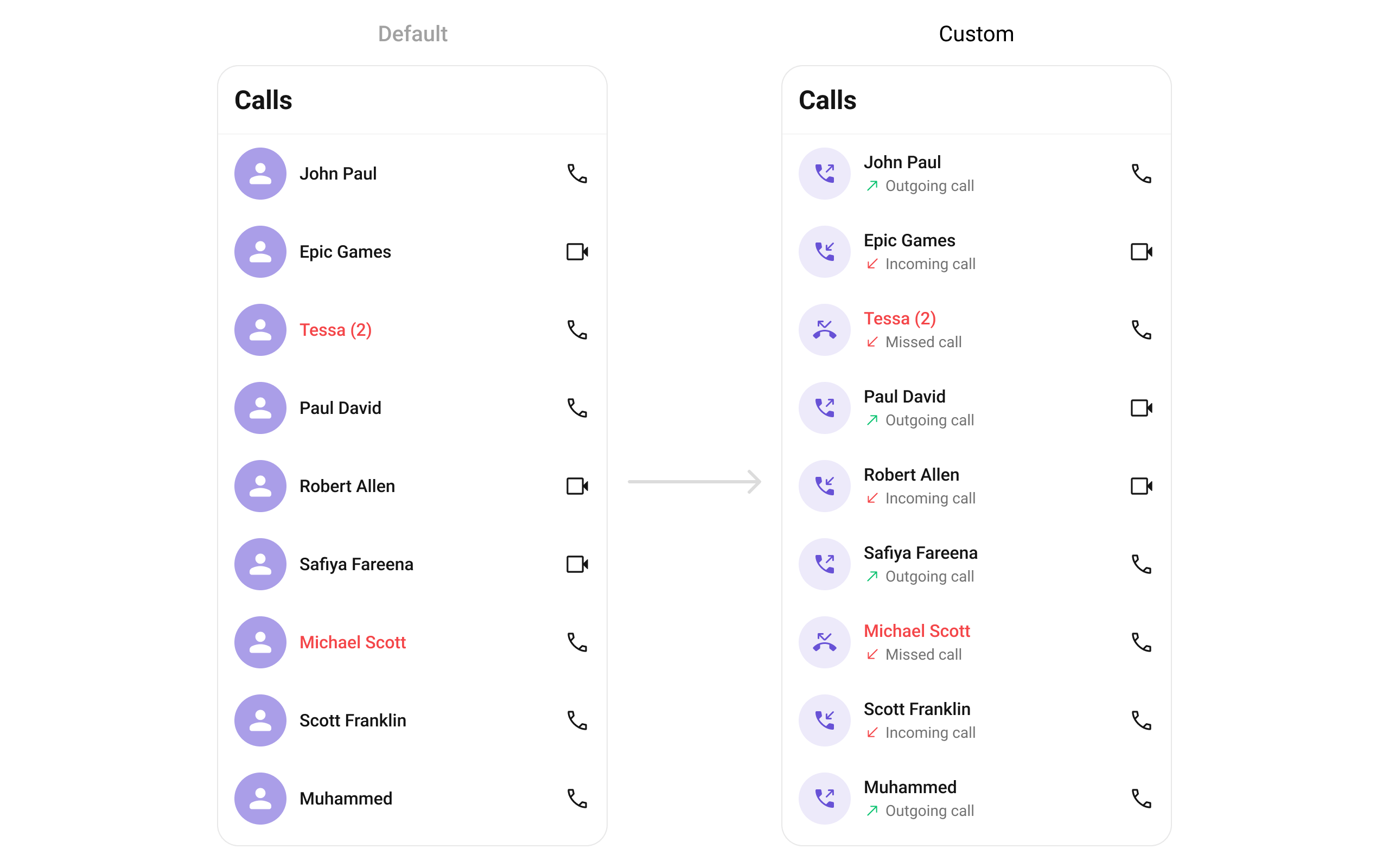
### Leading View
Replace the avatar / left section.
***
## Where It Fits
`CometChatCallLogs` is a list component. It renders the user's call history and emits the selected `CallLog` via `onItemClick`. Use it as a standalone call history screen or as a tab in a tabbed layout alongside conversations and contacts.
```xml activity_call_logs.xml lines theme={null}
```
```kotlin lines theme={null}
val callLogs = findViewById(R.id.call_logs)
callLogs.setOnItemClick { callLog ->
// Navigate to call detail or initiate call
}
```
```kotlin lines theme={null}
CometChatCallLogs(
modifier = Modifier.fillMaxSize(),
onItemClick = { callLog ->
// Navigate to call detail or initiate call
}
)
```
***
## Quick Start
Add to your layout XML:
```xml lines theme={null}
```
Or programmatically:
```kotlin lines theme={null}
override fun onCreate(savedInstanceState: Bundle?) {
super.onCreate(savedInstanceState)
setContentView(CometChatCallLogs(this))
}
```
```kotlin lines theme={null}
@Composable
fun CallLogsScreen() {
CometChatCallLogs(
modifier = Modifier.fillMaxSize()
)
}
```
Prerequisites: CometChat SDK initialized with `CometChatUIKit.init()`, a user logged in, the UI Kit dependency added, and the CometChat Calls SDK configured.
Or in a Fragment:
```kotlin lines theme={null}
override fun onCreateView(inflater: LayoutInflater, container: ViewGroup?, savedInstanceState: Bundle?): View {
return CometChatCallLogs(requireContext())
}
```
```kotlin lines theme={null}
override fun onCreateView(inflater: LayoutInflater, container: ViewGroup?, savedInstanceState: Bundle?): View {
return ComposeView(requireContext()).apply {
setContent { CometChatCallLogs() }
}
}
```
***
## Filtering Call Logs
Pass a `CallLogRequest.CallLogRequestBuilder` to control what loads:
```kotlin lines theme={null}
callLogs.setCallLogRequestBuilder(
CallLogRequest.CallLogRequestBuilder()
.setLimit(20)
.setCallCategory(CometChatConstants.CALL_CATEGORY_CALL)
)
```
```kotlin lines theme={null}
CometChatCallLogs(
callLogRequestBuilder = CallLogRequest.CallLogRequestBuilder()
.setLimit(20)
.setCallCategory(CometChatConstants.CALL_CATEGORY_CALL)
)
```
### Filter Recipes
| Recipe | Builder method |
| ---------------- | --------------------------------------------------------- |
| Limit per page | `.setLimit(10)` |
| Audio calls only | `.setCallType(CometChatConstants.CALL_TYPE_AUDIO)` |
| Video calls only | `.setCallType(CometChatConstants.CALL_TYPE_VIDEO)` |
| Call category | `.setCallCategory(CometChatConstants.CALL_CATEGORY_CALL)` |
Pass the builder object, not the result of `.build()`. The component calls `.build()` internally. Default page size is 30 with infinite scroll.
***
## Actions and Events
### Callback Methods
#### `onItemClick`
Fires when a call log row is tapped. Primary navigation hook.
```kotlin lines theme={null}
callLogs.setOnItemClick { callLog ->
// Navigate to call detail
}
```
```kotlin lines theme={null}
CometChatCallLogs(
onItemClick = { callLog ->
// Navigate to call detail
}
)
```
> Replaces the default item-click behavior. Your custom lambda executes instead of the built-in navigation.
#### `onItemLongClick`
Fires when a call log row is long-pressed.
```kotlin lines theme={null}
callLogs.setOnItemLongClick { callLog ->
// Show context menu
}
```
```kotlin lines theme={null}
CometChatCallLogs(
onItemLongClick = { callLog ->
// Show context menu
}
)
```
#### `onBackPress`
Fires when the user presses the back button in the toolbar.
```kotlin lines theme={null}
callLogs.setOnBackPress {
finish()
}
```
```kotlin lines theme={null}
CometChatCallLogs(
onBackPress = { /* navigate back */ }
)
```
#### `onError`
Fires on internal errors (network failure, auth issue, SDK exception).
```kotlin lines theme={null}
callLogs.setOnError { exception ->
Log.e("CallLogs", "Error: ${exception.message}")
}
```
```kotlin lines theme={null}
CometChatCallLogs(
onError = { exception ->
Log.e("CallLogs", "Error: ${exception.message}")
}
)
```
#### `onLoad`
Fires when the list is successfully fetched and loaded.
```kotlin lines theme={null}
callLogs.setOnLoad { callLogList ->
Log.d("CallLogs", "Loaded ${callLogList.size}")
}
```
```kotlin lines theme={null}
CometChatCallLogs(
onLoad = { callLogList ->
Log.d("CallLogs", "Loaded ${callLogList.size}")
}
)
```
#### `onEmpty`
Fires when the list is empty after loading.
```kotlin lines theme={null}
callLogs.setOnEmpty {
Log.d("CallLogs", "No call logs")
}
```
```kotlin lines theme={null}
CometChatCallLogs(
onEmpty = { /* no call logs */ }
)
```
***
## Functionality
| Method (Kotlin XML) | Compose Parameter | Description |
| ------------------------------------- | ------------------------ | ---------------------- |
| `setBackIconVisibility(View.VISIBLE)` | `hideBackIcon = false` | Toggle back button |
| `setToolbarVisibility(View.GONE)` | `hideToolbar = true` | Toggle toolbar |
| `setSeparatorVisibility(View.GONE)` | `hideSeparator = true` | Toggle list separators |
| `setTitle("Call History")` | `title = "Call History"` | Custom toolbar title |
***
## Custom View Slots
### Leading View
Replace the avatar / left section.
 ```kotlin lines theme={null}
callLogs.setLeadingView(object : CallLogsViewHolderListener() {
override fun createView(context: Context, binding: CometchatListBaseItemsBinding): View {
return ImageView(context).apply {
layoutParams = ViewGroup.LayoutParams(48.dp, 48.dp)
}
}
override fun bindView(
context: Context, createdView: View, callLog: CallLog,
holder: RecyclerView.ViewHolder, callLogList: List, position: Int
) {
val imageView = createdView as ImageView
// Load caller avatar
}
})
```
```kotlin lines theme={null}
CometChatCallLogs(
leadingView = { callLog ->
CometChatAvatar(
imageUrl = callLog.initiator?.avatar,
name = callLog.initiator?.name
)
}
)
```
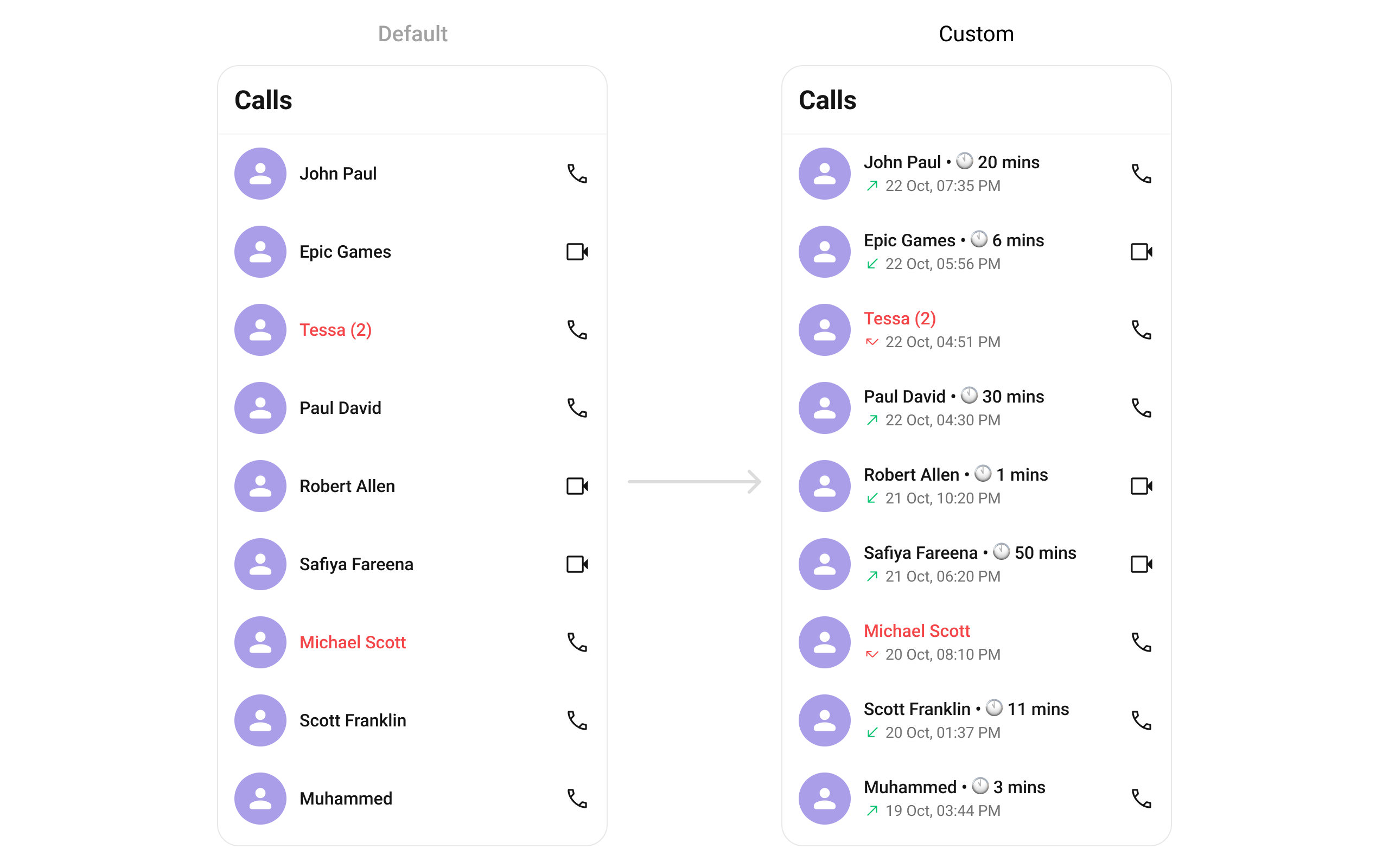
### Title View
Replace the name / title text.
```kotlin lines theme={null}
callLogs.setLeadingView(object : CallLogsViewHolderListener() {
override fun createView(context: Context, binding: CometchatListBaseItemsBinding): View {
return ImageView(context).apply {
layoutParams = ViewGroup.LayoutParams(48.dp, 48.dp)
}
}
override fun bindView(
context: Context, createdView: View, callLog: CallLog,
holder: RecyclerView.ViewHolder, callLogList: List, position: Int
) {
val imageView = createdView as ImageView
// Load caller avatar
}
})
```
```kotlin lines theme={null}
CometChatCallLogs(
leadingView = { callLog ->
CometChatAvatar(
imageUrl = callLog.initiator?.avatar,
name = callLog.initiator?.name
)
}
)
```
### Title View
Replace the name / title text.
 ```kotlin lines theme={null}
callLogs.setTitleView(object : CallLogsViewHolderListener() {
override fun createView(context: Context, binding: CometchatListBaseItemsBinding): View {
return TextView(context)
}
override fun bindView(
context: Context, createdView: View, callLog: CallLog,
holder: RecyclerView.ViewHolder, callLogList: List, position: Int
) {
(createdView as TextView).text = callLog.initiator?.name ?: ""
}
})
```
```kotlin lines theme={null}
CometChatCallLogs(
titleView = { callLog ->
Text(
text = callLog.initiator?.name ?: "",
style = CometChatTheme.typography.heading4Medium
)
}
)
```
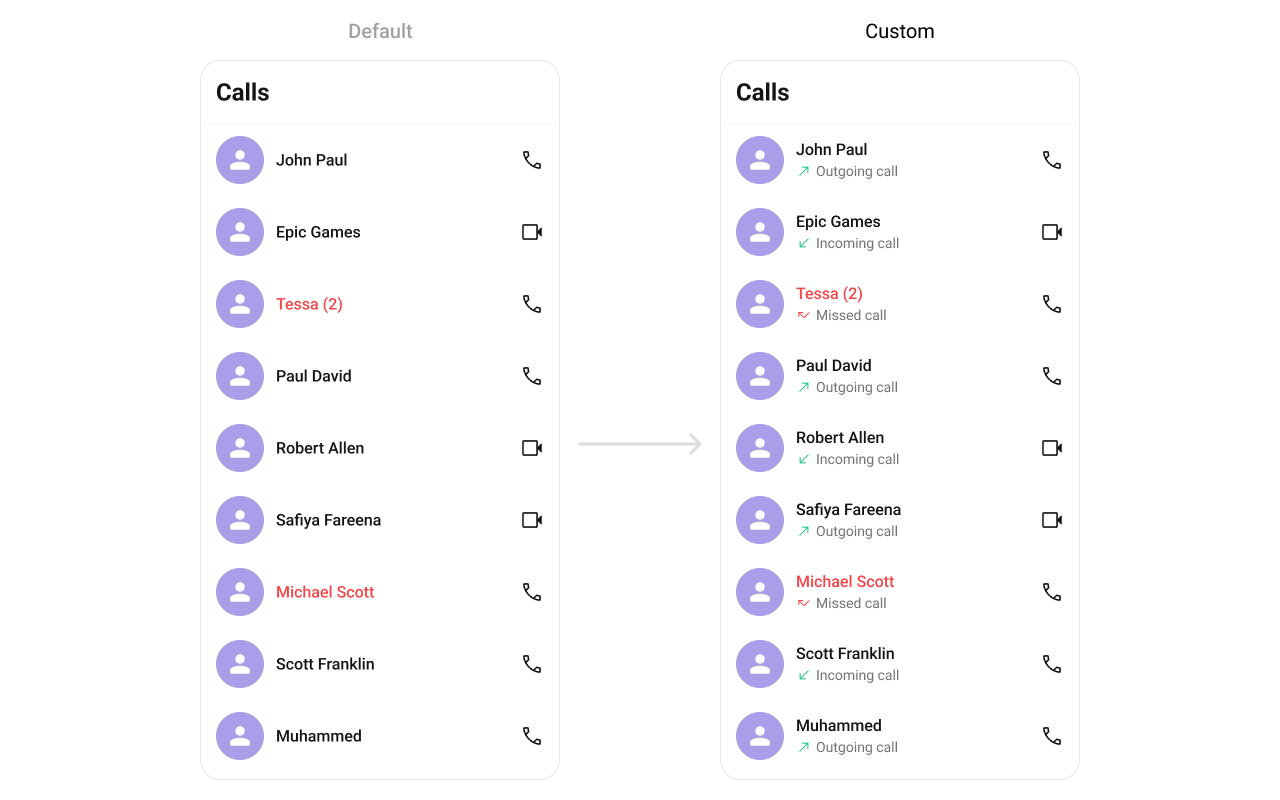
### Subtitle View
Replace the subtitle text below the caller's name.
```kotlin lines theme={null}
callLogs.setTitleView(object : CallLogsViewHolderListener() {
override fun createView(context: Context, binding: CometchatListBaseItemsBinding): View {
return TextView(context)
}
override fun bindView(
context: Context, createdView: View, callLog: CallLog,
holder: RecyclerView.ViewHolder, callLogList: List, position: Int
) {
(createdView as TextView).text = callLog.initiator?.name ?: ""
}
})
```
```kotlin lines theme={null}
CometChatCallLogs(
titleView = { callLog ->
Text(
text = callLog.initiator?.name ?: "",
style = CometChatTheme.typography.heading4Medium
)
}
)
```
### Subtitle View
Replace the subtitle text below the caller's name.
 ```kotlin lines theme={null}
callLogs.setSubtitleView(object : CallLogsViewHolderListener() {
override fun createView(context: Context, binding: CometchatListBaseItemsBinding): View {
return TextView(context).apply { maxLines = 1; ellipsize = TextUtils.TruncateAt.END }
}
override fun bindView(
context: Context, createdView: View, callLog: CallLog,
holder: RecyclerView.ViewHolder, callLogList: List, position: Int
) {
(createdView as TextView).text = callLog.status ?: "Unknown"
}
})
```
```kotlin lines theme={null}
CometChatCallLogs(
subtitleView = { callLog ->
Text(
text = callLog.status ?: "Unknown",
maxLines = 1,
overflow = TextOverflow.Ellipsis
)
}
)
```
### Trailing View
Replace the right section of each call log item.
```kotlin lines theme={null}
callLogs.setSubtitleView(object : CallLogsViewHolderListener() {
override fun createView(context: Context, binding: CometchatListBaseItemsBinding): View {
return TextView(context).apply { maxLines = 1; ellipsize = TextUtils.TruncateAt.END }
}
override fun bindView(
context: Context, createdView: View, callLog: CallLog,
holder: RecyclerView.ViewHolder, callLogList: List, position: Int
) {
(createdView as TextView).text = callLog.status ?: "Unknown"
}
})
```
```kotlin lines theme={null}
CometChatCallLogs(
subtitleView = { callLog ->
Text(
text = callLog.status ?: "Unknown",
maxLines = 1,
overflow = TextOverflow.Ellipsis
)
}
)
```
### Trailing View
Replace the right section of each call log item.
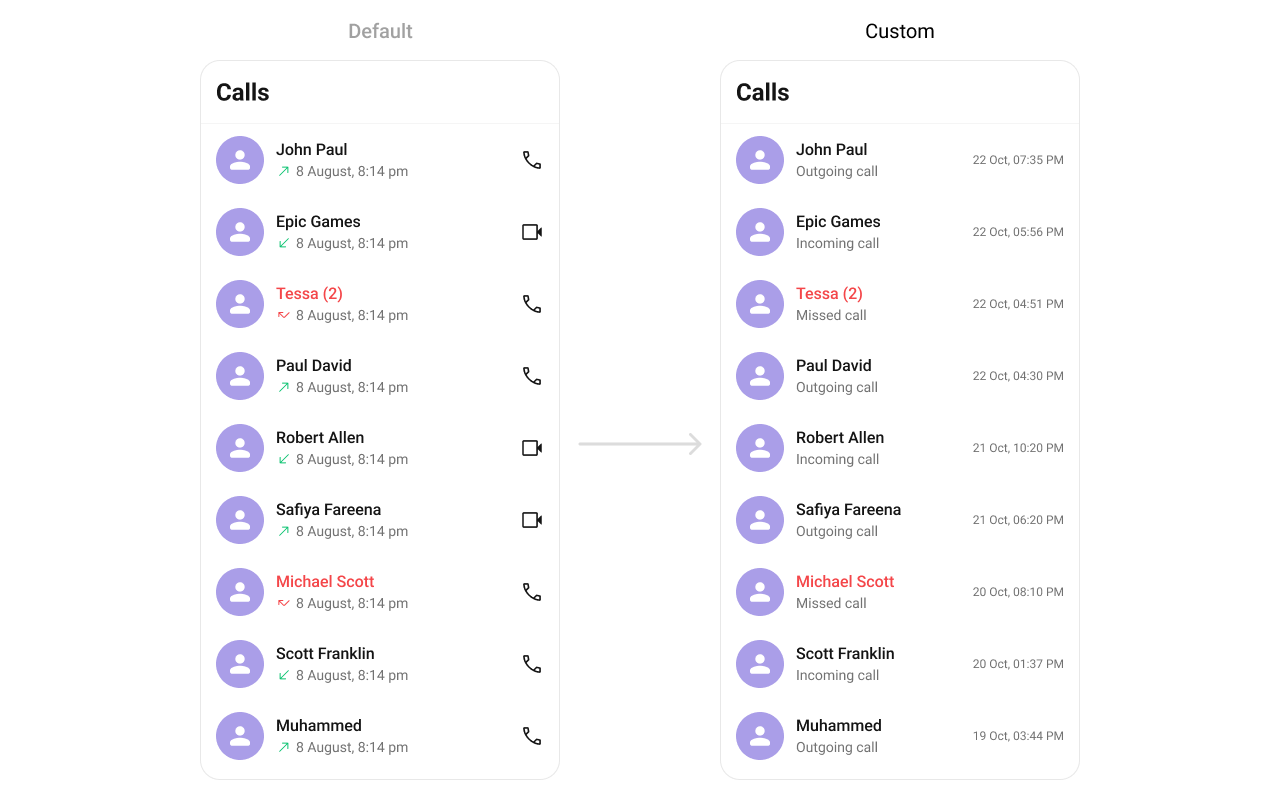 ```kotlin lines theme={null}
callLogs.setTrailingView(object : CallLogsViewHolderListener() {
override fun createView(context: Context, binding: CometchatListBaseItemsBinding): View {
return TextView(context)
}
override fun bindView(
context: Context, createdView: View, callLog: CallLog,
holder: RecyclerView.ViewHolder, callLogList: List, position: Int
) {
(createdView as TextView).text = SimpleDateFormat("h:mm a", Locale.getDefault())
.format(Date(callLog.initiatedAt * 1000))
}
})
```
```kotlin lines theme={null}
CometChatCallLogs(
trailingView = { callLog ->
Text(
text = SimpleDateFormat("h:mm a", Locale.getDefault())
.format(Date(callLog.initiatedAt * 1000))
)
}
)
```
### Item View
Replace the entire list item row.
```kotlin lines theme={null}
callLogs.setTrailingView(object : CallLogsViewHolderListener() {
override fun createView(context: Context, binding: CometchatListBaseItemsBinding): View {
return TextView(context)
}
override fun bindView(
context: Context, createdView: View, callLog: CallLog,
holder: RecyclerView.ViewHolder, callLogList: List, position: Int
) {
(createdView as TextView).text = SimpleDateFormat("h:mm a", Locale.getDefault())
.format(Date(callLog.initiatedAt * 1000))
}
})
```
```kotlin lines theme={null}
CometChatCallLogs(
trailingView = { callLog ->
Text(
text = SimpleDateFormat("h:mm a", Locale.getDefault())
.format(Date(callLog.initiatedAt * 1000))
)
}
)
```
### Item View
Replace the entire list item row.
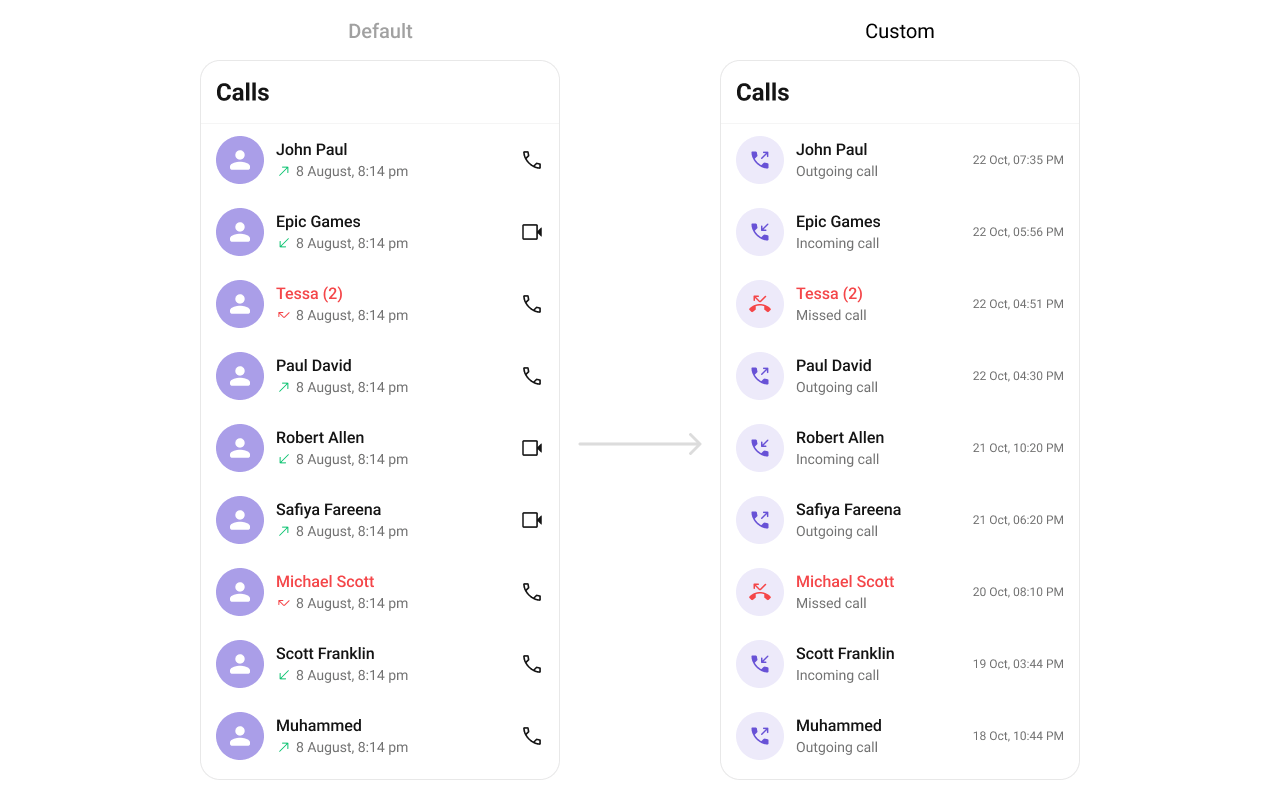 ```kotlin lines theme={null}
callLogs.setItemView(object : CallLogsViewHolderListener() {
override fun createView(context: Context, binding: CometchatListBaseItemsBinding): View {
return LayoutInflater.from(context).inflate(R.layout.custom_call_log_item, null)
}
override fun bindView(
context: Context, createdView: View, callLog: CallLog,
holder: RecyclerView.ViewHolder, callLogList: List, position: Int
) {
val avatar = createdView.findViewById(R.id.custom_avatar)
val title = createdView.findViewById(R.id.tvName)
title.text = callLog.initiator?.name
avatar.setAvatar(callLog.initiator?.name, callLog.initiator?.avatar)
}
})
```
```kotlin lines theme={null}
CometChatCallLogs(
itemView = { callLog ->
Row(
modifier = Modifier.fillMaxWidth().padding(12.dp),
verticalAlignment = Alignment.CenterVertically
) {
CometChatAvatar(imageUrl = callLog.initiator?.avatar, name = callLog.initiator?.name)
Spacer(Modifier.width(12.dp))
Column(modifier = Modifier.weight(1f)) {
Text(callLog.initiator?.name ?: "", style = CometChatTheme.typography.heading4Medium)
Text(callLog.status ?: "", style = CometChatTheme.typography.body3Regular)
}
}
}
)
```
### State Views
```kotlin lines theme={null}
callLogs.setEmptyView(R.layout.custom_empty_view)
callLogs.setErrorView(R.layout.custom_error_view)
callLogs.setLoadingView(R.layout.custom_loading_view)
```
```kotlin lines theme={null}
CometChatCallLogs(
emptyView = { Text("No call logs") },
errorView = { onRetry -> Button(onClick = onRetry) { Text("Retry") } },
loadingView = { CircularProgressIndicator() }
)
```
### Overflow Menu
```kotlin lines theme={null}
callLogs.setOverflowMenu(ImageButton(context).apply {
setImageResource(R.drawable.ic_filter)
setOnClickListener { /* show filter */ }
})
```
```kotlin lines theme={null}
CometChatCallLogs(
overflowMenu = {
IconButton(onClick = { /* show filter */ }) {
Icon(painterResource(R.drawable.ic_filter), "Filter")
}
}
)
```
***
## Menu Options
```kotlin lines theme={null}
// Replace all options
callLogs.setOptions { context, callLog ->
listOf(
CometChatPopupMenu.MenuItem(id = "delete", name = "Delete", onClick = { /* ... */ }),
CometChatPopupMenu.MenuItem(id = "callback", name = "Call Back", onClick = { /* ... */ })
)
}
// Append to defaults
callLogs.setAddOptions { context, callLog ->
listOf(
CometChatPopupMenu.MenuItem(id = "info", name = "Info", onClick = { /* ... */ })
)
}
```
```kotlin lines theme={null}
CometChatCallLogs(
options = { context, callLog ->
listOf(
MenuItem(id = "delete", name = "Delete", onClick = { /* ... */ }),
MenuItem(id = "callback", name = "Call Back", onClick = { /* ... */ })
)
},
addOptions = { context, callLog ->
listOf(MenuItem(id = "info", name = "Info", onClick = { /* ... */ }))
}
)
```
***
## Common Patterns
### Minimal list — hide all chrome
```kotlin lines theme={null}
callLogs.setToolbarVisibility(View.GONE)
callLogs.setSeparatorVisibility(View.GONE)
```
```kotlin lines theme={null}
CometChatCallLogs(
hideToolbar = true,
hideSeparator = true
)
```
### Audio calls only
```kotlin lines theme={null}
callLogs.setCallLogRequestBuilder(
CallLogRequest.CallLogRequestBuilder()
.setCallType(CometChatConstants.CALL_TYPE_AUDIO)
)
```
```kotlin lines theme={null}
CometChatCallLogs(
callLogRequestBuilder = CallLogRequest.CallLogRequestBuilder()
.setCallType(CometChatConstants.CALL_TYPE_AUDIO)
)
```
### Video calls only
```kotlin lines theme={null}
callLogs.setCallLogRequestBuilder(
CallLogRequest.CallLogRequestBuilder()
.setCallType(CometChatConstants.CALL_TYPE_VIDEO)
)
```
```kotlin lines theme={null}
CometChatCallLogs(
callLogRequestBuilder = CallLogRequest.CallLogRequestBuilder()
.setCallType(CometChatConstants.CALL_TYPE_VIDEO)
)
```
***
## Advanced Methods
### ViewModel Access
```kotlin lines theme={null}
val factory = CometChatCallLogsViewModelFactory()
val viewModel = ViewModelProvider(this, factory)
.get(CometChatCallLogsViewModel::class.java)
```
```kotlin lines theme={null}
callLogs.setViewModel(viewModel)
```
```kotlin lines theme={null}
CometChatCallLogs(
callLogsViewModel = viewModel
)
```
See [ViewModel & Data](/ui-kit/android/v6/customization-viewmodel-data) for ListOperations, state observation, and custom repositories.
***
## Style
```kotlin lines theme={null}
callLogs.setItemView(object : CallLogsViewHolderListener() {
override fun createView(context: Context, binding: CometchatListBaseItemsBinding): View {
return LayoutInflater.from(context).inflate(R.layout.custom_call_log_item, null)
}
override fun bindView(
context: Context, createdView: View, callLog: CallLog,
holder: RecyclerView.ViewHolder, callLogList: List, position: Int
) {
val avatar = createdView.findViewById(R.id.custom_avatar)
val title = createdView.findViewById(R.id.tvName)
title.text = callLog.initiator?.name
avatar.setAvatar(callLog.initiator?.name, callLog.initiator?.avatar)
}
})
```
```kotlin lines theme={null}
CometChatCallLogs(
itemView = { callLog ->
Row(
modifier = Modifier.fillMaxWidth().padding(12.dp),
verticalAlignment = Alignment.CenterVertically
) {
CometChatAvatar(imageUrl = callLog.initiator?.avatar, name = callLog.initiator?.name)
Spacer(Modifier.width(12.dp))
Column(modifier = Modifier.weight(1f)) {
Text(callLog.initiator?.name ?: "", style = CometChatTheme.typography.heading4Medium)
Text(callLog.status ?: "", style = CometChatTheme.typography.body3Regular)
}
}
}
)
```
### State Views
```kotlin lines theme={null}
callLogs.setEmptyView(R.layout.custom_empty_view)
callLogs.setErrorView(R.layout.custom_error_view)
callLogs.setLoadingView(R.layout.custom_loading_view)
```
```kotlin lines theme={null}
CometChatCallLogs(
emptyView = { Text("No call logs") },
errorView = { onRetry -> Button(onClick = onRetry) { Text("Retry") } },
loadingView = { CircularProgressIndicator() }
)
```
### Overflow Menu
```kotlin lines theme={null}
callLogs.setOverflowMenu(ImageButton(context).apply {
setImageResource(R.drawable.ic_filter)
setOnClickListener { /* show filter */ }
})
```
```kotlin lines theme={null}
CometChatCallLogs(
overflowMenu = {
IconButton(onClick = { /* show filter */ }) {
Icon(painterResource(R.drawable.ic_filter), "Filter")
}
}
)
```
***
## Menu Options
```kotlin lines theme={null}
// Replace all options
callLogs.setOptions { context, callLog ->
listOf(
CometChatPopupMenu.MenuItem(id = "delete", name = "Delete", onClick = { /* ... */ }),
CometChatPopupMenu.MenuItem(id = "callback", name = "Call Back", onClick = { /* ... */ })
)
}
// Append to defaults
callLogs.setAddOptions { context, callLog ->
listOf(
CometChatPopupMenu.MenuItem(id = "info", name = "Info", onClick = { /* ... */ })
)
}
```
```kotlin lines theme={null}
CometChatCallLogs(
options = { context, callLog ->
listOf(
MenuItem(id = "delete", name = "Delete", onClick = { /* ... */ }),
MenuItem(id = "callback", name = "Call Back", onClick = { /* ... */ })
)
},
addOptions = { context, callLog ->
listOf(MenuItem(id = "info", name = "Info", onClick = { /* ... */ }))
}
)
```
***
## Common Patterns
### Minimal list — hide all chrome
```kotlin lines theme={null}
callLogs.setToolbarVisibility(View.GONE)
callLogs.setSeparatorVisibility(View.GONE)
```
```kotlin lines theme={null}
CometChatCallLogs(
hideToolbar = true,
hideSeparator = true
)
```
### Audio calls only
```kotlin lines theme={null}
callLogs.setCallLogRequestBuilder(
CallLogRequest.CallLogRequestBuilder()
.setCallType(CometChatConstants.CALL_TYPE_AUDIO)
)
```
```kotlin lines theme={null}
CometChatCallLogs(
callLogRequestBuilder = CallLogRequest.CallLogRequestBuilder()
.setCallType(CometChatConstants.CALL_TYPE_AUDIO)
)
```
### Video calls only
```kotlin lines theme={null}
callLogs.setCallLogRequestBuilder(
CallLogRequest.CallLogRequestBuilder()
.setCallType(CometChatConstants.CALL_TYPE_VIDEO)
)
```
```kotlin lines theme={null}
CometChatCallLogs(
callLogRequestBuilder = CallLogRequest.CallLogRequestBuilder()
.setCallType(CometChatConstants.CALL_TYPE_VIDEO)
)
```
***
## Advanced Methods
### ViewModel Access
```kotlin lines theme={null}
val factory = CometChatCallLogsViewModelFactory()
val viewModel = ViewModelProvider(this, factory)
.get(CometChatCallLogsViewModel::class.java)
```
```kotlin lines theme={null}
callLogs.setViewModel(viewModel)
```
```kotlin lines theme={null}
CometChatCallLogs(
callLogsViewModel = viewModel
)
```
See [ViewModel & Data](/ui-kit/android/v6/customization-viewmodel-data) for ListOperations, state observation, and custom repositories.
***
## Style
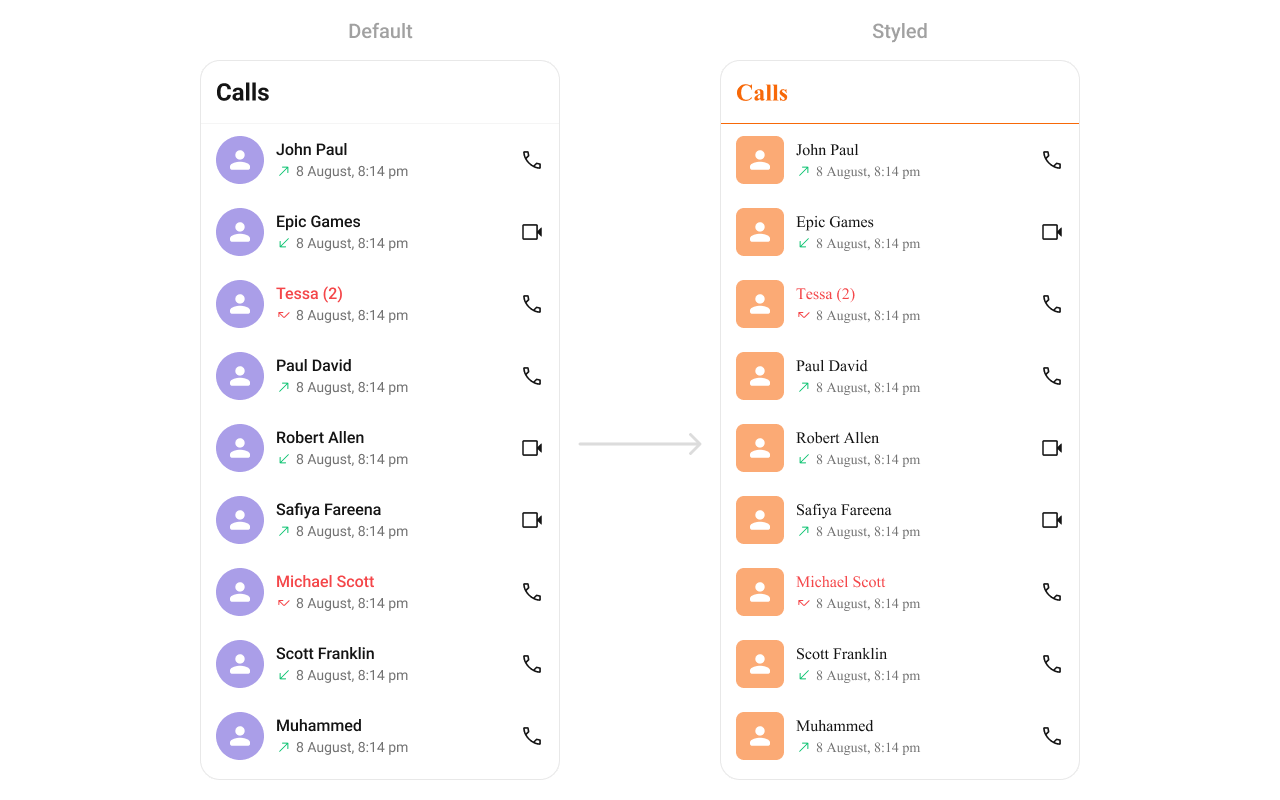 Define a custom style in `themes.xml`:
```xml themes.xml lines theme={null}
```
```kotlin lines theme={null}
CometChatCallLogs(
style = CometChatCallLogsStyle.default().copy(
backgroundColor = Color(0xFFF5F5F5),
titleTextColor = Color(0xFF141414),
itemStyle = CometChatCallLogsItemStyle.default().copy(
backgroundColor = Color.White,
titleTextColor = Color(0xFF141414),
subtitleTextColor = Color(0xFF727272),
avatarStyle = CometChatAvatarStyle.default().copy(cornerRadius = 12.dp)
)
)
)
```
### Style Properties
| Property | Description |
| ----------------------------- | ---------------------- |
| `backgroundColor` | List background color |
| `titleTextColor` | Toolbar title color |
| `itemStyle.backgroundColor` | Row background |
| `itemStyle.titleTextColor` | Caller name color |
| `itemStyle.subtitleTextColor` | Call status text color |
| `itemStyle.separatorColor` | Row separator color |
| `itemStyle.avatarStyle` | Avatar appearance |
See [Component Styling](/ui-kit/android/v6/component-styling) for the full reference.
***
## Next Steps
Voice and video calling overview
Browse recent conversations
Detailed styling reference with screenshots
Custom ViewModels, repositories, and ListOperations
Define a custom style in `themes.xml`:
```xml themes.xml lines theme={null}
```
```kotlin lines theme={null}
CometChatCallLogs(
style = CometChatCallLogsStyle.default().copy(
backgroundColor = Color(0xFFF5F5F5),
titleTextColor = Color(0xFF141414),
itemStyle = CometChatCallLogsItemStyle.default().copy(
backgroundColor = Color.White,
titleTextColor = Color(0xFF141414),
subtitleTextColor = Color(0xFF727272),
avatarStyle = CometChatAvatarStyle.default().copy(cornerRadius = 12.dp)
)
)
)
```
### Style Properties
| Property | Description |
| ----------------------------- | ---------------------- |
| `backgroundColor` | List background color |
| `titleTextColor` | Toolbar title color |
| `itemStyle.backgroundColor` | Row background |
| `itemStyle.titleTextColor` | Caller name color |
| `itemStyle.subtitleTextColor` | Call status text color |
| `itemStyle.separatorColor` | Row separator color |
| `itemStyle.avatarStyle` | Avatar appearance |
See [Component Styling](/ui-kit/android/v6/component-styling) for the full reference.
***
## Next Steps
Voice and video calling overview
Browse recent conversations
Detailed styling reference with screenshots
Custom ViewModels, repositories, and ListOperations