> ## Documentation Index
> Fetch the complete documentation index at: https://cometchat-22654f5b-docs-audit-content-webhooks.mintlify.site/llms.txt
> Use this file to discover all available pages before exploring further.
# Building A One To One/Group Chat Experience
> Build focused CometChat Android UI Kit one-to-one or group chat screens with headers, message lists, composers, and direct navigation.
| Field | Value |
| ------------ | ---------------------------------------------------------------------------- |
| Package | `com.cometchat:chat-uikit-android` |
| Components | `CometChatMessageHeader`, `CometChatMessageList`, `CometChatMessageComposer` |
| Layout | Single chat window — no conversation list |
| Prerequisite | Complete [Integration](/ui-kit/android/getting-started) Steps 1–4 first |
| Pattern | Support chat, embedded widgets, focused messaging |
This guide builds a single chat window — no sidebar, no conversation list. Users go directly into a one-to-one or group chat. Good for support chat, dating apps, or notification-driven flows.
This assumes you've already completed [Integration](/ui-kit/android/getting-started) (project created, dependencies installed, init + login working, theme set up).
***
## What You're Building
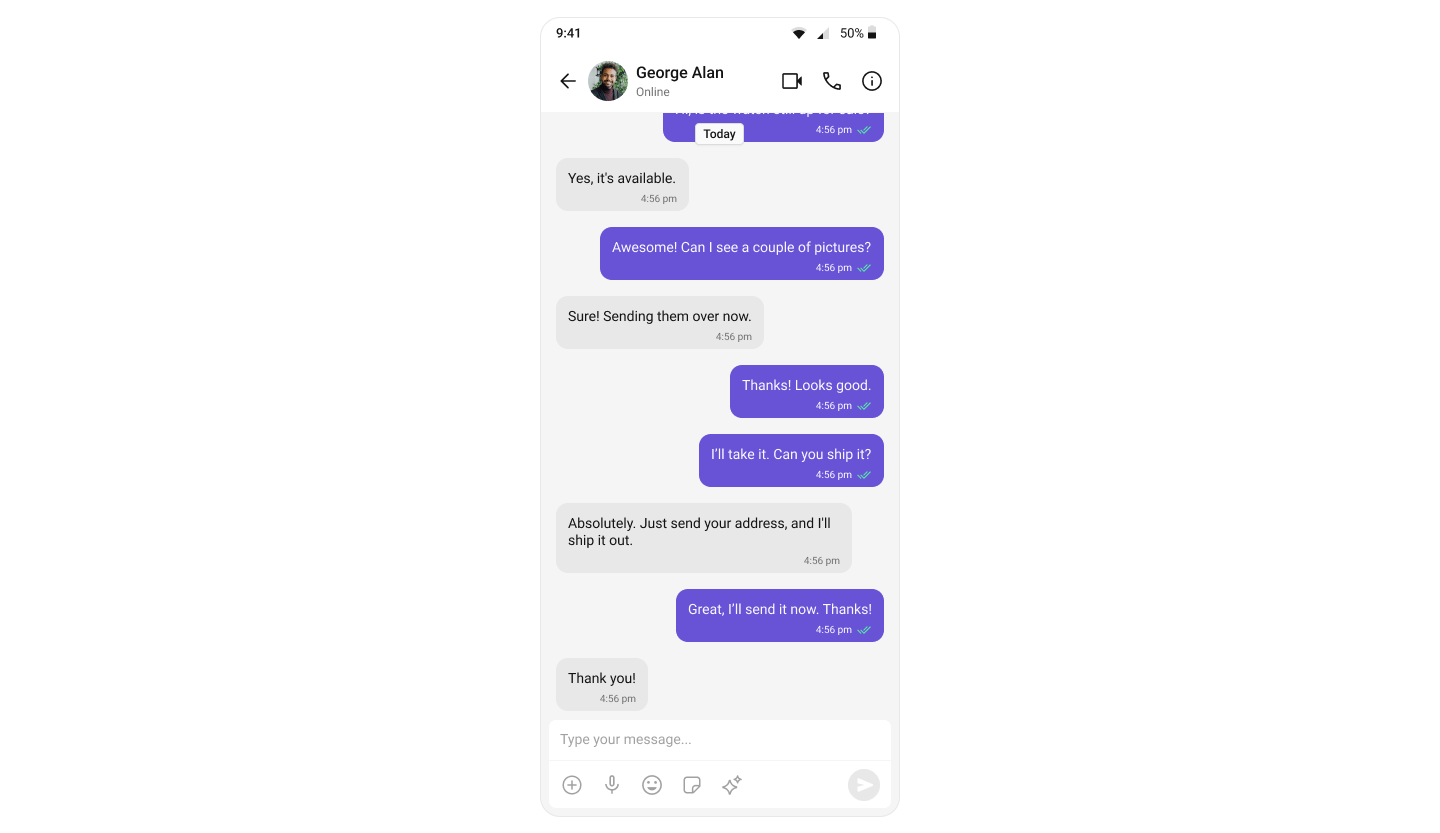 Three components stacked vertically:
1. **Message header** — displays user/group name, avatar, and status
2. **Message list** — real-time chat history with scrolling
3. **Message composer** — text input with media and attachments
The user or group ID is passed via Intent extras when launching the Activity — ideal for launching from a user profile, support button, or notification.
***
### Step 1: Set Up Message Activity
Create an Activity - `MessageActivity` to display the full-screen chat interface.
#### Layout
Define the layout with `CometChatMessageHeader`, `CometChatMessageList`, and `CometChatMessageComposer` in `activity_message.xml`:
```xml activity_message.xml lines theme={null}
```
#### Activity
Retrieve the user or group ID from the Intent extras and configure the message components:
```kotlin MessageActivity.kt lines theme={null}
import android.os.Bundle
import android.util.Log
import android.widget.Toast
import androidx.activity.enableEdgeToEdge
import androidx.appcompat.app.AppCompatActivity
import com.cometchat.chat.core.CometChat
import com.cometchat.chat.exceptions.CometChatException
import com.cometchat.chat.models.Group
import com.cometchat.chat.models.User
import com.cometchat.chatuikit.messagecomposer.CometChatMessageComposer
import com.cometchat.chatuikit.messageheader.CometChatMessageHeader
import com.cometchat.chatuikit.messagelist.CometChatMessageList
class MessageActivity : AppCompatActivity() {
private lateinit var messageHeader: CometChatMessageHeader
private lateinit var messageList: CometChatMessageList
private lateinit var messageComposer: CometChatMessageComposer
private var uid: String? = null
private var guid: String? = null
private val TAG = "MessageActivity"
override fun onCreate(savedInstanceState: Bundle?) {
super.onCreate(savedInstanceState)
enableEdgeToEdge()
setContentView(R.layout.activity_message)
initializeViews()
setupChat()
setupHeaderBackButton()
}
private fun initializeViews() {
messageHeader = findViewById(R.id.message_header)
messageList = findViewById(R.id.message_list)
messageComposer = findViewById(R.id.message_composer)
}
private fun setupChat() {
uid = intent.getStringExtra("uid")
guid = intent.getStringExtra("guid")
when {
uid != null -> setupUserChat(uid!!)
guid != null -> setupGroupChat(guid!!)
else -> {
Log.e(TAG, "No user ID or group ID provided")
showError("Missing user ID or group ID")
finish()
}
}
}
private fun setupUserChat(userId: String) {
CometChat.getUser(userId, object : CometChat.CallbackListener() {
override fun onSuccess(user: User) {
Log.d(TAG, "Successfully loaded user: ${user.uid}")
messageHeader.setUser(user)
messageList.setUser(user)
messageComposer.setUser(user)
}
override fun onError(e: CometChatException?) {
Log.e(TAG, "Error loading user: ${e?.message}")
showError("Could not find user: ${e?.message}")
finish()
}
})
}
private fun setupGroupChat(groupId: String) {
CometChat.getGroup(groupId, object : CometChat.CallbackListener() {
override fun onSuccess(group: Group) {
Log.d(TAG, "Successfully loaded group: ${group.guid}")
messageHeader.setGroup(group)
messageList.setGroup(group)
messageComposer.setGroup(group)
}
override fun onError(e: CometChatException?) {
Log.e(TAG, "Error loading group: ${e?.message}")
showError("Could not find group: ${e?.message}")
finish()
}
})
}
private fun setupHeaderBackButton() {
messageHeader.setOnBackButtonPressed {
finish()
}
}
private fun showError(message: String) {
Toast.makeText(this, message, Toast.LENGTH_SHORT).show()
}
}
```
```java MessageActivity.java lines theme={null}
import android.os.Bundle;
import android.util.Log;
import android.widget.Toast;
import androidx.appcompat.app.AppCompatActivity;
import com.cometchat.chat.core.CometChat;
import com.cometchat.chat.exceptions.CometChatException;
import com.cometchat.chat.models.Group;
import com.cometchat.chat.models.User;
import com.cometchat.chatuikit.messagecomposer.CometChatMessageComposer;
import com.cometchat.chatuikit.messageheader.CometChatMessageHeader;
import com.cometchat.chatuikit.messagelist.CometChatMessageList;
public class MessageActivity extends AppCompatActivity {
private static final String TAG = "MessageActivity";
private CometChatMessageHeader messageHeader;
private CometChatMessageList messageList;
private CometChatMessageComposer messageComposer;
private String uid;
private String guid;
@Override
protected void onCreate(Bundle savedInstanceState) {
super.onCreate(savedInstanceState);
getWindow().setDecorFitsSystemWindows(false); // enableEdgeToEdge()
setContentView(R.layout.activity_message);
initializeViews();
setupChat();
setupHeaderBackButton();
}
private void initializeViews() {
messageHeader = findViewById(R.id.message_header);
messageList = findViewById(R.id.message_list);
messageComposer = findViewById(R.id.message_composer);
}
private void setupChat() {
uid = getIntent().getStringExtra("uid");
guid = getIntent().getStringExtra("guid");
if (uid != null) {
setupUserChat(uid);
} else if (guid != null) {
setupGroupChat(guid);
} else {
Log.e(TAG, "No user ID or group ID provided");
showError("Missing user ID or group ID");
finish();
}
}
private void setupUserChat(String userId) {
CometChat.getUser(userId, new CometChat.CallbackListener() {
@Override
public void onSuccess(User user) {
Log.d(TAG, "Successfully loaded user: " + user.getUid());
messageHeader.setUser(user);
messageList.setUser(user);
messageComposer.setUser(user);
}
@Override
public void onError(CometChatException e) {
Log.e(TAG, "Error loading user: " + (e != null ? e.getMessage() : "Unknown error"));
showError("Could not find user: " + (e != null ? e.getMessage() : ""));
finish();
}
});
}
private void setupGroupChat(String groupId) {
CometChat.getGroup(groupId, new CometChat.CallbackListener() {
@Override
public void onSuccess(Group group) {
Log.d(TAG, "Successfully loaded group: " + group.getGuid());
messageHeader.setGroup(group);
messageList.setGroup(group);
messageComposer.setGroup(group);
}
@Override
public void onError(CometChatException e) {
Log.e(TAG, "Error loading group: " + (e != null ? e.getMessage() : "Unknown error"));
showError("Could not find group: " + (e != null ? e.getMessage() : ""));
finish();
}
});
}
private void setupHeaderBackButton() {
messageHeader.setOnBackButtonPressed(() -> finish());
}
private void showError(String message) {
Toast.makeText(this, message, Toast.LENGTH_SHORT).show();
}
}
```
You must use an activity that supports the **lifecycle** API, such as:
* `AppCompatActivity`
* `ComponentActivity`
* `FragmentActivity`
This is necessary to properly manage the **UI Kit's lifecycle events**.
***
### Step 2: Launch MessageActivity from Your App
Update your `MainActivity` (or any other Activity) to launch `MessageActivity` with the appropriate user or group ID:
**Passing Data via Intent**
You can pass either:
* `uid` (String) - for one-to-one chats
* `guid` (String) - for group chats
The `MessageActivity` will automatically detect which type of chat to display based on the Intent extras.
```kotlin MainActivity.kt highlight={16-18, 20-21, 50-53} lines theme={null}
import android.content.Intent
import android.os.Bundle
import android.util.Log
import androidx.activity.ComponentActivity
import androidx.activity.enableEdgeToEdge
import com.cometchat.chat.core.CometChat
import com.cometchat.chat.exceptions.CometChatException
import com.cometchat.chat.models.User
import com.cometchat.chatuikit.shared.cometchatuikit.CometChatUIKit
import com.cometchat.chatuikit.shared.cometchatuikit.UIKitSettings
class MainActivity : ComponentActivity() {
private val TAG = "MainActivity"
private val appID = "APP_ID" // Replace with your App ID
private val region = "REGION" // Replace with your App Region
private val authKey = "AUTH_KEY" // Replace with your Auth Key or leave blank if you are authenticating using Auth Token
private val uid = "cometchat-uid-1" // Replace with the UID of the user you want to chat with
private val target_uid = "cometchat-uid-2" // Replace with the UID of the user you want to chat with
private val uiKitSettings = UIKitSettings.UIKitSettingsBuilder()
.setRegion(region)
.setAppId(appID)
.setAuthKey(authKey)
.subscribePresenceForAllUsers()
.build()
override fun onCreate(savedInstanceState: Bundle?) {
super.onCreate(savedInstanceState)
enableEdgeToEdge()
CometChatUIKit.init(this, uiKitSettings, object : CometChat.CallbackListener() {
override fun onSuccess(successString: String?) {
Log.d(TAG, "Initialization completed successfully")
loginUser()
}
override fun onError(e: CometChatException?) {}
})
}
private fun loginUser() {
CometChatUIKit.login(uid, object : CometChat.CallbackListener() {
override fun onSuccess(user: User) {
// Launch One-to-One or Group Chat Screen
val intent = Intent(this@MainActivity, MessageActivity::class.java)
intent.putExtra("uid", target_uid) // Pass the UID of the user you want to chat with
startActivity(intent)
}
override fun onError(e: CometChatException) {
// Handle login failure (e.g. show error message or retry)
Log.e("Login", "Login failed: ${e.message}")
}
})
}
}
```
```java MainActivity.java highlight={15-17, 19-20, 54-57} lines theme={null}
import android.content.Intent;
import android.os.Bundle;
import android.util.Log;
import androidx.activity.ComponentActivity;
import com.cometchat.chat.core.CometChat;
import com.cometchat.chat.exceptions.CometChatException;
import com.cometchat.chat.models.User;
import com.cometchat.chatuikit.shared.cometchatuikit.CometChatUIKit;
import com.cometchat.chatuikit.shared.cometchatuikit.UIKitSettings;
public class MainActivity extends ComponentActivity {
private static final String TAG = "MainActivity";
private final String appID = "APP_ID"; // Replace with your App ID
private final String region = "REGION"; // Replace with your App Region
private final String authKey = "AUTH_KEY"; // Replace with your Auth Key
private final String uid = "cometchat-uid-1"; // Replace with the UID of the user you want to chat with
private final String target_uid = "cometchat-uid-2"; // Replace with the UID of the user you want to chat with
@Override
protected void onCreate(Bundle savedInstanceState) {
super.onCreate(savedInstanceState);
getWindow().setDecorFitsSystemWindows(false); // Equivalent to enableEdgeToEdge()
UIKitSettings uiKitSettings = new UIKitSettings.UIKitSettingsBuilder()
.setRegion(region)
.setAppId(appID)
.setAuthKey(authKey)
.subscribePresenceForAllUsers()
.build();
CometChatUIKit.init(this, uiKitSettings, new CometChat.CallbackListener() {
@Override
public void onSuccess(String success) {
Log.d(TAG, "Initialization completed successfully");
loginUser();
}
@Override
public void onError(CometChatException e) {
Log.e(TAG, "Initialization failed: " + (e != null ? e.getMessage() : "Unknown error"));
}
});
}
private void loginUser() {
CometChatUIKit.login(uid, new CometChat.CallbackListener() {
@Override
public void onSuccess(User user) {
Log.d(TAG, "Login successful for user: " + user.getUid());
// Launch One-to-One or Group Chat Screen
Intent intent = new Intent(MainActivity.this, MessageActivity.class);
intent.putExtra("uid", target_uid);
startActivity(intent);
}
@Override
public void onError(CometChatException e) {
Log.e("Login", "Login failed: " + (e != null ? e.getMessage() : "Unknown error"));
}
});
}
}
```
***
## Running the Project
Once you've completed the setup, build and run the app:
```sh lines theme={null}
gradle build
```
**Required Permissions**
Ensure you've added the necessary permissions in your `AndroidManifest.xml` and initialized CometChat in your `Application` class.
:
```xml lines theme={null}
```
***
## Next Steps
Explore all available UI Kit components and their customization options
Customize colors, fonts, and styles to match your brand
Back to the main setup guide
Add capabilities like threaded messages, blocking, and group management
Three components stacked vertically:
1. **Message header** — displays user/group name, avatar, and status
2. **Message list** — real-time chat history with scrolling
3. **Message composer** — text input with media and attachments
The user or group ID is passed via Intent extras when launching the Activity — ideal for launching from a user profile, support button, or notification.
***
### Step 1: Set Up Message Activity
Create an Activity - `MessageActivity` to display the full-screen chat interface.
#### Layout
Define the layout with `CometChatMessageHeader`, `CometChatMessageList`, and `CometChatMessageComposer` in `activity_message.xml`:
```xml activity_message.xml lines theme={null}
```
#### Activity
Retrieve the user or group ID from the Intent extras and configure the message components:
```kotlin MessageActivity.kt lines theme={null}
import android.os.Bundle
import android.util.Log
import android.widget.Toast
import androidx.activity.enableEdgeToEdge
import androidx.appcompat.app.AppCompatActivity
import com.cometchat.chat.core.CometChat
import com.cometchat.chat.exceptions.CometChatException
import com.cometchat.chat.models.Group
import com.cometchat.chat.models.User
import com.cometchat.chatuikit.messagecomposer.CometChatMessageComposer
import com.cometchat.chatuikit.messageheader.CometChatMessageHeader
import com.cometchat.chatuikit.messagelist.CometChatMessageList
class MessageActivity : AppCompatActivity() {
private lateinit var messageHeader: CometChatMessageHeader
private lateinit var messageList: CometChatMessageList
private lateinit var messageComposer: CometChatMessageComposer
private var uid: String? = null
private var guid: String? = null
private val TAG = "MessageActivity"
override fun onCreate(savedInstanceState: Bundle?) {
super.onCreate(savedInstanceState)
enableEdgeToEdge()
setContentView(R.layout.activity_message)
initializeViews()
setupChat()
setupHeaderBackButton()
}
private fun initializeViews() {
messageHeader = findViewById(R.id.message_header)
messageList = findViewById(R.id.message_list)
messageComposer = findViewById(R.id.message_composer)
}
private fun setupChat() {
uid = intent.getStringExtra("uid")
guid = intent.getStringExtra("guid")
when {
uid != null -> setupUserChat(uid!!)
guid != null -> setupGroupChat(guid!!)
else -> {
Log.e(TAG, "No user ID or group ID provided")
showError("Missing user ID or group ID")
finish()
}
}
}
private fun setupUserChat(userId: String) {
CometChat.getUser(userId, object : CometChat.CallbackListener() {
override fun onSuccess(user: User) {
Log.d(TAG, "Successfully loaded user: ${user.uid}")
messageHeader.setUser(user)
messageList.setUser(user)
messageComposer.setUser(user)
}
override fun onError(e: CometChatException?) {
Log.e(TAG, "Error loading user: ${e?.message}")
showError("Could not find user: ${e?.message}")
finish()
}
})
}
private fun setupGroupChat(groupId: String) {
CometChat.getGroup(groupId, object : CometChat.CallbackListener() {
override fun onSuccess(group: Group) {
Log.d(TAG, "Successfully loaded group: ${group.guid}")
messageHeader.setGroup(group)
messageList.setGroup(group)
messageComposer.setGroup(group)
}
override fun onError(e: CometChatException?) {
Log.e(TAG, "Error loading group: ${e?.message}")
showError("Could not find group: ${e?.message}")
finish()
}
})
}
private fun setupHeaderBackButton() {
messageHeader.setOnBackButtonPressed {
finish()
}
}
private fun showError(message: String) {
Toast.makeText(this, message, Toast.LENGTH_SHORT).show()
}
}
```
```java MessageActivity.java lines theme={null}
import android.os.Bundle;
import android.util.Log;
import android.widget.Toast;
import androidx.appcompat.app.AppCompatActivity;
import com.cometchat.chat.core.CometChat;
import com.cometchat.chat.exceptions.CometChatException;
import com.cometchat.chat.models.Group;
import com.cometchat.chat.models.User;
import com.cometchat.chatuikit.messagecomposer.CometChatMessageComposer;
import com.cometchat.chatuikit.messageheader.CometChatMessageHeader;
import com.cometchat.chatuikit.messagelist.CometChatMessageList;
public class MessageActivity extends AppCompatActivity {
private static final String TAG = "MessageActivity";
private CometChatMessageHeader messageHeader;
private CometChatMessageList messageList;
private CometChatMessageComposer messageComposer;
private String uid;
private String guid;
@Override
protected void onCreate(Bundle savedInstanceState) {
super.onCreate(savedInstanceState);
getWindow().setDecorFitsSystemWindows(false); // enableEdgeToEdge()
setContentView(R.layout.activity_message);
initializeViews();
setupChat();
setupHeaderBackButton();
}
private void initializeViews() {
messageHeader = findViewById(R.id.message_header);
messageList = findViewById(R.id.message_list);
messageComposer = findViewById(R.id.message_composer);
}
private void setupChat() {
uid = getIntent().getStringExtra("uid");
guid = getIntent().getStringExtra("guid");
if (uid != null) {
setupUserChat(uid);
} else if (guid != null) {
setupGroupChat(guid);
} else {
Log.e(TAG, "No user ID or group ID provided");
showError("Missing user ID or group ID");
finish();
}
}
private void setupUserChat(String userId) {
CometChat.getUser(userId, new CometChat.CallbackListener() {
@Override
public void onSuccess(User user) {
Log.d(TAG, "Successfully loaded user: " + user.getUid());
messageHeader.setUser(user);
messageList.setUser(user);
messageComposer.setUser(user);
}
@Override
public void onError(CometChatException e) {
Log.e(TAG, "Error loading user: " + (e != null ? e.getMessage() : "Unknown error"));
showError("Could not find user: " + (e != null ? e.getMessage() : ""));
finish();
}
});
}
private void setupGroupChat(String groupId) {
CometChat.getGroup(groupId, new CometChat.CallbackListener() {
@Override
public void onSuccess(Group group) {
Log.d(TAG, "Successfully loaded group: " + group.getGuid());
messageHeader.setGroup(group);
messageList.setGroup(group);
messageComposer.setGroup(group);
}
@Override
public void onError(CometChatException e) {
Log.e(TAG, "Error loading group: " + (e != null ? e.getMessage() : "Unknown error"));
showError("Could not find group: " + (e != null ? e.getMessage() : ""));
finish();
}
});
}
private void setupHeaderBackButton() {
messageHeader.setOnBackButtonPressed(() -> finish());
}
private void showError(String message) {
Toast.makeText(this, message, Toast.LENGTH_SHORT).show();
}
}
```
You must use an activity that supports the **lifecycle** API, such as:
* `AppCompatActivity`
* `ComponentActivity`
* `FragmentActivity`
This is necessary to properly manage the **UI Kit's lifecycle events**.
***
### Step 2: Launch MessageActivity from Your App
Update your `MainActivity` (or any other Activity) to launch `MessageActivity` with the appropriate user or group ID:
**Passing Data via Intent**
You can pass either:
* `uid` (String) - for one-to-one chats
* `guid` (String) - for group chats
The `MessageActivity` will automatically detect which type of chat to display based on the Intent extras.
```kotlin MainActivity.kt highlight={16-18, 20-21, 50-53} lines theme={null}
import android.content.Intent
import android.os.Bundle
import android.util.Log
import androidx.activity.ComponentActivity
import androidx.activity.enableEdgeToEdge
import com.cometchat.chat.core.CometChat
import com.cometchat.chat.exceptions.CometChatException
import com.cometchat.chat.models.User
import com.cometchat.chatuikit.shared.cometchatuikit.CometChatUIKit
import com.cometchat.chatuikit.shared.cometchatuikit.UIKitSettings
class MainActivity : ComponentActivity() {
private val TAG = "MainActivity"
private val appID = "APP_ID" // Replace with your App ID
private val region = "REGION" // Replace with your App Region
private val authKey = "AUTH_KEY" // Replace with your Auth Key or leave blank if you are authenticating using Auth Token
private val uid = "cometchat-uid-1" // Replace with the UID of the user you want to chat with
private val target_uid = "cometchat-uid-2" // Replace with the UID of the user you want to chat with
private val uiKitSettings = UIKitSettings.UIKitSettingsBuilder()
.setRegion(region)
.setAppId(appID)
.setAuthKey(authKey)
.subscribePresenceForAllUsers()
.build()
override fun onCreate(savedInstanceState: Bundle?) {
super.onCreate(savedInstanceState)
enableEdgeToEdge()
CometChatUIKit.init(this, uiKitSettings, object : CometChat.CallbackListener() {
override fun onSuccess(successString: String?) {
Log.d(TAG, "Initialization completed successfully")
loginUser()
}
override fun onError(e: CometChatException?) {}
})
}
private fun loginUser() {
CometChatUIKit.login(uid, object : CometChat.CallbackListener() {
override fun onSuccess(user: User) {
// Launch One-to-One or Group Chat Screen
val intent = Intent(this@MainActivity, MessageActivity::class.java)
intent.putExtra("uid", target_uid) // Pass the UID of the user you want to chat with
startActivity(intent)
}
override fun onError(e: CometChatException) {
// Handle login failure (e.g. show error message or retry)
Log.e("Login", "Login failed: ${e.message}")
}
})
}
}
```
```java MainActivity.java highlight={15-17, 19-20, 54-57} lines theme={null}
import android.content.Intent;
import android.os.Bundle;
import android.util.Log;
import androidx.activity.ComponentActivity;
import com.cometchat.chat.core.CometChat;
import com.cometchat.chat.exceptions.CometChatException;
import com.cometchat.chat.models.User;
import com.cometchat.chatuikit.shared.cometchatuikit.CometChatUIKit;
import com.cometchat.chatuikit.shared.cometchatuikit.UIKitSettings;
public class MainActivity extends ComponentActivity {
private static final String TAG = "MainActivity";
private final String appID = "APP_ID"; // Replace with your App ID
private final String region = "REGION"; // Replace with your App Region
private final String authKey = "AUTH_KEY"; // Replace with your Auth Key
private final String uid = "cometchat-uid-1"; // Replace with the UID of the user you want to chat with
private final String target_uid = "cometchat-uid-2"; // Replace with the UID of the user you want to chat with
@Override
protected void onCreate(Bundle savedInstanceState) {
super.onCreate(savedInstanceState);
getWindow().setDecorFitsSystemWindows(false); // Equivalent to enableEdgeToEdge()
UIKitSettings uiKitSettings = new UIKitSettings.UIKitSettingsBuilder()
.setRegion(region)
.setAppId(appID)
.setAuthKey(authKey)
.subscribePresenceForAllUsers()
.build();
CometChatUIKit.init(this, uiKitSettings, new CometChat.CallbackListener() {
@Override
public void onSuccess(String success) {
Log.d(TAG, "Initialization completed successfully");
loginUser();
}
@Override
public void onError(CometChatException e) {
Log.e(TAG, "Initialization failed: " + (e != null ? e.getMessage() : "Unknown error"));
}
});
}
private void loginUser() {
CometChatUIKit.login(uid, new CometChat.CallbackListener() {
@Override
public void onSuccess(User user) {
Log.d(TAG, "Login successful for user: " + user.getUid());
// Launch One-to-One or Group Chat Screen
Intent intent = new Intent(MainActivity.this, MessageActivity.class);
intent.putExtra("uid", target_uid);
startActivity(intent);
}
@Override
public void onError(CometChatException e) {
Log.e("Login", "Login failed: " + (e != null ? e.getMessage() : "Unknown error"));
}
});
}
}
```
***
## Running the Project
Once you've completed the setup, build and run the app:
```sh lines theme={null}
gradle build
```
**Required Permissions**
Ensure you've added the necessary permissions in your `AndroidManifest.xml` and initialized CometChat in your `Application` class.
:
```xml lines theme={null}
```
***
## Next Steps
Explore all available UI Kit components and their customization options
Customize colors, fonts, and styles to match your brand
Back to the main setup guide
Add capabilities like threaded messages, blocking, and group management